

Using Pipedream OAuth
There are two types of apps in Pipedream:- Key-based: These apps require static credentials, like API keys. Pipedream stores these credentials securely and exposes them via API.
- OAuth: These apps require OAuth authorization. Pipedream manages the OAuth flow for these apps, ensuring you always have a fresh access token for requests.
For any OAuth app that supports it, you can always use your own client. Your ability to use Pipedream’s OAuth clients in production depends on the use case. See below for details.
Using a custom OAuth client
- Follow the steps here to create an OAuth client in Pipedream, or create one with the API.
- When connecting an account either via the frontend SDK, make sure to include the
oauthAppIdinpd.connectAccount(). - If using Connect Link, make sure to include the
oauthAppIdin the URL.
Finding your OAuth app ID
Create your OAuth client in Pipedream then click the arrow to the left of the client name to expand the details.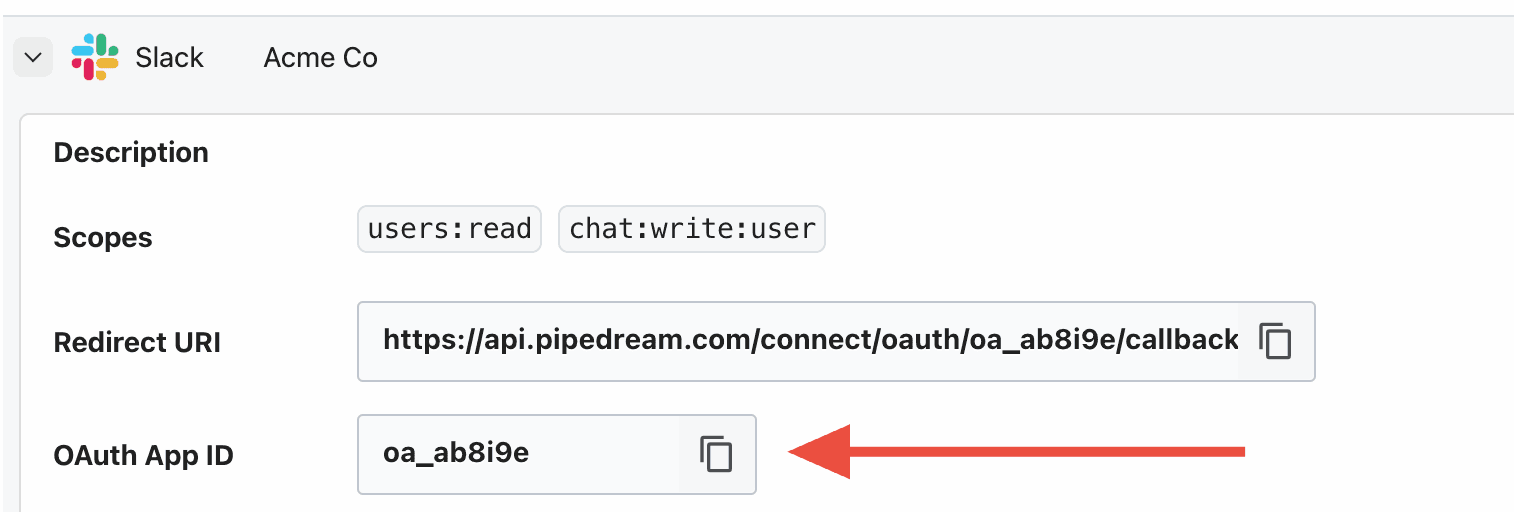
Managing OAuth clients with the API
You can also create and manage custom OAuth clients through the Connect API, instead of the Pipedream UI. Clients are owned by either a workspace or a project, and listing them for a project returns the project’s own clients and those of its parent workspace.The
clientId and clientSecret you pass when creating a client are the credentials the third-party app issued to you. They are not your Pipedream OAuth credentials, which you pass to the client constructor.redirect_uri. Register it with the third-party app so it redirects users back to Pipedream. The app must have custom OAuth clients enabled.
See the OAuth Clients API reference for all endpoints.