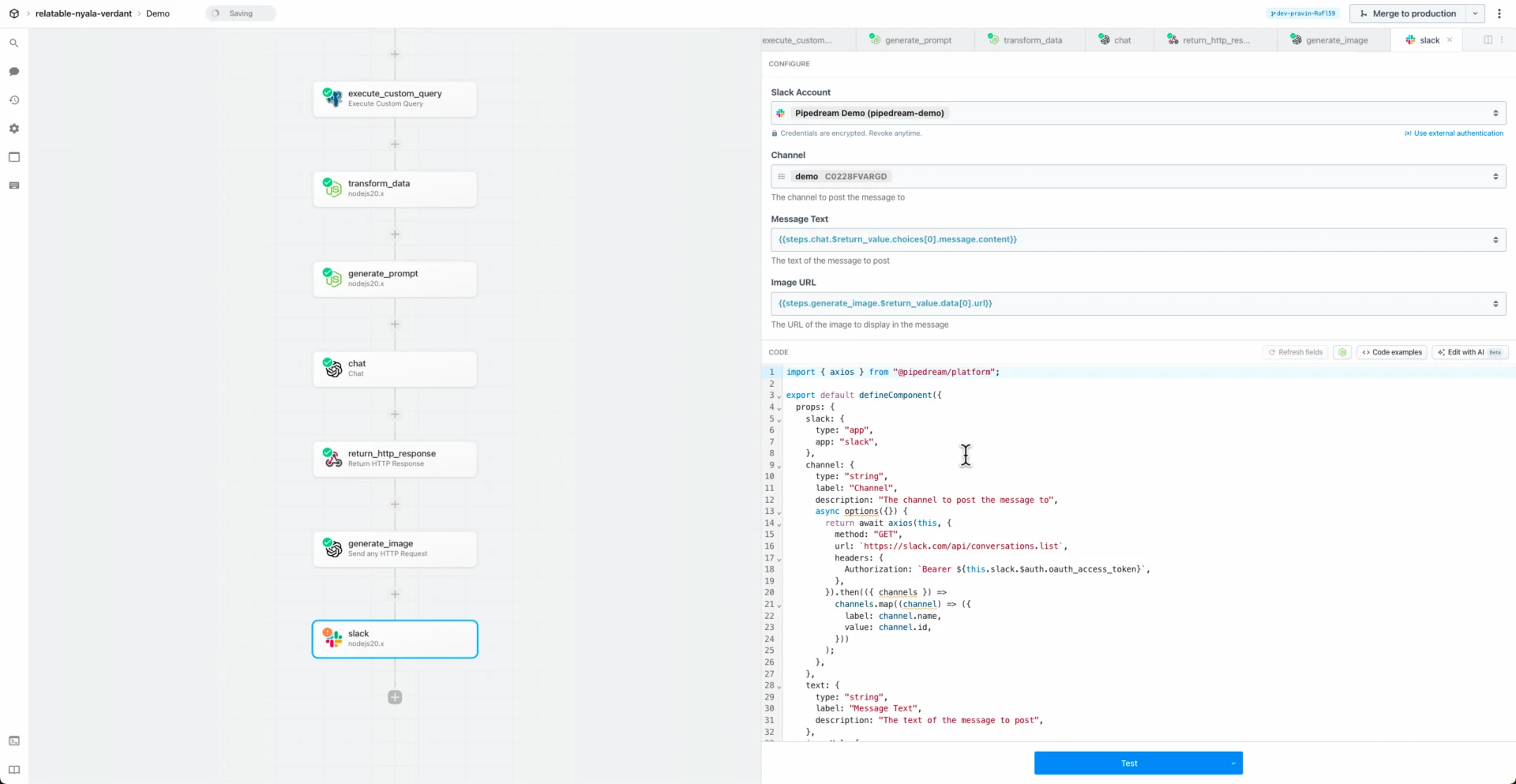
import intellihr from "../../intellihr.app.mjs";

export default {
  key: "intellihr-find-person",
  name: "Find Person",
  description: "Searches for a person in intellihr using. [See the documentation](https://developers.intellihr.io/docs/v1/#tag/People/paths/~1people/get)",
  version: "0.0.2",
  annotations: {
    destructiveHint: false,
    openWorldHint: true,
    readOnlyHint: true,
  },
  type: "action",
  props: {
    intellihr,
    name: {
      type: "string",
      label: "Name",
      description: "Name of a Person in the system. This filter checks for an exact string match with any part of a Persons name. This filter is performed case insensitively and regardless of name order",
      optional: true,
    },
    email: {
      propDefinition: [
        intellihr,
        "email",
      ],
      optional: true,
    },
    employeeNumber: {
      propDefinition: [
        intellihr,
        "employeeNumber",
      ],
    },
    jobId: {
      propDefinition: [
        intellihr,
        "jobId",
      ],
    },
    updatedWithin: {
      type: "integer",
      label: "Updated Within",
      description: "Filters people that have been updated within the specified amount of days.",
      optional: true,
    },
    isOnExtendedLeave: {
      type: "boolean",
      label: "Is On Extended Leave",
      description: "Filters people that are on extended leave.",
      optional: true,
    },
  },
  async run({ $ }) {
    const results = this.intellihr.paginate({
      resourceFn: this.intellihr.listPeople,
      params: {
        "filters[name][eq]": this.name,
        "filters[primaryEmailAddress][eq]": this.email,
        "filters[employeeNumber][eq]": this.employeeNumber,
        "filters[jobId][eq]": this.jobId,
        "filters[updatedWithin][eq]": this.updatedWithin,
        "filters[isOnExtendedLeave][eq]": this.isOnExtendedLeave === true
          ? "true"
          : this.isOnExtendedLeave === false
            ? "false"
            : undefined,
      },
    });

    const people = [];
    for await (const person of results) {
      people.push(person);
    }

    $.export("$summary", `Found ${people.length} person(s)`);
    return people;
  },
};


















 Chase Roberts@chsrbrts@benedictevans If you haven’t used @pipedream yet, then you haven’t lived.
 ✨Ellie Day✨@heyelliedayEvaluation update: @pipedream has quite literally been a dream to work with! I’m excited to leverage this tool for all the various workflows I need to write. I’m currently at 11k invocations a day from the initial workflows I’ve written in the past couple weeks.
 Michael Braedley@MBraedleyUpdate: I got it working properly, and it's working so well that I'm dropping IFTTT. @pipedream can do everything that IFTTT basic can, and most (if not all things) IFTTT pro can for free or at a reasonable price if you need it. I am recommending it for basically any power user.
 Thomas Cutting@mrthomascuttingWant quick+dirty integrations for a serverless workflow - @pipedream is my new go-to 😃
 Matthew Roberts@mattdotrobertsday 013 - finally hit node js. This is the secret sauce of taking #nocode projects that one step further. Pumped about getting deeper into @pipedream now
 Kenneth Auchenberg 💭@auchenbergYahoo Pipes is back! Kinda 😍 @pipedream
 Raymond Camden 🥑@raymondcamdenAwesome video by the @pipedream folks showing real time twitter sentiment analysis integrated with Google Sheets. This is where Pipedream *really* shines, connecting systems together in easy workflows.
 Nacho Caballero@nachocaballeroI couldn't recommend @pipedream more. It's an amazing service to integrate different APIs. Much more powerful than Zapier and more user-friendly than AWS Lambda. I'm very proud to wear this t-shirt #NoCode
 Jason Snow@jyksnwDeveloped a working prototype environmental sensor IoT solution with @particle Photon, @pipedream, and @MongoDB with full graphing and alerting in less than a day! All amazing technology, will def. be exploring these more.
 Steven Terrana@steven_terrana@burgwyn you've inspired me to finally set up my own blog. I'll make sure my first blog post explains the tech behind the setup. think @obsdmd + @GatsbyJS + @pipedream.
 🚄 James Augeri, PhD@DotDotJamesWant to low-code your back end, need more horsepower than @Bubble / @KnackHQ, or just miss Yahoo! Pipes? Check out @PipeDream
 Sébastien Chopin@AtinuxGitHub issues should be like @linear_app for maintainers. Looking forward more integrations with GH actions or tools like @pipedream 👀
 Raul@raul_predescuIf you're a dev and not using @pipedream, you're missing out. Been using it for months, daily. FREE for devs. Plenty of integrations and good limits. Absolutely love it.
 Bruno Skvorc@bitfallsSo @pipedream is pretty amazing. In 3 minutes I just made a flow which adds @rickastley's Never Gonna Give You Up to my @spotify playlist whenever a new pull request arrives in an old repo of mine.
 Zach Lanich@ZachLanichUm, wow 🤯 @pipedream
 Steven Bell@bellontechI just used @pipedream to build a Shopify App. Wow, they make small backed tasks easy.
 Jay Hack 🎩🇺🇸@_jayhack_Very impressed with this bad boi - it reminds me of a @PalantirTech internal tool, but geared towards integrations instead of data analysis and far more customizable. Great expectations here 🚀🤩
 Tree Sturgeon 🔥🚴♂️🌳@philsturgeonFor context this is day 2 of a really challenging and stupid migration from Notion to @airtable with disparate/missing data. It's going better than expected and thanks to @pipedream I don't have to bother the iOS dev to add W3W.