> ## Documentation Index
> Fetch the complete documentation index at: https://pipedream.com/docs/llms.txt
> Use this file to discover all available pages before exploring further.
# Connecting to Databases
Connecting to a database is essential for developing production workflows. Whether you’re storing application data, querying user information, or analyzing event logs, most workflows and serverless functions require querying data at some point.
Pipedream workflows run in the AWS `us-east-1` network, sending requests from standard AWS IP ranges.
## Connecting to Restricted Databases
**Unless your database is publicly accessible, you’ll likely need to add specific IPs to its allow-list.** To do this, you can configure your database connection to use either a shared or dedicated static IP address from Pipedream:
### Create a Dedicated Static IP for Outbound Traffic
* [Virtual Private Clouds (VPCs)](/workflows/vpc/) in Pipedream let you deploy any workflow to a private network and is the most secure and recommended approach to using a static IP.
* Once configured, the VPC will give you a dedicated egress IP that’s unique to your workspace, and is available to any workflow within your workspace.
### Send Requests from a Shared Static IP
* When configuring your database connection as a [connected account](/apps/connected-accounts/) to Pipedream, you can choose to route network requests through a static IP block for [any app that’s supported by Pipedream’s SQL Proxy](/workflows/data-management/databases/#supported-databases)
* Pipedream’s SQL Proxy routes requests to your database from the IP block below.
#### Supported Databases
Pipedream’s SQL Proxy, which enables the shared static IP, currently supports [MySQL](https://pipedream.com/apps/mysql), [PostgreSQL](https://pipedream.com/apps/postgresql), and [Snowflake](https://pipedream.com/apps/snowflake). Please let us know if you’d like to see support for other database types.
#### Enabling the Shared Static IP
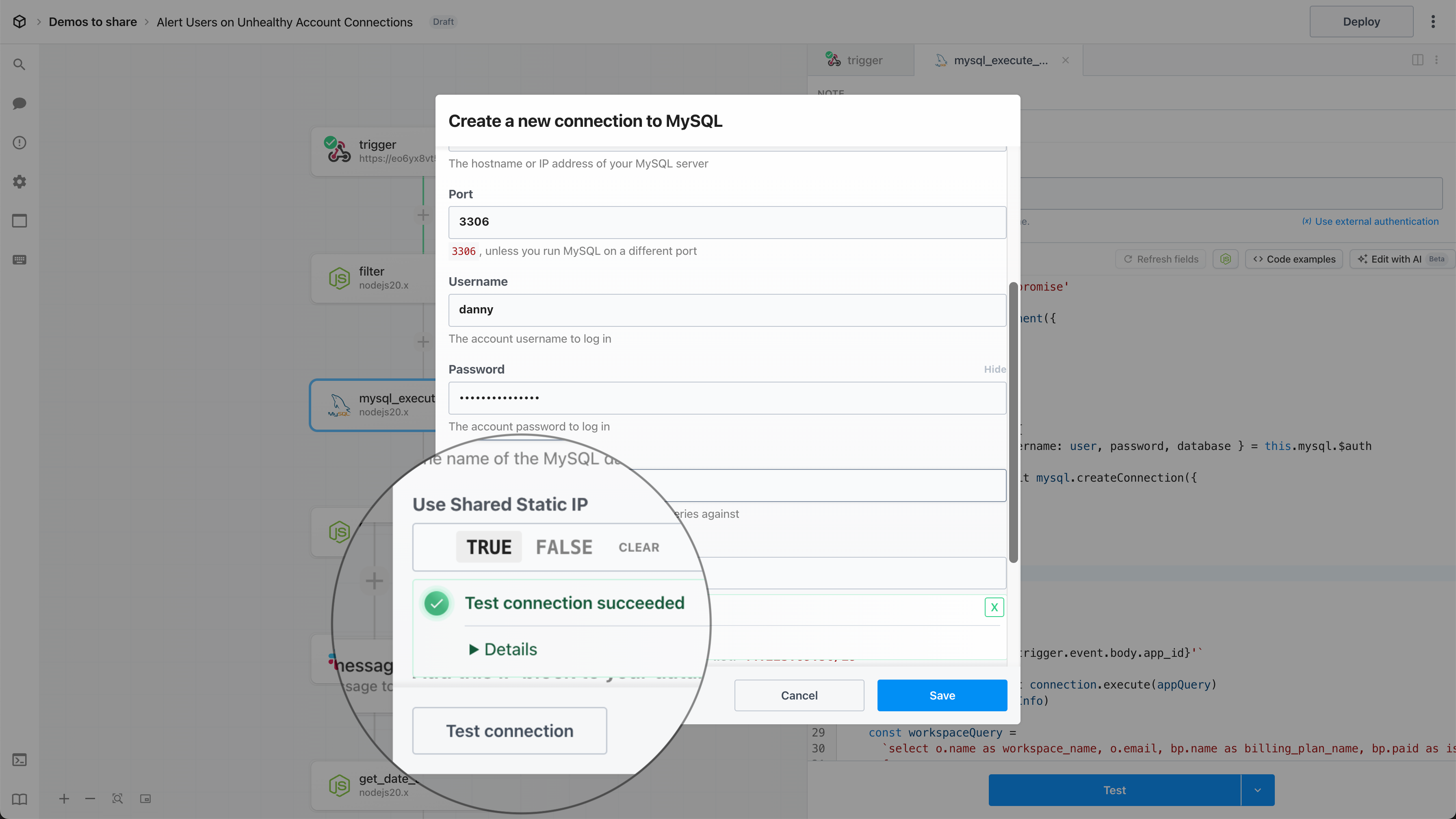
Connect your account for one of the [supported database apps](/workflows/data-management/databases/#supported-databases) and set **Use Shared Static IP** to **TRUE**, then click **Test connection** to ensure Pipedream can successfully connect to your database.
 #### Shared Static IP Block
Add the following IP block to your database allow-list:
```
44.223.89.56/29
```
## FAQ
### What’s the difference between using a shared static IP with the SQL Proxy vs a dedicated IP using a VPC?
Both the SQL Proxy and VPCs enable secure database connections from a static IP.
* VPCs offer enhanced isolation and security by providing a **dedicated** static IP for workflows within your workspace
* The SQL proxy routes requests to your database connections through a set of **shared** static IPs
#### Shared Static IP Block
Add the following IP block to your database allow-list:
```
44.223.89.56/29
```
## FAQ
### What’s the difference between using a shared static IP with the SQL Proxy vs a dedicated IP using a VPC?
Both the SQL Proxy and VPCs enable secure database connections from a static IP.
* VPCs offer enhanced isolation and security by providing a **dedicated** static IP for workflows within your workspace
* The SQL proxy routes requests to your database connections through a set of **shared** static IPs