> ## Documentation Index
> Fetch the complete documentation index at: https://pipedream.com/docs/llms.txt
> Use this file to discover all available pages before exploring further.
# Inspect Events
[The inspector](/workflows/building-workflows/inspect/#the-inspector) lists the events you send to a [workflow](/workflows/building-workflows/). Once you choose a [trigger](/workflows/building-workflows/triggers/) and send events to it, you’ll see those events in the inspector, to the left of your workflow.
Clicking on an event from the list lets you [review the incoming event data and workflow execution logs](/workflows/building-workflows/triggers/#examining-event-data) for that event.
You can use the inspector to replay events, delete them, and more.
## The inspector
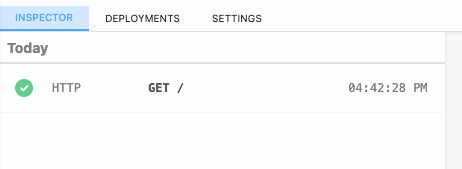
The inspector lists your workflow’s events:
## Event Duration
The duration shown when clicking an individual event notes the time it took to run your code, in addition to the time it took Pipedream to handle the execution of that code and manage its output. Specifically,
**Duration = Time Your Code Ran + Pipedream Execution Time**
## Replaying and deleting events
Hover over an event, and you’ll see two buttons:
The blue button with the arrow **replays** the event against the newest version of your workflow. The red button with the X **deletes** the event.
## Messages
Any `console.log()` statements or other output of code steps is attached to the associated code cells. But [`$.flow.exit()`](/workflows/building-workflows/code/nodejs/#ending-a-workflow-early) or [errors](/workflows/building-workflows/code/nodejs/#errors) end a workflow’s execution, so their details appear in the inspector.
## Limits
Pipedream retains a limited history of events for a given workflow. See the [limits docs](/workflows/limits/#event-history) for more information.
 ## Event Duration
The duration shown when clicking an individual event notes the time it took to run your code, in addition to the time it took Pipedream to handle the execution of that code and manage its output. Specifically,
**Duration = Time Your Code Ran + Pipedream Execution Time**
## Replaying and deleting events
Hover over an event, and you’ll see two buttons:
## Event Duration
The duration shown when clicking an individual event notes the time it took to run your code, in addition to the time it took Pipedream to handle the execution of that code and manage its output. Specifically,
**Duration = Time Your Code Ran + Pipedream Execution Time**
## Replaying and deleting events
Hover over an event, and you’ll see two buttons:
 The blue button with the arrow **replays** the event against the newest version of your workflow. The red button with the X **deletes** the event.
## Messages
Any `console.log()` statements or other output of code steps is attached to the associated code cells. But [`$.flow.exit()`](/workflows/building-workflows/code/nodejs/#ending-a-workflow-early) or [errors](/workflows/building-workflows/code/nodejs/#errors) end a workflow’s execution, so their details appear in the inspector.
## Limits
Pipedream retains a limited history of events for a given workflow. See the [limits docs](/workflows/limits/#event-history) for more information.
The blue button with the arrow **replays** the event against the newest version of your workflow. The red button with the X **deletes** the event.
## Messages
Any `console.log()` statements or other output of code steps is attached to the associated code cells. But [`$.flow.exit()`](/workflows/building-workflows/code/nodejs/#ending-a-workflow-early) or [errors](/workflows/building-workflows/code/nodejs/#errors) end a workflow’s execution, so their details appear in the inspector.
## Limits
Pipedream retains a limited history of events for a given workflow. See the [limits docs](/workflows/limits/#event-history) for more information.