> ## Documentation Index
> Fetch the complete documentation index at: https://pipedream.com/docs/llms.txt
> Use this file to discover all available pages before exploring further.
# Using Data Stores
In Node.js (JavaScript) code steps, you can also store and retrieve data within code steps without connecting a 3rd party database.
Add data stores to steps as props. By adding the store as a prop, it’s available under `this`.
For example, you can define a data store as a dataStore prop, and reference it at `this.dataStore`:
```javascript theme={null}
export default defineComponent({
props: {
// Define that the "dataStore" variable in our component is a data store
dataStore: { type: "data_store" },
},
async run({ steps, $ }) {
// Now we can access the data store at "this.dataStore"
await this.dataStore.get("email");
},
});
```
**`props` injects variables into `this`**. See how we declared the `dataStore` prop in the `props` object, and then accessed it at `this.dataStore` in the `run` method.
All data store operations are asynchronous, so must be `await`ed.
## Using the data store
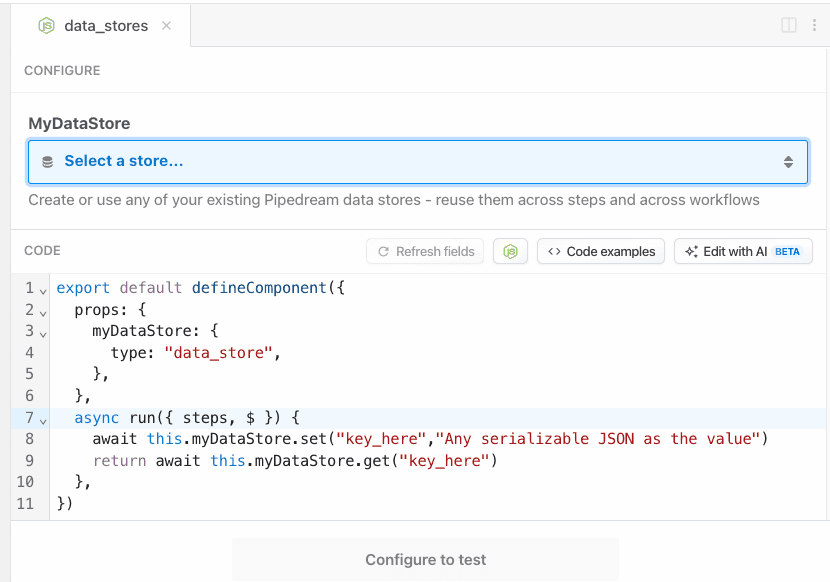
Once you’ve defined a data store prop for your component, then you’ll be able to create a new data store or use an existing one from your account.
 ## Saving data
Data Stores are key-value stores. Save data within a Data Store using the `this.dataStore.set` method. The first argument is the *key* where the data should be held, and the second argument is the *value* assigned to that key.
```javascript theme={null}
export default defineComponent({
props: {
dataStore: { type: "data_store" },
},
async run({ steps, $ }) {
// Store a timestamp each time this step is executed in the workflow
await this.dataStore.set("lastRanAt", new Date());
},
});
```
### Setting expiration (TTL) for records
You can set an expiration time for a record by passing a TTL (Time-To-Live) option as the third argument to the `set` method. The TTL value is specified in seconds:
```javascript theme={null}
export default defineComponent({
props: {
dataStore: { type: "data_store" },
},
async run({ steps, $ }) {
// Store a temporary value that will expire after 1 hour (3600 seconds)
await this.dataStore.set("temporaryToken", "abc123", { ttl: 3600 });
// Store a value that will expire after 1 day
await this.dataStore.set("dailyMetric", 42, { ttl: 86400 });
},
});
```
When the TTL period elapses, the record will be automatically deleted from the data store.
### Updating TTL for existing records
You can update the TTL for an existing record using the `setTtl` method:
```javascript theme={null}
export default defineComponent({
props: {
dataStore: { type: "data_store" },
},
async run({ steps, $ }) {
// Update an existing record to expire after 30 minutes
await this.dataStore.setTtl("temporaryToken", 1800);
// Remove expiration from a record
await this.dataStore.setTtl("temporaryToken", null);
},
});
```
This is useful for extending the lifetime of temporary data or removing expiration from records that should now be permanent.
## Retrieving keys
Fetch all the keys in a given Data Store using the `keys` method:
```javascript theme={null}
export default defineComponent({
props: {
dataStore: { type: "data_store" },
},
async run({ steps, $ }) {
// Return a list of all the keys in a given Data Store
return await this.dataStore.keys();
},
});
```
## Checking for the existence of specific keys
If you need to check whether a specific `key` exists in a Data Store, you can pass the `key` to the `has` method to get back a `true` or `false`:
```javascript theme={null}
export default defineComponent({
props: {
dataStore: { type: "data_store" },
},
async run({ steps, $ }) {
// Check if a specific key exists in your Data Store
return await this.dataStore.has("lastRanAt");
},
});
```
## Retrieving data
You can retrieve data with the Data Store using the `get` method. Pass the *key* to the `get` method to retrieve the content that was stored there with `set`.
```javascript theme={null}
export default defineComponent({
props: {
dataStore: { type: "data_store" },
},
async run({ steps, $ }) {
// Check if the lastRanAt key exists
const lastRanAt = await this.dataStore.get("lastRanAt");
},
});
```
## Retrieving all records
Use an async iterator to efficiently retrieve all records or keys in your data store:
```javascript theme={null}
export default defineComponent({
props: {
dataStore: { type: "data_store" },
},
async run({ steps, $ }) {
const records = {};
for await (const [k,v] of this.dataStore) {
records[k] = v;
}
return records;
},
});
```
## Deleting or updating values within a record
To delete or update the *value* of an individual record, use the `set` method for an existing `key` and pass either the new value or `''` as the second argument to remove the value but retain the key.
```javascript theme={null}
export default defineComponent({
props: {
dataStore: { type: "data_store" },
},
async run({ steps, $ }) {
// Update the value associated with the key, myKey
await this.dataStore.set("myKey", "newValue");
// Remove the value but retain the key
await this.dataStore.set("myKey", "");
},
});
```
## Deleting specific records
To delete individual records in a Data Store, use the `delete` method for a specific `key`:
```javascript theme={null}
export default defineComponent({
props: {
dataStore: { type: "data_store" },
},
async run({ steps, $ }) {
// Delete the lastRanAt record
const lastRanAt = await this.dataStore.delete("lastRanAt");
},
});
```
## Deleting all records from a specific Data Store
If you need to delete all records in a given Data Store, you can use the `clear` method. **Note that this is an irreversible change, even when testing code in the workflow builder.**
```javascript theme={null}
export default defineComponent({
props: {
dataStore: { type: "data_store" },
},
async run({ steps, $ }) {
// Delete all records from a specific Data Store
return await this.dataStore.clear();
},
});
```
## Viewing store data
You can view the contents of your data stores in your [Pipedream dashboard](https://pipedream.com/stores).
From here you can also manually edit your data store’s data, rename stores, delete stores or create new stores.
## Using multiple data stores in a single code step
It is possible to use multiple data stores in a single code step, just make a unique name per store in the `props` definition. Let’s define 2 separate `customers` and `orders` data sources and leverage them in a single code step:
```javascript theme={null}
export default defineComponent({
props: {
customers: { type: "data_store" },
orders: { type: "data_store" },
},
async run({ steps, $ }) {
// Retrieve the customer from our customer store
const customer = await this.customer.get(steps.trigger.event.customer_id);
// Retrieve the order from our order data store
const order = await this.orders.get(steps.trigger.event.order_id);
},
});
```
## Workflow counter example
You can use a data store as a counter. For example, this code counts the number of times the workflow runs:
```javascript theme={null}
export default defineComponent({
props: {
dataStore: { type: "data_store" },
},
async run({ steps, $ }) {
// By default, all database entries are undefined.
// It's wise to set a default value so our code as an initial value to work with
const counter = (await this.dataStore.get("counter")) ?? 0;
// On the first run "counter" will be 0 and we'll increment it to 1
// The next run will increment the counter to 2, and so forth
await this.dataStore.set("counter", counter + 1);
},
});
```
## Dedupe data example
Data Stores are also useful for storing data from prior runs to prevent acting on duplicate data, or data that’s been seen before.
For example, this workflow’s trigger contains an email address from a potential new customer. But we want to track all emails collected so we don’t send a welcome email twice:
```javascript theme={null}
export default defineComponent({
props: {
dataStore: { type: "data_store" },
},
async run({ steps, $ }) {
const email = steps.trigger.event.body.new_customer_email;
// Retrieve the past recorded emails from other runs
const emails = (await this.dataStore.get("emails")) ?? [];
// If the current email being passed from our webhook is already in our list, exit early
if (emails.includes(email)) {
return $.flow.exit("Already welcomed this user");
}
// Add the current email to the list of past emails so we can detect it in the future runs
await this.dataStore.set("emails", [...emails, email]);
},
});
```
## TTL use case: temporary caching and rate limiting
TTL functionality is particularly useful for implementing temporary caching and rate limiting. Here’s an example of a simple rate limiter that prevents a user from making more than 5 requests per hour:
```javascript theme={null}
export default defineComponent({
props: {
dataStore: { type: "data_store" },
},
async run({ steps, $ }) {
const userId = steps.trigger.event.userId;
const rateKey = `ratelimit:${userId}`;
// Try to get current rate limit counter
let requests = await this.dataStore.get(rateKey);
if (requests === undefined) {
// First request from this user in the time window
await this.dataStore.set(rateKey, 1, { ttl: 3600 }); // Expire after 1 hour
return { allowed: true, remaining: 4 };
}
if (requests >= 5) {
// Rate limit exceeded
return { allowed: false, error: "Rate limit exceeded", retryAfter: "1 hour" };
}
// Increment the counter
await this.dataStore.set(rateKey, requests + 1);
return { allowed: true, remaining: 4 - requests };
},
});
```
This pattern can be extended for various temporary caching scenarios like:
* Session tokens with automatic expiration
* Short-lived feature flags
* Temporary access grants
* Time-based promotional codes
### Supported data types
Data stores can hold any JSON-serializable data within the storage limits. This includes data types including:
* Strings
* Objects
* Arrays
* Dates
* Integers
* Floats
But you cannot serialize Functions, Classes, or other more complex objects.
## Saving data
Data Stores are key-value stores. Save data within a Data Store using the `this.dataStore.set` method. The first argument is the *key* where the data should be held, and the second argument is the *value* assigned to that key.
```javascript theme={null}
export default defineComponent({
props: {
dataStore: { type: "data_store" },
},
async run({ steps, $ }) {
// Store a timestamp each time this step is executed in the workflow
await this.dataStore.set("lastRanAt", new Date());
},
});
```
### Setting expiration (TTL) for records
You can set an expiration time for a record by passing a TTL (Time-To-Live) option as the third argument to the `set` method. The TTL value is specified in seconds:
```javascript theme={null}
export default defineComponent({
props: {
dataStore: { type: "data_store" },
},
async run({ steps, $ }) {
// Store a temporary value that will expire after 1 hour (3600 seconds)
await this.dataStore.set("temporaryToken", "abc123", { ttl: 3600 });
// Store a value that will expire after 1 day
await this.dataStore.set("dailyMetric", 42, { ttl: 86400 });
},
});
```
When the TTL period elapses, the record will be automatically deleted from the data store.
### Updating TTL for existing records
You can update the TTL for an existing record using the `setTtl` method:
```javascript theme={null}
export default defineComponent({
props: {
dataStore: { type: "data_store" },
},
async run({ steps, $ }) {
// Update an existing record to expire after 30 minutes
await this.dataStore.setTtl("temporaryToken", 1800);
// Remove expiration from a record
await this.dataStore.setTtl("temporaryToken", null);
},
});
```
This is useful for extending the lifetime of temporary data or removing expiration from records that should now be permanent.
## Retrieving keys
Fetch all the keys in a given Data Store using the `keys` method:
```javascript theme={null}
export default defineComponent({
props: {
dataStore: { type: "data_store" },
},
async run({ steps, $ }) {
// Return a list of all the keys in a given Data Store
return await this.dataStore.keys();
},
});
```
## Checking for the existence of specific keys
If you need to check whether a specific `key` exists in a Data Store, you can pass the `key` to the `has` method to get back a `true` or `false`:
```javascript theme={null}
export default defineComponent({
props: {
dataStore: { type: "data_store" },
},
async run({ steps, $ }) {
// Check if a specific key exists in your Data Store
return await this.dataStore.has("lastRanAt");
},
});
```
## Retrieving data
You can retrieve data with the Data Store using the `get` method. Pass the *key* to the `get` method to retrieve the content that was stored there with `set`.
```javascript theme={null}
export default defineComponent({
props: {
dataStore: { type: "data_store" },
},
async run({ steps, $ }) {
// Check if the lastRanAt key exists
const lastRanAt = await this.dataStore.get("lastRanAt");
},
});
```
## Retrieving all records
Use an async iterator to efficiently retrieve all records or keys in your data store:
```javascript theme={null}
export default defineComponent({
props: {
dataStore: { type: "data_store" },
},
async run({ steps, $ }) {
const records = {};
for await (const [k,v] of this.dataStore) {
records[k] = v;
}
return records;
},
});
```
## Deleting or updating values within a record
To delete or update the *value* of an individual record, use the `set` method for an existing `key` and pass either the new value or `''` as the second argument to remove the value but retain the key.
```javascript theme={null}
export default defineComponent({
props: {
dataStore: { type: "data_store" },
},
async run({ steps, $ }) {
// Update the value associated with the key, myKey
await this.dataStore.set("myKey", "newValue");
// Remove the value but retain the key
await this.dataStore.set("myKey", "");
},
});
```
## Deleting specific records
To delete individual records in a Data Store, use the `delete` method for a specific `key`:
```javascript theme={null}
export default defineComponent({
props: {
dataStore: { type: "data_store" },
},
async run({ steps, $ }) {
// Delete the lastRanAt record
const lastRanAt = await this.dataStore.delete("lastRanAt");
},
});
```
## Deleting all records from a specific Data Store
If you need to delete all records in a given Data Store, you can use the `clear` method. **Note that this is an irreversible change, even when testing code in the workflow builder.**
```javascript theme={null}
export default defineComponent({
props: {
dataStore: { type: "data_store" },
},
async run({ steps, $ }) {
// Delete all records from a specific Data Store
return await this.dataStore.clear();
},
});
```
## Viewing store data
You can view the contents of your data stores in your [Pipedream dashboard](https://pipedream.com/stores).
From here you can also manually edit your data store’s data, rename stores, delete stores or create new stores.
## Using multiple data stores in a single code step
It is possible to use multiple data stores in a single code step, just make a unique name per store in the `props` definition. Let’s define 2 separate `customers` and `orders` data sources and leverage them in a single code step:
```javascript theme={null}
export default defineComponent({
props: {
customers: { type: "data_store" },
orders: { type: "data_store" },
},
async run({ steps, $ }) {
// Retrieve the customer from our customer store
const customer = await this.customer.get(steps.trigger.event.customer_id);
// Retrieve the order from our order data store
const order = await this.orders.get(steps.trigger.event.order_id);
},
});
```
## Workflow counter example
You can use a data store as a counter. For example, this code counts the number of times the workflow runs:
```javascript theme={null}
export default defineComponent({
props: {
dataStore: { type: "data_store" },
},
async run({ steps, $ }) {
// By default, all database entries are undefined.
// It's wise to set a default value so our code as an initial value to work with
const counter = (await this.dataStore.get("counter")) ?? 0;
// On the first run "counter" will be 0 and we'll increment it to 1
// The next run will increment the counter to 2, and so forth
await this.dataStore.set("counter", counter + 1);
},
});
```
## Dedupe data example
Data Stores are also useful for storing data from prior runs to prevent acting on duplicate data, or data that’s been seen before.
For example, this workflow’s trigger contains an email address from a potential new customer. But we want to track all emails collected so we don’t send a welcome email twice:
```javascript theme={null}
export default defineComponent({
props: {
dataStore: { type: "data_store" },
},
async run({ steps, $ }) {
const email = steps.trigger.event.body.new_customer_email;
// Retrieve the past recorded emails from other runs
const emails = (await this.dataStore.get("emails")) ?? [];
// If the current email being passed from our webhook is already in our list, exit early
if (emails.includes(email)) {
return $.flow.exit("Already welcomed this user");
}
// Add the current email to the list of past emails so we can detect it in the future runs
await this.dataStore.set("emails", [...emails, email]);
},
});
```
## TTL use case: temporary caching and rate limiting
TTL functionality is particularly useful for implementing temporary caching and rate limiting. Here’s an example of a simple rate limiter that prevents a user from making more than 5 requests per hour:
```javascript theme={null}
export default defineComponent({
props: {
dataStore: { type: "data_store" },
},
async run({ steps, $ }) {
const userId = steps.trigger.event.userId;
const rateKey = `ratelimit:${userId}`;
// Try to get current rate limit counter
let requests = await this.dataStore.get(rateKey);
if (requests === undefined) {
// First request from this user in the time window
await this.dataStore.set(rateKey, 1, { ttl: 3600 }); // Expire after 1 hour
return { allowed: true, remaining: 4 };
}
if (requests >= 5) {
// Rate limit exceeded
return { allowed: false, error: "Rate limit exceeded", retryAfter: "1 hour" };
}
// Increment the counter
await this.dataStore.set(rateKey, requests + 1);
return { allowed: true, remaining: 4 - requests };
},
});
```
This pattern can be extended for various temporary caching scenarios like:
* Session tokens with automatic expiration
* Short-lived feature flags
* Temporary access grants
* Time-based promotional codes
### Supported data types
Data stores can hold any JSON-serializable data within the storage limits. This includes data types including:
* Strings
* Objects
* Arrays
* Dates
* Integers
* Floats
But you cannot serialize Functions, Classes, or other more complex objects.