> ## Documentation Index
> Fetch the complete documentation index at: https://pipedream.com/docs/llms.txt
> Use this file to discover all available pages before exploring further.
# Pause, Resume, and Rerun a Workflow
You can use `$.flow.suspend` and `$.flow.rerun` to pause a workflow and resume it later.
This is useful when you want to:
* Pause a workflow until someone manually approves it
* Poll an external API until some job completes, and proceed with the workflow when it’s done
* Trigger an external API to start a job, pause the workflow, and resume it when the external API sends an HTTP callback
We’ll cover all of these examples below.
## `$.flow.suspend`
Use `$.flow.suspend` when you want to pause a workflow and proceed with the remaining steps only when manually approved or cancelled.
For example, you can suspend a workflow and send yourself a link to manually resume or cancel the rest of the workflow:
```javascript theme={null}
export default defineComponent({
async run({ $ }) {
const { resume_url, cancel_url } = $.flow.suspend();
$.send.email({
subject: "Please approve this important workflow",
text: `Click here to approve the workflow: ${resume_url}, and cancel here: ${cancel_url}`,
});
// Pipedream suspends your workflow at the end of the step
},
});
```
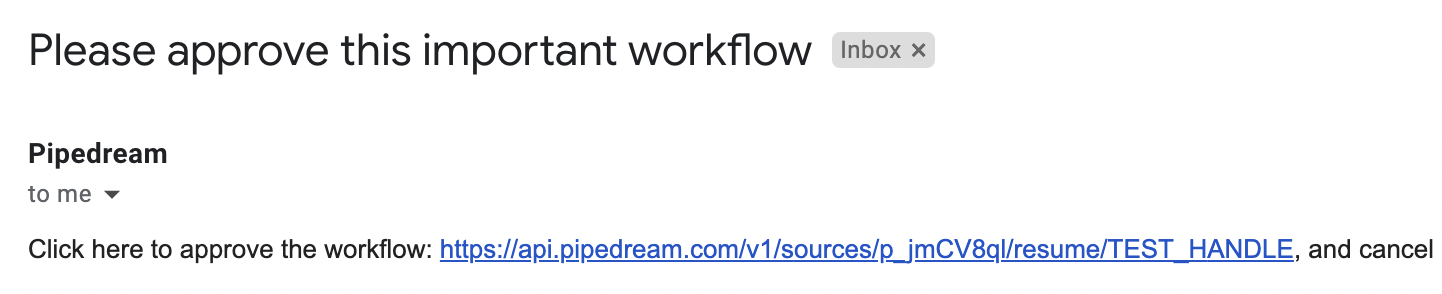
You’ll receive an email like this:
And can resume or cancel the rest of the workflow by clicking on the appropriate link.
### `resume_url` and `cancel_url`
In general, calling `$.flow.suspend` returns a `cancel_url` and `resume_url` that lets you cancel or resume paused executions. Since Pipedream pauses your workflow at the *end* of the step, you can pass these URLs to any external service before the workflow pauses. If that service accepts a callback URL, it can trigger the `resume_url` when its work is complete.
These URLs are specific to a single execution of your workflow. While the workflow is paused, you can load these in your browser or send any HTTP request to them:
* Sending an HTTP request to the `cancel_url` will cancel that execution
* Sending an HTTP request to the `resume_url` will resume that execution
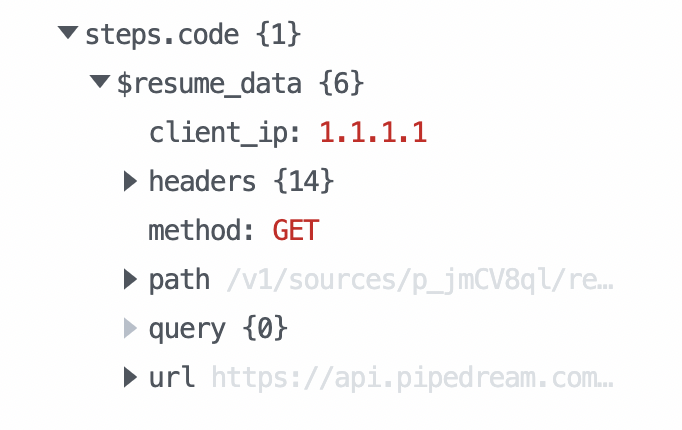
If you resume a workflow, any data sent in the HTTP request is passed to the workflow and returned in the `$resume_data` [step export](/workflows/#step-exports) of the suspended step. For example, if you call `$.flow.suspend` within a step named `code`, the `$resume_data` export should contain the data sent in the `resume_url` request:
Requests to the `resume_url` have [the same limits as any HTTP request to Pipedream](/workflows/limits/#http-request-body-size), but you can send larger payloads using our [large payload](/workflows/building-workflows/triggers/#sending-large-payloads) or [large file](/workflows/building-workflows/triggers/#large-file-support) interfaces.
### Default timeout of 24 hours
By default, `$.flow.suspend` will automatically cancel the workflow after 24 hours. You can set your own timeout (in milliseconds) as the first argument:
```javascript theme={null}
export default defineComponent({
async run({ $ }) {
// 7 days
const TIMEOUT = 1000 * 60 * 60 * 24 * 7;
$.flow.suspend(TIMEOUT);
},
});
```
## `$.flow.rerun`
Use `$.flow.rerun` when you want to run a specific step of a workflow multiple times. This is useful when you need to start a job in an external API and poll for its completion, or have the service call back to the step and let you process the HTTP request within the step.
### Retrying a Failed API Request
`$.flow.rerun` can be used to conditionally retry a failed API request due to a service outage or rate limit reached. Place the `$.flow.rerun` call within a `catch` block to only retry the API request if an error is thrown:
```javascript theme={null}
import { axios } from "@pipedream/platform";
export default defineComponent({
props: {
openai: {
type: "app",
app: "openai",
},
},
async run({ steps, $ }) {
try {
return await axios($, {
url: `https://api.openai.com/v1/completions`,
method: "post",
headers: {
Authorization: `Bearer ${this.openai.$auth.api_key}`,
},
data: {
model: "text-davinci-003",
prompt: "Say this is a test",
max_tokens: 7,
temperature: 0,
},
});
} catch (error) {
const MAX_RETRIES = 3;
const DELAY = 1000 * 30;
// Retry the request every 30 seconds, for up to 3 times
$.flow.rerun(DELAY, null, MAX_RETRIES);
}
},
});
```
### Polling for the status of an external job
Sometimes you need to poll for the status of an external job until it completes. `$.flow.rerun` lets you rerun a specific step multiple times:
```javascript theme={null}
import axios from "axios";
export default defineComponent({
async run({ $ }) {
const MAX_RETRIES = 3;
// 10 seconds
const DELAY = 1000 * 10;
const { run } = $.context;
// $.context.run.runs starts at 1 and increments when the step is rerun
if (run.runs === 1) {
// $.flow.rerun(delay, context (discussed below), max retries)
$.flow.rerun(DELAY, null, MAX_RETRIES);
} else if (run.runs === MAX_RETRIES + 1) {
throw new Error("Max retries exceeded");
} else {
// Poll external API for status
const { data } = await axios({
method: "GET",
url: "https://example.com/status",
});
// If we're done, continue with the rest of the workflow
if (data.status === "DONE") return data;
// Else retry later
$.flow.rerun(DELAY, null, MAX_RETRIES);
}
},
});
```
`$.flow.rerun` accepts the following arguments:
```javascript theme={null}
$.flow.rerun(
delay, // The number of milliseconds until the step will be rerun
context, // JSON-serializable data you need to pass between runs
maxRetries // The total number of times the step will rerun. Defaults to 10
);
```
### Accept an HTTP callback from an external service
When you trigger a job in an external service, and that service can send back data in an HTTP callback to Pipedream, you can process that data within the same step using `$.flow.rerun`:
```javascript theme={null}
import axios from "axios";
export default defineComponent({
async run({ steps, $ }) {
const TIMEOUT = 86400 * 1000;
const { run } = $.context;
// $.context.run.runs starts at 1 and increments when the step is rerun
if (run.runs === 1) {
const { cancel_url, resume_url } = $.flow.rerun(TIMEOUT, null, 1);
// Send resume_url to external service
await axios({
method: "POST",
url: "your callback URL",
data: {
resume_url,
cancel_url,
},
});
}
// When the external service calls back into the resume_url, you have access to
// the callback data within $.context.run.callback_request
else if (run.callback_request) {
return run.callback_request;
}
},
});
```
### Passing `context` to `$.flow.rerun`
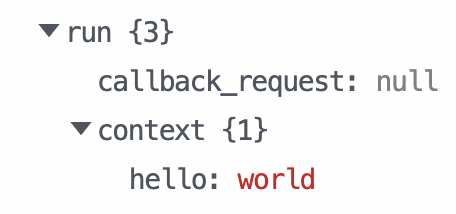
Within a Node.js code step, `$.context.run.context` contains the `context` passed from the prior call to `rerun`. This lets you pass data from one run to another. For example, if you call:
```javascript theme={null}
$.flow.rerun(1000, { hello: "world" });
```
`$.context.run.context` will contain:
### `maxRetries`
By default, `maxRetries` is **10**.
When you exceed `maxRetries`, the workflow proceeds to the next step. If you need to handle this case with an exception, `throw` an error from the step:
```javascript theme={null}
export default defineComponent({
async run({ $ }) {
const MAX_RETRIES = 3;
const { run } = $.context;
if (run.runs === 1) {
$.flow.rerun(1000, null, MAX_RETRIES);
} else if (run.runs === MAX_RETRIES + 1) {
throw new Error("Max retries exceeded");
}
},
});
```
## Behavior when testing
When you’re building a workflow and test a step with `$.flow.suspend` or `$.flow.rerun`, it will not suspend the workflow, and you’ll see a message like the following:
> Workflow execution canceled — this may be due to `$.flow.suspend()` usage (not supported in test)
These functions will only suspend and resume when run in production.
## Credits when using `suspend` / `rerun`
You are not charged for the time your workflow is suspended during a `$.flow.rerun` or `$.flow.suspend`. Only when workflows are resumed will compute time count toward [credit usage](/pricing/#credits-and-billing).
When a suspended workflow reawakens, it will reset the credit counter.
Each rerun or reawakening from a suspension will count as a new fresh credit.
 And can resume or cancel the rest of the workflow by clicking on the appropriate link.
### `resume_url` and `cancel_url`
In general, calling `$.flow.suspend` returns a `cancel_url` and `resume_url` that lets you cancel or resume paused executions. Since Pipedream pauses your workflow at the *end* of the step, you can pass these URLs to any external service before the workflow pauses. If that service accepts a callback URL, it can trigger the `resume_url` when its work is complete.
These URLs are specific to a single execution of your workflow. While the workflow is paused, you can load these in your browser or send any HTTP request to them:
* Sending an HTTP request to the `cancel_url` will cancel that execution
* Sending an HTTP request to the `resume_url` will resume that execution
If you resume a workflow, any data sent in the HTTP request is passed to the workflow and returned in the `$resume_data` [step export](/workflows/#step-exports) of the suspended step. For example, if you call `$.flow.suspend` within a step named `code`, the `$resume_data` export should contain the data sent in the `resume_url` request:
And can resume or cancel the rest of the workflow by clicking on the appropriate link.
### `resume_url` and `cancel_url`
In general, calling `$.flow.suspend` returns a `cancel_url` and `resume_url` that lets you cancel or resume paused executions. Since Pipedream pauses your workflow at the *end* of the step, you can pass these URLs to any external service before the workflow pauses. If that service accepts a callback URL, it can trigger the `resume_url` when its work is complete.
These URLs are specific to a single execution of your workflow. While the workflow is paused, you can load these in your browser or send any HTTP request to them:
* Sending an HTTP request to the `cancel_url` will cancel that execution
* Sending an HTTP request to the `resume_url` will resume that execution
If you resume a workflow, any data sent in the HTTP request is passed to the workflow and returned in the `$resume_data` [step export](/workflows/#step-exports) of the suspended step. For example, if you call `$.flow.suspend` within a step named `code`, the `$resume_data` export should contain the data sent in the `resume_url` request:
 Requests to the `resume_url` have [the same limits as any HTTP request to Pipedream](/workflows/limits/#http-request-body-size), but you can send larger payloads using our [large payload](/workflows/building-workflows/triggers/#sending-large-payloads) or [large file](/workflows/building-workflows/triggers/#large-file-support) interfaces.
### Default timeout of 24 hours
By default, `$.flow.suspend` will automatically cancel the workflow after 24 hours. You can set your own timeout (in milliseconds) as the first argument:
```javascript theme={null}
export default defineComponent({
async run({ $ }) {
// 7 days
const TIMEOUT = 1000 * 60 * 60 * 24 * 7;
$.flow.suspend(TIMEOUT);
},
});
```
## `$.flow.rerun`
Use `$.flow.rerun` when you want to run a specific step of a workflow multiple times. This is useful when you need to start a job in an external API and poll for its completion, or have the service call back to the step and let you process the HTTP request within the step.
### Retrying a Failed API Request
`$.flow.rerun` can be used to conditionally retry a failed API request due to a service outage or rate limit reached. Place the `$.flow.rerun` call within a `catch` block to only retry the API request if an error is thrown:
```javascript theme={null}
import { axios } from "@pipedream/platform";
export default defineComponent({
props: {
openai: {
type: "app",
app: "openai",
},
},
async run({ steps, $ }) {
try {
return await axios($, {
url: `https://api.openai.com/v1/completions`,
method: "post",
headers: {
Authorization: `Bearer ${this.openai.$auth.api_key}`,
},
data: {
model: "text-davinci-003",
prompt: "Say this is a test",
max_tokens: 7,
temperature: 0,
},
});
} catch (error) {
const MAX_RETRIES = 3;
const DELAY = 1000 * 30;
// Retry the request every 30 seconds, for up to 3 times
$.flow.rerun(DELAY, null, MAX_RETRIES);
}
},
});
```
### Polling for the status of an external job
Sometimes you need to poll for the status of an external job until it completes. `$.flow.rerun` lets you rerun a specific step multiple times:
```javascript theme={null}
import axios from "axios";
export default defineComponent({
async run({ $ }) {
const MAX_RETRIES = 3;
// 10 seconds
const DELAY = 1000 * 10;
const { run } = $.context;
// $.context.run.runs starts at 1 and increments when the step is rerun
if (run.runs === 1) {
// $.flow.rerun(delay, context (discussed below), max retries)
$.flow.rerun(DELAY, null, MAX_RETRIES);
} else if (run.runs === MAX_RETRIES + 1) {
throw new Error("Max retries exceeded");
} else {
// Poll external API for status
const { data } = await axios({
method: "GET",
url: "https://example.com/status",
});
// If we're done, continue with the rest of the workflow
if (data.status === "DONE") return data;
// Else retry later
$.flow.rerun(DELAY, null, MAX_RETRIES);
}
},
});
```
`$.flow.rerun` accepts the following arguments:
```javascript theme={null}
$.flow.rerun(
delay, // The number of milliseconds until the step will be rerun
context, // JSON-serializable data you need to pass between runs
maxRetries // The total number of times the step will rerun. Defaults to 10
);
```
### Accept an HTTP callback from an external service
When you trigger a job in an external service, and that service can send back data in an HTTP callback to Pipedream, you can process that data within the same step using `$.flow.rerun`:
```javascript theme={null}
import axios from "axios";
export default defineComponent({
async run({ steps, $ }) {
const TIMEOUT = 86400 * 1000;
const { run } = $.context;
// $.context.run.runs starts at 1 and increments when the step is rerun
if (run.runs === 1) {
const { cancel_url, resume_url } = $.flow.rerun(TIMEOUT, null, 1);
// Send resume_url to external service
await axios({
method: "POST",
url: "your callback URL",
data: {
resume_url,
cancel_url,
},
});
}
// When the external service calls back into the resume_url, you have access to
// the callback data within $.context.run.callback_request
else if (run.callback_request) {
return run.callback_request;
}
},
});
```
### Passing `context` to `$.flow.rerun`
Within a Node.js code step, `$.context.run.context` contains the `context` passed from the prior call to `rerun`. This lets you pass data from one run to another. For example, if you call:
```javascript theme={null}
$.flow.rerun(1000, { hello: "world" });
```
`$.context.run.context` will contain:
Requests to the `resume_url` have [the same limits as any HTTP request to Pipedream](/workflows/limits/#http-request-body-size), but you can send larger payloads using our [large payload](/workflows/building-workflows/triggers/#sending-large-payloads) or [large file](/workflows/building-workflows/triggers/#large-file-support) interfaces.
### Default timeout of 24 hours
By default, `$.flow.suspend` will automatically cancel the workflow after 24 hours. You can set your own timeout (in milliseconds) as the first argument:
```javascript theme={null}
export default defineComponent({
async run({ $ }) {
// 7 days
const TIMEOUT = 1000 * 60 * 60 * 24 * 7;
$.flow.suspend(TIMEOUT);
},
});
```
## `$.flow.rerun`
Use `$.flow.rerun` when you want to run a specific step of a workflow multiple times. This is useful when you need to start a job in an external API and poll for its completion, or have the service call back to the step and let you process the HTTP request within the step.
### Retrying a Failed API Request
`$.flow.rerun` can be used to conditionally retry a failed API request due to a service outage or rate limit reached. Place the `$.flow.rerun` call within a `catch` block to only retry the API request if an error is thrown:
```javascript theme={null}
import { axios } from "@pipedream/platform";
export default defineComponent({
props: {
openai: {
type: "app",
app: "openai",
},
},
async run({ steps, $ }) {
try {
return await axios($, {
url: `https://api.openai.com/v1/completions`,
method: "post",
headers: {
Authorization: `Bearer ${this.openai.$auth.api_key}`,
},
data: {
model: "text-davinci-003",
prompt: "Say this is a test",
max_tokens: 7,
temperature: 0,
},
});
} catch (error) {
const MAX_RETRIES = 3;
const DELAY = 1000 * 30;
// Retry the request every 30 seconds, for up to 3 times
$.flow.rerun(DELAY, null, MAX_RETRIES);
}
},
});
```
### Polling for the status of an external job
Sometimes you need to poll for the status of an external job until it completes. `$.flow.rerun` lets you rerun a specific step multiple times:
```javascript theme={null}
import axios from "axios";
export default defineComponent({
async run({ $ }) {
const MAX_RETRIES = 3;
// 10 seconds
const DELAY = 1000 * 10;
const { run } = $.context;
// $.context.run.runs starts at 1 and increments when the step is rerun
if (run.runs === 1) {
// $.flow.rerun(delay, context (discussed below), max retries)
$.flow.rerun(DELAY, null, MAX_RETRIES);
} else if (run.runs === MAX_RETRIES + 1) {
throw new Error("Max retries exceeded");
} else {
// Poll external API for status
const { data } = await axios({
method: "GET",
url: "https://example.com/status",
});
// If we're done, continue with the rest of the workflow
if (data.status === "DONE") return data;
// Else retry later
$.flow.rerun(DELAY, null, MAX_RETRIES);
}
},
});
```
`$.flow.rerun` accepts the following arguments:
```javascript theme={null}
$.flow.rerun(
delay, // The number of milliseconds until the step will be rerun
context, // JSON-serializable data you need to pass between runs
maxRetries // The total number of times the step will rerun. Defaults to 10
);
```
### Accept an HTTP callback from an external service
When you trigger a job in an external service, and that service can send back data in an HTTP callback to Pipedream, you can process that data within the same step using `$.flow.rerun`:
```javascript theme={null}
import axios from "axios";
export default defineComponent({
async run({ steps, $ }) {
const TIMEOUT = 86400 * 1000;
const { run } = $.context;
// $.context.run.runs starts at 1 and increments when the step is rerun
if (run.runs === 1) {
const { cancel_url, resume_url } = $.flow.rerun(TIMEOUT, null, 1);
// Send resume_url to external service
await axios({
method: "POST",
url: "your callback URL",
data: {
resume_url,
cancel_url,
},
});
}
// When the external service calls back into the resume_url, you have access to
// the callback data within $.context.run.callback_request
else if (run.callback_request) {
return run.callback_request;
}
},
});
```
### Passing `context` to `$.flow.rerun`
Within a Node.js code step, `$.context.run.context` contains the `context` passed from the prior call to `rerun`. This lets you pass data from one run to another. For example, if you call:
```javascript theme={null}
$.flow.rerun(1000, { hello: "world" });
```
`$.context.run.context` will contain:
 ### `maxRetries`
By default, `maxRetries` is **10**.
When you exceed `maxRetries`, the workflow proceeds to the next step. If you need to handle this case with an exception, `throw` an error from the step:
```javascript theme={null}
export default defineComponent({
async run({ $ }) {
const MAX_RETRIES = 3;
const { run } = $.context;
if (run.runs === 1) {
$.flow.rerun(1000, null, MAX_RETRIES);
} else if (run.runs === MAX_RETRIES + 1) {
throw new Error("Max retries exceeded");
}
},
});
```
## Behavior when testing
When you’re building a workflow and test a step with `$.flow.suspend` or `$.flow.rerun`, it will not suspend the workflow, and you’ll see a message like the following:
> Workflow execution canceled — this may be due to `$.flow.suspend()` usage (not supported in test)
These functions will only suspend and resume when run in production.
## Credits when using `suspend` / `rerun`
You are not charged for the time your workflow is suspended during a `$.flow.rerun` or `$.flow.suspend`. Only when workflows are resumed will compute time count toward [credit usage](/pricing/#credits-and-billing).
### `maxRetries`
By default, `maxRetries` is **10**.
When you exceed `maxRetries`, the workflow proceeds to the next step. If you need to handle this case with an exception, `throw` an error from the step:
```javascript theme={null}
export default defineComponent({
async run({ $ }) {
const MAX_RETRIES = 3;
const { run } = $.context;
if (run.runs === 1) {
$.flow.rerun(1000, null, MAX_RETRIES);
} else if (run.runs === MAX_RETRIES + 1) {
throw new Error("Max retries exceeded");
}
},
});
```
## Behavior when testing
When you’re building a workflow and test a step with `$.flow.suspend` or `$.flow.rerun`, it will not suspend the workflow, and you’ll see a message like the following:
> Workflow execution canceled — this may be due to `$.flow.suspend()` usage (not supported in test)
These functions will only suspend and resume when run in production.
## Credits when using `suspend` / `rerun`
You are not charged for the time your workflow is suspended during a `$.flow.rerun` or `$.flow.suspend`. Only when workflows are resumed will compute time count toward [credit usage](/pricing/#credits-and-billing).