> ## Documentation Index
> Fetch the complete documentation index at: https://pipedream.com/docs/llms.txt
> Use this file to discover all available pages before exploring further.
# Using AI to Generate Code
Tell Pipedream the code you want, we generate it for you.
Pipedream’s [built-in actions](/workflows/building-workflows/actions/) are great for running common API operations without having to write code, but sometimes you need code-level control in a workflow. You can [write this code yourself](/workflows/building-workflows/code/), or you can let Pipedream generate it for you with AI.
This feature is new, and [we welcome feedback](https://pipedream.com/support). Please let us know what we can improve or add to make this more useful for you.
## Getting Started
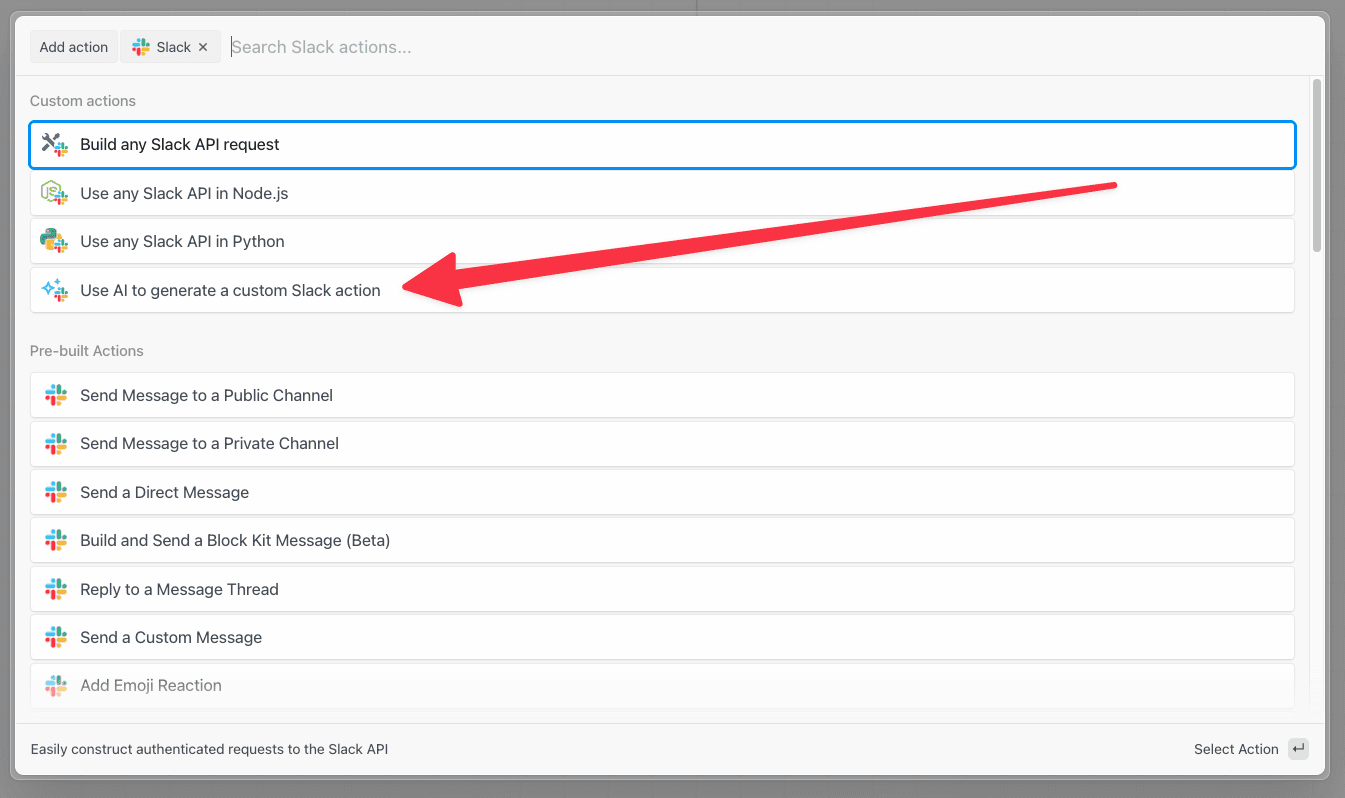
Access the feature either from within a Node.js code cell or from any app in the step selector.
A window should pop up and ask for your prompt. Write exactly what you want to do within that step. **Be verbose** and see our tips for [getting the best results](/workflows/building-workflows/code/nodejs/ai-code-generation/#getting-the-best-results).
* **Bad**: “Send a Slack message”
* **Good**: “Send a Slack message in the following format: `Hello, ${name}`. Let me select the channel from a list of available options.”
Once you’re done, hit **Enter** or click **Generate**.
Code will immediately start streaming to the editor. You can modify the prompt and re-generate the code if it doesn’t look right, or click **Use this code** to add it to your code cell and test it.
Pipedream will automatically refresh the step to show connected accounts and any input fields (props) above the step.
Edit the code however you’d like. Once you’re done, test the code. You’ll see the option to provide a :+1: or :-1: on the code, which helps us learn what’s working and what’s not.
## Editing existing code
You can also edit existing code with AI. Click the **Edit with AI** button at the top-right of any Node.js code step. You’ll see the code gen window appear with the original code from your step. Enter a prompt to suggest an edit, and we’ll give you the modified code.
## Getting the best results
**Generating code works best with clear, precise, and detailed instructions of what you want to do in your step.** The code gen service understands the [Pipedream component API](/components/contributing/api/) and references the API docs of [integrated apps](https://pipedream.com/apps). For example, you can tell it to include specific [props](/components/contributing/api/#props) (input) or [async options](/components/contributing/api/#async-options-example), and reference specific API endpoints you want to use for the selected app.
### Examples
#### Slack
Send a message to the `#general` channel that says, “This message was sent with AI-generate code!” Format it as a Slack block, with a header named, “Hello, world!”
**Output**:
```javascript theme={null}
import { axios } from "@pipedream/platform";
export default defineComponent({
props: {
slack: {
type: "app",
app: "slack",
},
},
async run({ steps, $ }) {
return await axios($, {
method: "POST",
url: `https://slack.com/api/chat.postMessage`,
headers: {
Authorization: `Bearer ${this.slack.$auth.oauth_access_token}`,
},
data: {
channel: "#general",
blocks: [
{
type: "header",
text: {
type: "plain_text",
text: "Hello, world!",
},
},
{
type: "section",
text: {
type: "mrkdwn",
text: "This message was sent with AI-generated code!",
},
},
],
},
});
},
});
```
#### Stripe
Get the subscription information about a specific customer based on their email address
**Output:**
```javascript theme={null}
import { axios } from "@pipedream/platform";
export default defineComponent({
props: {
stripe: {
type: "app",
app: "stripe",
},
email: {
type: "string",
label: "Email Address",
description:
"The email address of the customer to get subscription information for",
},
},
async run({ steps, $ }) {
const customerResponse = await axios($, {
method: "GET",
url: `https://api.stripe.com/v1/customers`,
headers: {
Authorization: `Bearer ${this.stripe.$auth.api_key}`,
},
params: {
email: this.email,
},
});
if (customerResponse.data.length === 0) {
throw new Error("Customer not found");
}
const customerId = customerResponse.data[0].id;
return await axios($, {
method: "GET",
url: `https://api.stripe.com/v1/subscriptions`,
headers: {
Authorization: `Bearer ${this.stripe.$auth.api_key}`,
},
params: {
customer: customerId,
},
});
},
});
```
## Current limitations, and what we’re working on next
* Currently supports Pipedream actions, not triggers
* Only supports Node.js output. Python coming soon.
* It supports single steps, and not entire workflows (also coming soon)
 Pipedream’s [built-in actions](/workflows/building-workflows/actions/) are great for running common API operations without having to write code, but sometimes you need code-level control in a workflow. You can [write this code yourself](/workflows/building-workflows/code/), or you can let Pipedream generate it for you with AI.
This feature is new, and [we welcome feedback](https://pipedream.com/support). Please let us know what we can improve or add to make this more useful for you.
## Getting Started
Access the feature either from within a Node.js code cell or from any app in the step selector.
Pipedream’s [built-in actions](/workflows/building-workflows/actions/) are great for running common API operations without having to write code, but sometimes you need code-level control in a workflow. You can [write this code yourself](/workflows/building-workflows/code/), or you can let Pipedream generate it for you with AI.
This feature is new, and [we welcome feedback](https://pipedream.com/support). Please let us know what we can improve or add to make this more useful for you.
## Getting Started
Access the feature either from within a Node.js code cell or from any app in the step selector.
 A window should pop up and ask for your prompt. Write exactly what you want to do within that step. **Be verbose** and see our tips for [getting the best results](/workflows/building-workflows/code/nodejs/ai-code-generation/#getting-the-best-results).
* **Bad**: “Send a Slack message”
* **Good**: “Send a Slack message in the following format: `Hello, ${name}`. Let me select the channel from a list of available options.”
Once you’re done, hit **Enter** or click **Generate**.
Code will immediately start streaming to the editor. You can modify the prompt and re-generate the code if it doesn’t look right, or click **Use this code** to add it to your code cell and test it.
Pipedream will automatically refresh the step to show connected accounts and any input fields (props) above the step.
A window should pop up and ask for your prompt. Write exactly what you want to do within that step. **Be verbose** and see our tips for [getting the best results](/workflows/building-workflows/code/nodejs/ai-code-generation/#getting-the-best-results).
* **Bad**: “Send a Slack message”
* **Good**: “Send a Slack message in the following format: `Hello, ${name}`. Let me select the channel from a list of available options.”
Once you’re done, hit **Enter** or click **Generate**.
Code will immediately start streaming to the editor. You can modify the prompt and re-generate the code if it doesn’t look right, or click **Use this code** to add it to your code cell and test it.
Pipedream will automatically refresh the step to show connected accounts and any input fields (props) above the step.
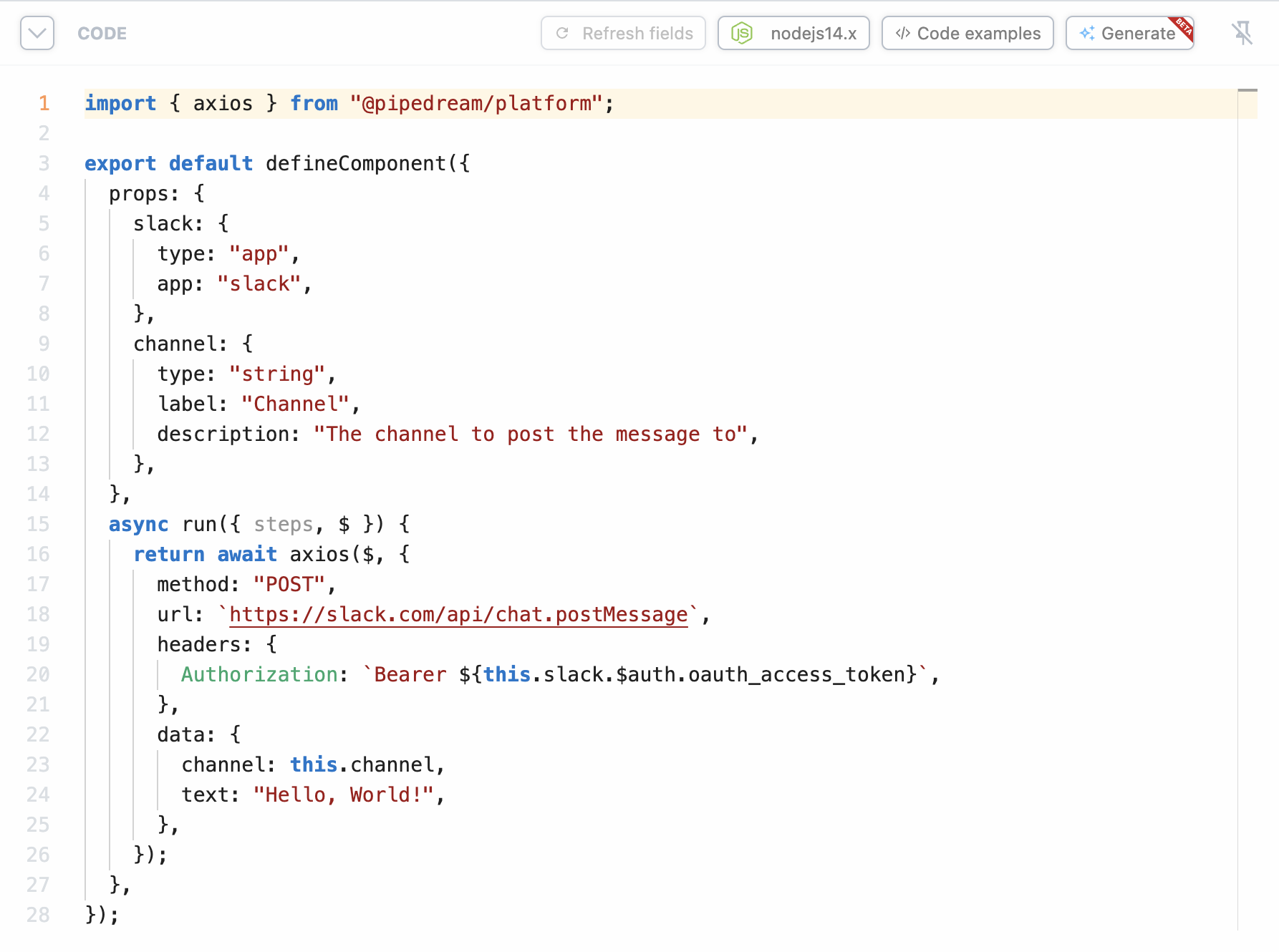 Edit the code however you’d like. Once you’re done, test the code. You’ll see the option to provide a :+1: or :-1: on the code, which helps us learn what’s working and what’s not.
## Editing existing code
You can also edit existing code with AI. Click the **Edit with AI** button at the top-right of any Node.js code step. You’ll see the code gen window appear with the original code from your step. Enter a prompt to suggest an edit, and we’ll give you the modified code.
Edit the code however you’d like. Once you’re done, test the code. You’ll see the option to provide a :+1: or :-1: on the code, which helps us learn what’s working and what’s not.
## Editing existing code
You can also edit existing code with AI. Click the **Edit with AI** button at the top-right of any Node.js code step. You’ll see the code gen window appear with the original code from your step. Enter a prompt to suggest an edit, and we’ll give you the modified code.
 ## Getting the best results
**Generating code works best with clear, precise, and detailed instructions of what you want to do in your step.** The code gen service understands the [Pipedream component API](/components/contributing/api/) and references the API docs of [integrated apps](https://pipedream.com/apps). For example, you can tell it to include specific [props](/components/contributing/api/#props) (input) or [async options](/components/contributing/api/#async-options-example), and reference specific API endpoints you want to use for the selected app.
### Examples
#### Slack
Send a message to the `#general` channel that says, “This message was sent with AI-generate code!” Format it as a Slack block, with a header named, “Hello, world!”
**Output**:
```javascript theme={null}
import { axios } from "@pipedream/platform";
export default defineComponent({
props: {
slack: {
type: "app",
app: "slack",
},
},
async run({ steps, $ }) {
return await axios($, {
method: "POST",
url: `https://slack.com/api/chat.postMessage`,
headers: {
Authorization: `Bearer ${this.slack.$auth.oauth_access_token}`,
},
data: {
channel: "#general",
blocks: [
{
type: "header",
text: {
type: "plain_text",
text: "Hello, world!",
},
},
{
type: "section",
text: {
type: "mrkdwn",
text: "This message was sent with AI-generated code!",
},
},
],
},
});
},
});
```
#### Stripe
Get the subscription information about a specific customer based on their email address
**Output:**
```javascript theme={null}
import { axios } from "@pipedream/platform";
export default defineComponent({
props: {
stripe: {
type: "app",
app: "stripe",
},
email: {
type: "string",
label: "Email Address",
description:
"The email address of the customer to get subscription information for",
},
},
async run({ steps, $ }) {
const customerResponse = await axios($, {
method: "GET",
url: `https://api.stripe.com/v1/customers`,
headers: {
Authorization: `Bearer ${this.stripe.$auth.api_key}`,
},
params: {
email: this.email,
},
});
if (customerResponse.data.length === 0) {
throw new Error("Customer not found");
}
const customerId = customerResponse.data[0].id;
return await axios($, {
method: "GET",
url: `https://api.stripe.com/v1/subscriptions`,
headers: {
Authorization: `Bearer ${this.stripe.$auth.api_key}`,
},
params: {
customer: customerId,
},
});
},
});
```
## Current limitations, and what we’re working on next
* Currently supports Pipedream actions, not triggers
* Only supports Node.js output. Python coming soon.
* It supports single steps, and not entire workflows (also coming soon)
## Getting the best results
**Generating code works best with clear, precise, and detailed instructions of what you want to do in your step.** The code gen service understands the [Pipedream component API](/components/contributing/api/) and references the API docs of [integrated apps](https://pipedream.com/apps). For example, you can tell it to include specific [props](/components/contributing/api/#props) (input) or [async options](/components/contributing/api/#async-options-example), and reference specific API endpoints you want to use for the selected app.
### Examples
#### Slack
Send a message to the `#general` channel that says, “This message was sent with AI-generate code!” Format it as a Slack block, with a header named, “Hello, world!”
**Output**:
```javascript theme={null}
import { axios } from "@pipedream/platform";
export default defineComponent({
props: {
slack: {
type: "app",
app: "slack",
},
},
async run({ steps, $ }) {
return await axios($, {
method: "POST",
url: `https://slack.com/api/chat.postMessage`,
headers: {
Authorization: `Bearer ${this.slack.$auth.oauth_access_token}`,
},
data: {
channel: "#general",
blocks: [
{
type: "header",
text: {
type: "plain_text",
text: "Hello, world!",
},
},
{
type: "section",
text: {
type: "mrkdwn",
text: "This message was sent with AI-generated code!",
},
},
],
},
});
},
});
```
#### Stripe
Get the subscription information about a specific customer based on their email address
**Output:**
```javascript theme={null}
import { axios } from "@pipedream/platform";
export default defineComponent({
props: {
stripe: {
type: "app",
app: "stripe",
},
email: {
type: "string",
label: "Email Address",
description:
"The email address of the customer to get subscription information for",
},
},
async run({ steps, $ }) {
const customerResponse = await axios($, {
method: "GET",
url: `https://api.stripe.com/v1/customers`,
headers: {
Authorization: `Bearer ${this.stripe.$auth.api_key}`,
},
params: {
email: this.email,
},
});
if (customerResponse.data.length === 0) {
throw new Error("Customer not found");
}
const customerId = customerResponse.data[0].id;
return await axios($, {
method: "GET",
url: `https://api.stripe.com/v1/subscriptions`,
headers: {
Authorization: `Bearer ${this.stripe.$auth.api_key}`,
},
params: {
customer: customerId,
},
});
},
});
```
## Current limitations, and what we’re working on next
* Currently supports Pipedream actions, not triggers
* Only supports Node.js output. Python coming soon.
* It supports single steps, and not entire workflows (also coming soon)