> ## Documentation Index
> Fetch the complete documentation index at: https://pipedream.com/docs/llms.txt
> Use this file to discover all available pages before exploring further.

# OpenAI Integration

export const SUPABASE_ANON_KEY = 'eyJhbGciOiJIUzI1NiIsInR5cCI6IkpXVCJ9.eyJpc3MiOiJzdXBhYmFzZSIsInJlZiI6Im92d3R0cXZyYm15aWNlcWtnYXZxIiwicm9sZSI6ImFub24iLCJpYXQiOjE3NTEzODY4MTYsImV4cCI6MjA2Njk2MjgxNn0.7QHhvz7K9KPmCGI8vm36TM5hiIASuXAY54OXt3SqCVg';

export const SUPABASE_URL = 'https://ovwttqvrbmyiceqkgavq.supabase.co';

export const AppSearchDemo = ({supabaseUrl, supabaseAnonKey}) => {
  const generateRequestToken = () => {
    if (typeof window === "undefined") return "";
    const baseString = `${navigator.userAgent}:${window.location.host}:connect-demo`;
    return btoa(baseString);
  };
  const generateUUID = () => {
    return crypto.randomUUID();
  };
  const useDebounce = (value, delay) => {
    const [debouncedValue, setDebouncedValue] = useState(value);
    useEffect(() => {
      const handler = setTimeout(() => {
        setDebouncedValue(value);
      }, delay);
      return () => {
        clearTimeout(handler);
      };
    }, [value, delay]);
    return debouncedValue;
  };
  const scrollbarStyles = `
    .custom-scrollbar::-webkit-scrollbar {
        width: 6px;
    }
    .custom-scrollbar::-webkit-scrollbar-track {
        background: transparent;
    }
    .custom-scrollbar::-webkit-scrollbar-thumb {
        background-color: rgba(156, 163, 175, 0.5);
        border-radius: 3px;
    }
    .custom-scrollbar::-webkit-scrollbar-thumb:hover {
        background-color: rgba(156, 163, 175, 0.8);
    }
    .dark .custom-scrollbar::-webkit-scrollbar-thumb {
        background-color: rgba(75, 85, 99, 0.5);
    }
    .dark .custom-scrollbar::-webkit-scrollbar-thumb:hover {
        background-color: rgba(75, 85, 99, 0.8);
    }
  `;
  const [searchQuery, setSearchQuery] = useState("");
  const [apps, setApps] = useState([]);
  const [isLoading, setIsLoading] = useState(false);
  const [error, setError] = useState("");
  const [copiedSlug, setCopiedSlug] = useState("");
  const [connectToken, setConnectToken] = useState("");
  const [externalUserId, setExternalUserId] = useState("");
  const debouncedSearchQuery = useDebounce(searchQuery, 300);
  useEffect(() => {
    setExternalUserId(generateUUID());
  }, []);
  useEffect(() => {
    if (externalUserId) {
      getConnectToken();
    }
  }, [externalUserId]);
  const getConnectToken = async () => {
    try {
      const requestToken = generateRequestToken();
      const response = await fetch(`${supabaseUrl}/functions/v1/demo-connect-token`, {
        method: "POST",
        headers: {
          "Content-Type": "application/json",
          "Authorization": `Bearer ${supabaseAnonKey}`,
          "X-Request-Token": requestToken
        },
        body: JSON.stringify({
          external_user_id: externalUserId
        })
      });
      if (!response.ok) {
        throw new Error("Failed to get Connect token");
      }
      const data = await response.json();
      setConnectToken(data.token);
    } catch (err) {
      console.error("Error getting Connect token:", err);
      setError("Failed to initialize app search. Please refresh the page.");
    }
  };
  const searchApps = useCallback(async query => {
    if (!query || query.length < 2 || !connectToken) {
      setApps([]);
      return;
    }
    setIsLoading(true);
    setError("");
    try {
      const params = new URLSearchParams();
      params.append("q", query);
      params.append("sort_key", "featured_weight");
      params.append("sort_direction", "desc");
      params.append("has_actions", "1");
      const response = await fetch(`https://api.pipedream.com/v1/apps?${params.toString()}`, {
        headers: {
          "Authorization": `Bearer ${connectToken}`,
          "Content-Type": "application/json"
        }
      });
      if (!response.ok) {
        throw new Error("Failed to search apps");
      }
      const data = await response.json();
      const formattedApps = data.data.map(app => ({
        id: app.id,
        name: app.name,
        name_slug: app.name_slug,
        description: app.description,
        icon: app.img_src,
        featured_weight: app.featured_weight,
        categories: app.categories || []
      }));
      const sortedApps = [...formattedApps].sort((a, b) => (b.featured_weight || 0) - (a.featured_weight || 0));
      setApps(sortedApps);
    } catch (err) {
      console.error("Error searching apps:", err);
      setError("Failed to search apps. Please try again.");
      setApps([]);
    } finally {
      setIsLoading(false);
    }
  }, [connectToken]);
  useEffect(() => {
    searchApps(debouncedSearchQuery);
  }, [debouncedSearchQuery, searchApps]);
  const copyToClipboard = async nameSlug => {
    if (typeof window === "undefined" || !navigator.clipboard) {
      return;
    }
    try {
      await navigator.clipboard.writeText(nameSlug);
      setCopiedSlug(nameSlug);
      setTimeout(() => setCopiedSlug(""), 2000);
    } catch (err) {}
  };
  return <div className="border border-gray-200 dark:border-gray-700 rounded-md overflow-hidden mt-4">
      <style jsx>{scrollbarStyles}</style>
      <div className="bg-gray-100 dark:bg-gray-800 border-b border-gray-200 dark:border-gray-700 px-4 py-2 font-medium text-sm text-gray-800 dark:text-gray-200">Search for an app</div>
      <div className="p-4">
        <input type="text" value={searchQuery} onChange={e => setSearchQuery(e.target.value)} placeholder="Search for an app (e.g., Slack, Notion, Gmail)" className="w-full px-4 py-2 border border-gray-300 dark:border-gray-600 rounded-md bg-white dark:bg-gray-800 text-gray-800 dark:text-gray-200 placeholder-gray-400 dark:placeholder-gray-500" />

        {searchQuery.length > 0 && searchQuery.length < 2 && <p className="text-sm text-gray-500 dark:text-gray-400 mt-2">
            Type at least 2 characters to search
          </p>}

        {isLoading && <div className="mt-4 text-center">
            <p className="text-sm text-gray-600 dark:text-gray-400">Searching...</p>
          </div>}

        {error && <div className="mt-4 p-3 bg-red-50 dark:bg-red-900/20 border border-red-200 dark:border-red-700 text-red-800 dark:text-red-400 rounded-md">
            <p className="text-sm">{error}</p>
          </div>}

        {apps.length > 0 && !isLoading && <div className="mt-4">
            <div className="relative">
              <div className="max-h-[500px] overflow-y-auto space-y-3 pr-2 custom-scrollbar">
                {apps.map(app => <div key={app.id} className="p-4 border border-gray-200 dark:border-gray-700 rounded-lg hover:border-gray-300 dark:hover:border-gray-600 transition-colors">
                    <div className="flex items-start gap-3">
                      {app.icon && <img src={app.icon} alt={app.name} className="w-10 h-10 rounded bg-white border border-gray-200 dark:border-gray-600 p-1" />}
                      <div className="flex-1">
                        <div className="flex items-center gap-3 mb-1 flex-wrap">
                          <p className="font-semibold text-base text-gray-800 dark:text-gray-200 m-0">
                            {app.name}
                          </p>
                          <div className="flex items-center gap-1 bg-gray-100 dark:bg-gray-800 rounded px-2 py-0.5">
                            <div className="font-mono text-xs">
                              {app.name_slug}
                            </div>
                            <button onClick={() => copyToClipboard(app.name_slug)} className="p-0.5 hover:bg-gray-200 dark:hover:bg-gray-700 rounded transition-colors ml-1" title={copiedSlug === app.name_slug ? "Copied!" : "Copy app name slug"}>
                              {copiedSlug === app.name_slug ? <svg className="w-3.5 h-3.5 text-green-600 dark:text-green-400" fill="none" stroke="currentColor" viewBox="0 0 24 24">
                                    <path strokeLinecap="round" strokeLinejoin="round" strokeWidth={2} d="M5 13l4 4L19 7" />
                                  </svg> : <svg className="w-3.5 h-3.5 text-gray-500 dark:text-gray-400" fill="none" stroke="currentColor" viewBox="0 0 24 24">
                                    <path strokeLinecap="round" strokeLinejoin="round" strokeWidth={2} d="M8 16H6a2 2 0 01-2-2V6a2 2 0 012-2h8a2 2 0 012 2v2m-6 12h8a2 2 0 002-2v-8a2 2 0 00-2-2h-8a2 2 0 00-2 2v8a2 2 0 002 2z" />
                                  </svg>}
                            </button>
                          </div>
                        </div>
                        <p className="text-sm text-gray-500 dark:text-gray-400 line-clamp-2">
                          {app.description}
                        </p>
                        {app.categories.length > 0 && <div className="mt-2 flex flex-wrap gap-1">
                            {app.categories.map(category => <span key={category} className="text-xs px-2 py-1 bg-gray-100 dark:bg-gray-800 text-gray-600 dark:text-gray-400 rounded">
                                {category}
                              </span>)}
                          </div>}
                      </div>
                    </div>
                  </div>)}
              </div>
              {apps.length > 5 && <div className="absolute bottom-0 left-0 right-0 h-8 bg-gradient-to-t from-white dark:from-gray-900 to-transparent pointer-events-none"></div>}
            </div>
            {apps.length > 5 && <p className="text-xs text-gray-500 dark:text-gray-400 mt-2 text-center">
                Scroll to see more
              </p>}
          </div>}

        {debouncedSearchQuery.length >= 2 && apps.length === 0 && !isLoading && !error && <div className="mt-4 text-center">
            <p className="text-sm text-gray-500 dark:text-gray-400">
                No apps found for "{debouncedSearchQuery}"
            </p>
          </div>}

        <div className="mt-4">
          <p className="text-sm text-gray-500 dark:text-gray-400">
            Browse all available apps at{" "}
            <a href="https://mcp.pipedream.com" target="_blank" rel="noopener noreferrer" className="text-blue-500 hover:text-blue-600">
              mcp.pipedream.com
            </a>
          </p>
        </div>
      </div>
    </div>;
};

export const TemporaryTokenGenerator = () => {
  const [token, setToken] = useState("");
  const [copied, setCopied] = useState(false);
  const generateUUID = () => {
    if (typeof window === "undefined" || !window.crypto) {
      return ('xxxxxxxx-xxxx-4xxx-yxxx-xxxxxxxxxxxx').replace(/[xy]/g, function (c) {
        const r = Math.random() * 16 | 0;
        const v = c == 'x' ? r : r & 0x3 | 0x8;
        return v.toString(16);
      });
    }
    return crypto.randomUUID();
  };
  const generateToken = () => {
    const uuid = generateUUID();
    const newToken = `devtok_${uuid}`;
    setToken(newToken);
    setCopied(false);
  };
  const copyToClipboard = async () => {
    if (typeof window === "undefined" || !navigator.clipboard) {
      console.error("Clipboard API not available");
      return;
    }
    try {
      await navigator.clipboard.writeText(token);
      setCopied(true);
      setTimeout(() => setCopied(false), 2000);
    } catch (err) {
      console.error("Failed to copy:", err);
    }
  };
  return <div className="border border-gray-200 dark:border-gray-700 rounded-md overflow-hidden mt-4">
      <div className="bg-gray-100 dark:bg-gray-800 border-b border-gray-200 dark:border-gray-700 px-4 py-2 font-medium text-sm text-gray-800 dark:text-gray-200">
        Generate a temporary access token
      </div>
      <div className="p-4">
        <div className="mb-4">
          <button onClick={generateToken} className="px-4 py-2 bg-blue-500 text-white rounded-md hover:bg-blue-600 transition-colors disabled:opacity-50 font-medium text-sm">
            Generate token
          </button>
        </div>

        {token && <div className="mt-4">
            <div className="flex items-center gap-2">
              <div className="flex bg-gray-100 dark:bg-gray-800 rounded pl-2 pr-4 py-2 border">
                <div className="text-sm break-all text-gray-800 dark:text-gray-200 font-mono">{token}</div>
              </div>
              <button onClick={copyToClipboard} className="px-4 py-2 bg-gray-100 dark:bg-gray-800 border border-gray-300 dark:border-gray-600 text-gray-700 dark:text-gray-300 rounded-md hover:bg-gray-200 dark:hover:bg-gray-700 transition-colors font-medium text-sm inline-flex items-center">
                {copied ? <>
                      <svg className="w-4 h-4 mr-1" fill="currentColor" viewBox="0 0 20 20">
                        <path fillRule="evenodd" d="M16.707 5.293a1 1 0 010 1.414l-8 8a1 1 0 01-1.414 0l-4-4a1 1 0 011.414-1.414L8 12.586l7.293-7.293a1 1 0 011.414 0z" clipRule="evenodd" />
                      </svg>
                    Copied!
                    </> : <>
                      <svg className="w-4 h-4 mr-1" fill="none" stroke="currentColor" viewBox="0 0 24 24">
                        <path strokeLinecap="round" strokeLinejoin="round" strokeWidth={2} d="M8 16H6a2 2 0 01-2-2V6a2 2 0 012-2h8a2 2 0 012 2v2m-6 12h8a2 2 0 002-2v-8a2 2 0 00-2-2h-8a2 2 0 00-2 2v8a2 2 0 002 2z" />
                      </svg>
                    Copy
                    </>}
              </button>
            </div>
            <div className="text-sm text-gray-500 dark:text-gray-400 mt-2">
              This is a temporary token. Any linked connected accounts will be regularly deleted.
            </div>
          </div>}
      </div>
    </div>;
};

Use Pipedream MCP with OpenAI's API and playground. OpenAI provides [native MCP support](https://platform.openai.com/guides/tools-remote-mcp) for tool calling.

## Testing in OpenAI’s API Playground

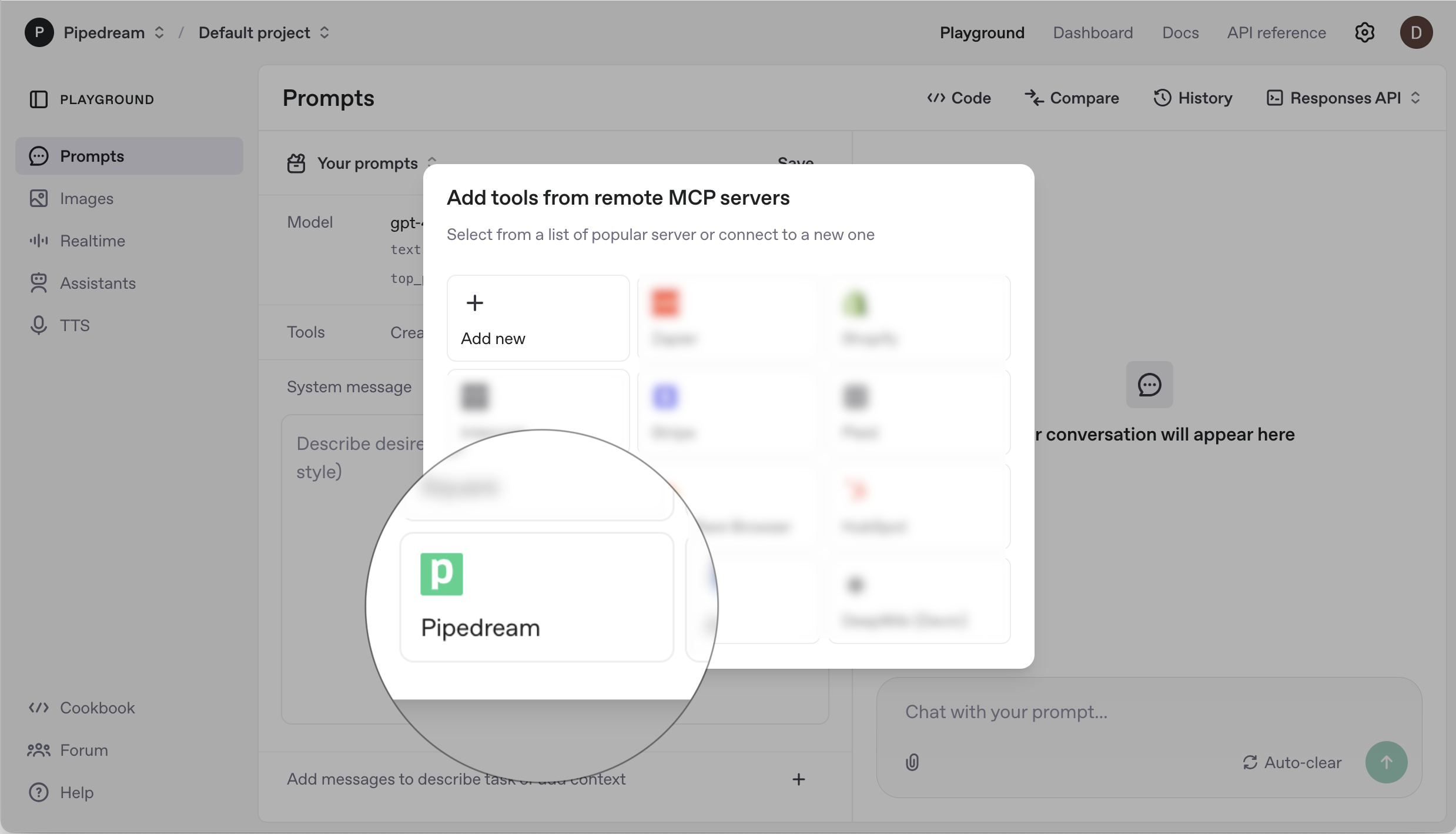
OpenAI provides an API playground for developers to test prompts and tool calling, which provides an easy way to test Pipedream MCP. Get started below.

<Frame>
  <img src="https://mintcdn.com/pipedream/nKh6d_6A4aXFb6xD/images/f10d1976-CleanShot_2025-05-29_at_13.09.23_4_2x_yujxkt.png?fit=max&auto=format&n=nKh6d_6A4aXFb6xD&q=85&s=7e36ce9a0b80b1ee662f9077bf415f77" width="2477" height="1418" data-path="images/f10d1976-CleanShot_2025-05-29_at_13.09.23_4_2x_yujxkt.png" />
</Frame>

<Steps>
  <Step title="Open the playground">
    Navigate to [OpenAI’s playground](https://platform.openai.com/chat/edit) and sign in with your OpenAI account.
  </Step>

  <Step title="Add Pipedream MCP">
    Click the **Create** button in the **Tools** section, then select **Pipedream**.
  </Step>

  <Step title="Enter your access token">
    <TemporaryTokenGenerator />
  </Step>

  <Step title="Select an app">
    <AppSearchDemo supabaseUrl={SUPABASE_URL} supabaseAnonKey={SUPABASE_ANON_KEY} />
  </Step>

  <Step title="Click Connect">
    Enter a prompt and start chatting!
  </Step>
</Steps>

<Note>
  Refer to the instructions below when you’re ready to use Pipedream MCP in your app.
</Note>

## Using Pipedream MCP in your app

Set your OpenAI API key:

```ini theme={null}
OPENAI_API_KEY=your_openai_api_key
```

Other environment variables are covered in the [setup guide](/connect/mcp).

## Generate responses with Pipedream MCP

Below is an end to end example showing how to:

1. Initialize the Pipedream SDK
2. Find the relevant MCP server
3. Send a prompt to OpenAI with the MCP server as a tool call

<CodeGroup>
  ```typescript TypeScript theme={null}
  import OpenAI from 'openai';
  import { PipedreamClient } from "@pipedream/sdk";
   
  // Initialize the Pipedream SDK client
  const pd = new PipedreamClient({
    projectEnvironment: PIPEDREAM_ENVIRONMENT,
    clientId: PIPEDREAM_CLIENT_ID,
    clientSecret: PIPEDREAM_CLIENT_SECRET,
    projectId: PIPEDREAM_PROJECT_ID
  });
   
  // Find the app to use for the MCP server
  // For this example, we'll use Notion
  const apps = await pd.apps.list({ q: "notion" });
  const appSlug = apps.data[0].name_slug; // e.g., "notion"
   
  // Get access token for MCP server auth
  const accessToken = await pd.rawAccessToken;
   
  // Send the unique ID that you use to identify this user in your system
  const externalUserId = 'abc-123'; // Used in MCP URL to identify the user
   
  // Initialize OpenAI client
  const openaiClient = new OpenAI();
   
  // Make the OpenAI request with the MCP server
  const response = await openaiClient.responses.create({
    model: 'gpt-4.1',
    tools: [
      {
        type: 'mcp',
        server_label: appSlug,
        server_url: `https://remote.mcp.pipedream.net/v3`,
        headers: {
          Authorization: `Bearer ${accessToken}`,
          "x-pd-project-id": PIPEDREAM_PROJECT_ID,
          "x-pd-environment": PIPEDREAM_ENVIRONMENT,
          "x-pd-external-user-id": externalUserId,
          "x-pd-app-slug": appSlug,
        },
        require_approval: 'never'
      }
    ],
    input: 'Summarize my most recently created Notion doc for me and help draft an email to our customers'
  });
   
  console.log(response);
  ```

  ```python Python theme={null}
  import openai
  from pipedream import Pipedream

  # Initialize the Pipedream SDK client
  pd = Pipedream(
      project_id=PIPEDREAM_PROJECT_ID,
      project_environment=PIPEDREAM_ENVIRONMENT,
      client_id=PIPEDREAM_CLIENT_ID,
      client_secret=PIPEDREAM_CLIENT_SECRET,
  )

  # Find the app to use for the MCP server
  # For this example, we'll use Notion
  apps = pd.apps.list(q="notion")
  app_slug = apps.data[0].name_slug  # e.g., "notion"

  # Get access token for MCP server auth
  access_token = await pd.raw_access_token

  # Send the unique ID that you use to identify this user in your system
  external_user_id = 'abc-123'  # Used in MCP URL to identify the user

  # Initialize OpenAI client
  openai_client = openai.OpenAI()

  # Make the OpenAI request with the MCP server
  response = openai_client.responses.create(
      model='gpt-4.1',
      tools=[
          {
              "type": "mcp",
              "server_label": app_slug,
              "server_url": "https://remote.mcp.pipedream.net/v3",
              "headers": {
                  "Authorization": f"Bearer {access_token}",
                  "x-pd-project-id": PIPEDREAM_PROJECT_ID,
                  "x-pd-environment": PIPEDREAM_ENVIRONMENT,
                  "x-pd-external-user-id": external_user_id,
                  "x-pd-app-slug": app_slug,
              },
              "require_approval": "never"
          }
      ],
      input='Summarize my most recently created Notion doc for me and help draft an email to our customers'
  )

  print(response)
  ```

  ```sh cURL theme={null}
  # Step 1: Get access token from Pipedream
  ACCESS_TOKEN=$(curl -s -X POST https://api.pipedream.com/v1/oauth/token \
    -H "Content-Type: application/json" \
    -d '{
      "grant_type": "client_credentials", 
      "client_id": "'$PIPEDREAM_CLIENT_ID'", 
      "client_secret": "'$PIPEDREAM_CLIENT_SECRET'"
    }' | jq -r .access_token)
   
  # Step 2: Find the app to use for MCP server
  # Search for the Notion app
  APP_SLUG=$(curl -s -X GET "https://api.pipedream.com/v1/apps?q=notion" \
    -H "Authorization: Bearer $ACCESS_TOKEN" | jq -r '.data[0].name_slug')
   
  # Step 3: Make request to OpenAI with MCP tool
  curl -X POST https://api.openai.com/v1/responses \
    -H "Content-Type: application/json" \
    -H "Authorization: Bearer $OPENAI_API_KEY" \
    -d '{
      "model": "gpt-4.1",
      "input": "Summarize my most recently created Notion doc for me and help draft an email to our customers",
      "tools": [
        {
          "type": "mcp",
          "server_label": "Notion",
          "server_url": "https://remote.mcp.pipedream.net/v3",
          "headers": {
            "Authorization": "Bearer '"$ACCESS_TOKEN"'",
            "x-pd-project-id": "'"$PIPEDREAM_PROJECT_ID"'",
            "x-pd-environment": "'"$PIPEDREAM_ENVIRONMENT"'",
            "x-pd-external-user-id": "abc-123",
            "x-pd-app-slug": "'"$APP_SLUG"'"
          },
          "require_approval": "never"
        }
      ]
    }'
  ```
</CodeGroup>