> ## Documentation Index
> Fetch the complete documentation index at: https://pipedream.com/docs/llms.txt
> Use this file to discover all available pages before exploring further.
# Connect API Proxy
export const PUBLIC_APPS = '3,000';
Pipedream Connect provides a proxy API that you can use to send authenticated requests to any integrated API on behalf of your users. This is useful in a few scenarios:
1. You need code-level control and you want to use [Pipedream’s OAuth](/connect/managed-auth/oauth-clients/#using-pipedream-oauth) instead of [your own OAuth client](/connect/managed-auth/oauth-clients/#using-a-custom-oauth-client)
2. There isn’t a [pre-built tool](/connect/components/) (action) for the app, or you need to modify the request
3. You want to avoid storing end user credentials in your app
## Overview
The Connect proxy enables you to interface with any integrated API and make authenticated requests on behalf of your users, without dealing with OAuth or storing end user credentials.
1. You send a request to the proxy and identify the end user you want to act on behalf of
2. The proxy sends the request to the upstream API and dynamically inserts your end user’s auth credentials
3. The proxy returns the response from the upstream API back to you
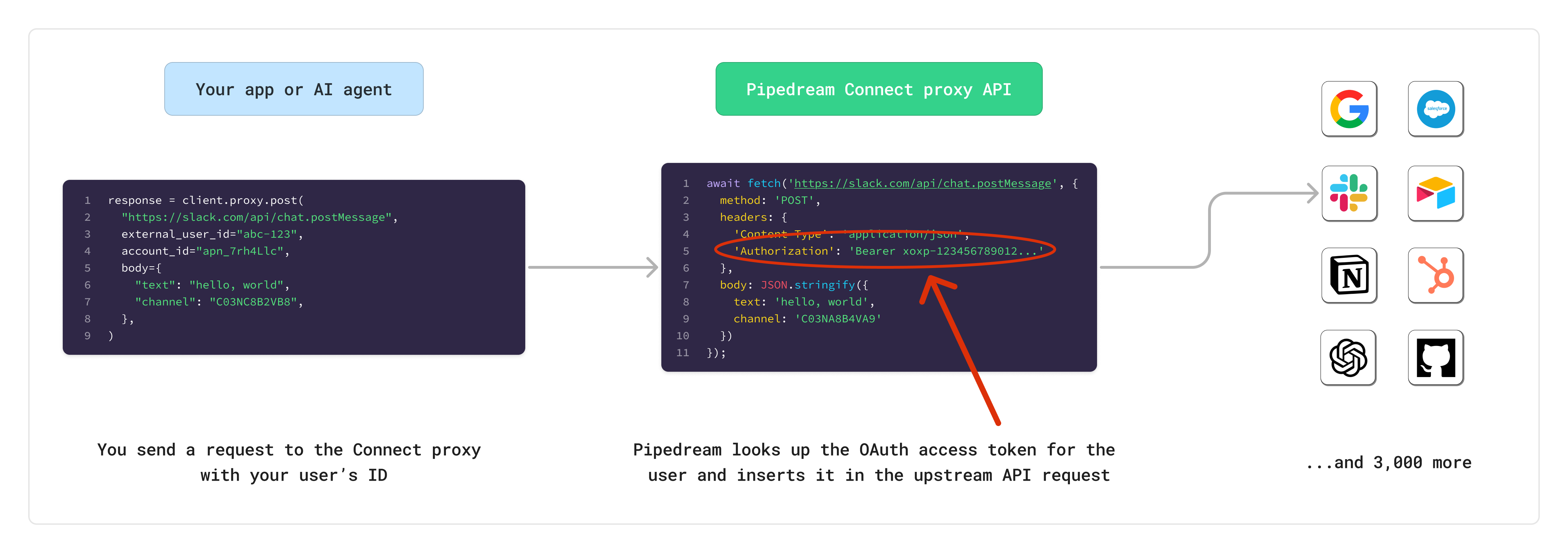 Before getting started with the Connect proxy, make sure you’ve already gone through the [managed auth quickstart](/connect/managed-auth/quickstart/) for Pipedream Connect.
## Getting started
You can send requests to the Connect proxy using one of the [Pipedream SDKs](/connect/api-reference/introduction#sdks) or directly with the Pipedream REST API.
### Prerequisites
* A [Pipedream OAuth client](/connect/api-reference/authentication) to make authenticated requests to Pipedream’s API
* Connect [environment](/connect/managed-auth/environments/) (ex, `production` or `development`)
* The [external user ID](/connect/api-reference/introduction) for your end user (ex, `abc-123`)
* The [account ID](/connect/api-reference/list-accounts) for your end user’s connected account (ex, `apn_1234567`)
Refer to the full Connect API [here](/connect/api-reference/).
### Authenticating on behalf of your users
One of the core benefits of using the Connect API Proxy is not having to deal with storing or retrieving sensitive credentials for your end users.
Since Pipedream has {PUBLIC_APPS}+ integrated apps, we know how the upstream APIs are expecting to receive access tokens or API keys. When you send a request to the proxy, Pipedream will look up the corresponding connected account for the relevant user, and **automatically insert the authorization credentials in the appropriate header or URL param**.
### Sending requests
When making requests to the Connect Proxy, you must provide the following parameters:
**URL**
* The URL of the API you want to call (ex, `https://slack.com/api/chat.postMessage`)
* If using the REST API directly, this should be a URL-safe Base64 encoded string (ex, `aHR0cHM6Ly9zbGFjay5jb20vYXBpL2NoYXQucG9zdE1lc3NhZ2U`)
**For apps with dynamic domains** (like Zendesk, Zoho, GitLab), you should use relative paths in your proxy requests. Pipedream automatically resolves the correct domain based on the user’s connected account. See [When to use relative vs full URLs](/connect/api-proxy/#when-to-use-relative-vs-full-urls) for details.
**HTTP method**
* Use the HTTP method required by the upstream API
**Body**
* Optionally include a body to send to the upstream API
**Headers**
* If using the REST API, include the `Authorization` header with your Pipedream OAuth access token (`Bearer {access_token}`)
* Headers that contain the prefix `x-pd-proxy-` will get forwarded to the upstream API
## Examples
```typescript TypeScript theme={null}
import { PipedreamClient } from "@pipedream/sdk";
const client = new PipedreamClient({
projectEnvironment: {development | production},
projectId: {your_pipedream_project_id},
clientId: {your_oauth_client_id},
clientSecret: {your_oauth_client_secret}
});
const resp = await client.proxy.post(
{
externalUserId: "{external_user_id}", // The external user ID for your end user
accountId: "{account_id}", // The account ID for your end user (ex, apn_1234567)
url: "https://slack.com/api/chat.postMessage", // Include any query params you need; no need to Base64 encode the URL if using the SDK
headers: {
"x-pd-proxy-hello": "world!" // Include any headers you need to send to the upstream API
},
body: {
text: "hello, world",
channel: "C03NA8B4VA9"
},
}
)
// Parse and return the data you need
console.log(resp);
```
```python Python theme={null}
from pipedream import Pipedream
pd = Pipedream(
project_environment="{development | production}",
project_id="{your_pipedream_project_id}",
client_id="{your_oauth_client_id}",
client_secret="{your_oauth_client_secret}"
)
response = pd.proxy.post(
"https://slack.com/api/chat.postMessage",
external_user_id="{external_user_id}", # The external user ID for your end user
account_id="{account_id}", # The account ID for your end user (ex, apn_1234567)
body={
"text": "hello, world",
"channel": "C03NA8B4VA9",
},
headers={
"x-pd-proxy-hello": "world!" # Include any headers you need to send to the upstream API
}
)
# Parse and return the data you need
print(response)
```
```java Java theme={null}
import com.pipedream.api.PipedreamClient;
import com.pipedream.api.requests.ProxyPostRequest;
import com.pipedream.api.requests.RequestOptions;
import java.util.Map;
PipedreamClient client = PipedreamClient.builder()
.projectEnvironment("{development | production}")
.projectId("{your_pipedream_project_id}")
.clientId("{your_oauth_client_id}")
.clientSecret("{your_oauth_client_secret}")
.build();
Map body = Map.of(
"text", "hello, world",
"channel", "C03NA8B4VA9"
);
ProxyPostRequest request = ProxyPostRequest.builder()
.externalUserId("{external_user_id}") // The external user ID for your end user
.accountId("{account_id}") // The account ID for your end user (ex, apn_1234567)
.body(body)
.build();
RequestOptions options = RequestOptions.builder()
.addHeader("x-pd-proxy-hello", "world!") // Include any headers you need to send to the upstream API
.build();
Object response = client.proxy().post("https://slack.com/api/chat.postMessage", request, options);
// Parse and return the data you need
System.out.println(response);
```
```sh cURL theme={null}
# First, obtain an OAuth access token to authenticate to the Pipedream API
curl -X POST https://api.pipedream.com/v1/oauth/token \
-H "Content-Type: application/json" \
-d '{
"grant_type": "client_credentials",
"client_id": "{your_oauth_client_id}",
"client_secret": "{your_oauth_client_secret}"
}'
# The response will include an access_token. Use it in the Authorization header below.
curl -X POST "https://api.pipedream.com/v1/connect/{your_project_id}/proxy/{url_safe_base64_encoded_url}?external_user_id={external_user_id}&account_id={apn_xxxxxxx}" \
-H "Authorization: Bearer {access_token}" \
-H "x-pd-environment: {development | production}" \
-H "x-pd-proxy-hello: world" \
-d '{
"text": "hello, world",
"channel": "C03NA8B4VA9"
}'
# Parse and return the data you need
```
## Allowed domains
The vast majority of apps in Pipedream work with the Connect Proxy. To check if an app is supported and what domains are allowed, use `pd.getApps()` or the [`/apps` REST API](/rest-api/api-reference/apps/list-apps).
### Understanding the Connect object
Each app in the `/apps` API response includes a `connect` object:
```json Slack app info highlight={6-12} theme={null}
{
"id": "app_OkrhR1",
"name_slug": "slack",
"name": "Slack",
// ...other fields...
"connect": {
"allowed_domains": [
"slack.com"
],
"base_proxy_target_url": "https://slack.com",
"proxy_enabled": true
}
}
```
```json GitLab app info highlight={6-12} theme={null}
{
"id": "app_1Z2hw1",
"name_slug": "gitlab",
"name": "GitLab",
// ...other fields...
"connect": {
"allowed_domains": [
"gitlab.com"
],
"base_proxy_target_url": "https://{{custom_fields.base_api_url}}",
"proxy_enabled": true
}
}
```
| Field | Description |
| ----------------------- | ------------------------------------------------------------------------------------- |
| `proxy_enabled` | Whether the app supports the Connect Proxy |
| `allowed_domains` | Domains you can send requests to when using full URLs |
| `base_proxy_target_url` | The base URL for proxy requests, may contain placeholders for account-specific values |
### When to use relative vs full URLs
The format of `base_proxy_target_url` determines whether you should use a relative path or full URL:
#### Apps with static domains
If `base_proxy_target_url` is a standard URL (e.g., `https://slack.com`), you can use either:
* **Full URL**: `https://slack.com/api/chat.postMessage`
* **Relative path**: `/api/chat.postMessage`
#### Apps with dynamic domains
If `base_proxy_target_url` contains placeholders like `{{custom_fields.base_api_url}}`, you **must** use relative paths. This applies to:
* Self-hosted instances (GitLab)
* Apps with account-specific subdomains (Zendesk, Zoho)
For these apps, Pipedream resolves the actual domain from the user’s connected account at runtime.
### Examples
```typescript Slack (static domain) theme={null}
// Both work
await client.proxy.post({
externalUserId: "user-123",
accountId: "apn_1234567",
url: "https://slack.com/api/chat.postMessage",
body: {...}
})
await client.proxy.post({
accountId: "apn_1234567",
externalUserId: "user-123",
url: "/api/chat.postMessage",
body: {...}
})
```
```typescript GitLab (dynamic domain) theme={null}
// Must use relative path
await client.proxy.get({
accountId: "apn_1234567",
externalUserId: "user-123",
url: "/api/v4/projects", // Pipedream resolves to the end user's GitLab instance
})
```
### Discovering app support programmatically
```typescript TypeScript theme={null}
const apps = await client.apps.list()
// Filter for apps that support the proxy
const proxyEnabledApps = apps.filter(app => app.connect?.proxy_enabled)
```
```bash cURL theme={null}
curl https://api.pipedream.com/v1/apps \
-H "Authorization: Bearer "
```
Refer to the Connect API Reference to learn more about [listing apps](/connect/api-reference/list-apps).
## Google Ads
Google Ads requires a special request structure because it uses Pipedream's internal proxy service to protect Pipedream's developer token. When making requests to Google Ads through the Connect Proxy, you need to nest the Google Ads API request inside the proxy request.
**Important notes:**
* The upstream URL is Pipedream's proxy service for Google Ads: `https://googleads.m.pipedream.net`
* Define the Google Ads API endpoint path in the `url` field within the request body
* The method to the Connect Proxy should always be `POST`, since it targets the Google Ads proxy (you define the actual method for the Google Ads API in the body)
```typescript TypeScript theme={null}
import { PipedreamClient } from "@pipedream/sdk";
const client = new PipedreamClient({
projectEnvironment: {development | production},
projectId: {your_pipedream_project_id},
clientId: {your_oauth_client_id},
clientSecret: {your_oauth_client_secret}
});
const resp = await client.proxy.post(
{
externalUserId: "{external_user_id}",
accountId: "{account_id}",
url: "https://googleads.m.pipedream.net",
body: {
method: "post", // The HTTP method for the Google Ads API
url: "/v21/customers/1234567890/googleAds:search", // Google Ads API endpoint path
data: {
query: "SELECT campaign.id, campaign.name FROM campaign",
},
},
}
)
console.log(resp);
```
```python Python theme={null}
from pipedream import Pipedream
pd = Pipedream(
project_environment="{development | production}",
project_id="{your_pipedream_project_id}",
client_id="{your_oauth_client_id}",
client_secret="{your_oauth_client_secret}"
)
response = pd.proxy.post(
"https://googleads.m.pipedream.net",
external_user_id="{external_user_id}",
account_id="{account_id}",
body={
"method": "post", # The HTTP method for the Google Ads API
"url": "/v21/customers/1234567890/googleAds:search", # Google Ads API endpoint path
"data": {
"query": "SELECT campaign.id, campaign.name FROM campaign",
},
}
)
print(response)
```
```sh cURL theme={null}
# First, obtain an OAuth access token to authenticate to the Pipedream API
curl -X POST https://api.pipedream.com/v1/oauth/token \
-H "Content-Type: application/json" \
-d '{
"grant_type": "client_credentials",
"client_id": "{your_oauth_client_id}",
"client_secret": "{your_oauth_client_secret}"
}'
# Base64 encode the Google Ads proxy URL: https://googleads.m.pipedream.net
# Encoded: aHR0cHM6Ly9nb29nbGVhZHMubS5waXBlZHJlYW0ubmV0
curl -X POST "https://api.pipedream.com/v1/connect/{your_project_id}/proxy/aHR0cHM6Ly9nb29nbGVhZHMubS5waXBlZHJlYW0ubmV0?external_user_id={external_user_id}&account_id={apn_xxxxxxx}" \
-H "Authorization: Bearer {access_token}" \
-H "x-pd-environment: {development | production}" \
-H "Content-Type: application/json" \
-d '{
"method": "post",
"url": "/v21/customers/1234567890/googleAds:search",
"data": {
"query": "SELECT campaign.id, campaign.name FROM campaign"
}
}'
```
## Limits
* The maximum timeout for a request is 30 seconds. Requests that take longer than 30 seconds will be terminated, and Pipedream will return a `504` error to the caller.
## Restricted headers
The following headers are not allowed when making requests through the Connect API Proxy. Requests that include these headers will be rejected with a `400` error:
* `Accept-Encoding`
* `Access-Control-Request-Headers`
* `Access-Control-Request-Method`
* `Connection`
* `Content-Length`
* `Cookie`
* `Date`
* `DNT`
* `Expect`
* `Host`
* `Keep-Alive`
* `Origin`
* `Permissions-Policy`
* `Referer`
* `TE`
* `Trailer`
* `Transfer-Encoding`
* `Upgrade`
* `Via`
* Headers starting with `Proxy-`
* Headers starting with `Sec-`
Before getting started with the Connect proxy, make sure you’ve already gone through the [managed auth quickstart](/connect/managed-auth/quickstart/) for Pipedream Connect.
## Getting started
You can send requests to the Connect proxy using one of the [Pipedream SDKs](/connect/api-reference/introduction#sdks) or directly with the Pipedream REST API.
### Prerequisites
* A [Pipedream OAuth client](/connect/api-reference/authentication) to make authenticated requests to Pipedream’s API
* Connect [environment](/connect/managed-auth/environments/) (ex, `production` or `development`)
* The [external user ID](/connect/api-reference/introduction) for your end user (ex, `abc-123`)
* The [account ID](/connect/api-reference/list-accounts) for your end user’s connected account (ex, `apn_1234567`)
Refer to the full Connect API [here](/connect/api-reference/).
### Authenticating on behalf of your users
One of the core benefits of using the Connect API Proxy is not having to deal with storing or retrieving sensitive credentials for your end users.
Since Pipedream has {PUBLIC_APPS}+ integrated apps, we know how the upstream APIs are expecting to receive access tokens or API keys. When you send a request to the proxy, Pipedream will look up the corresponding connected account for the relevant user, and **automatically insert the authorization credentials in the appropriate header or URL param**.
### Sending requests
When making requests to the Connect Proxy, you must provide the following parameters:
**URL**
* The URL of the API you want to call (ex, `https://slack.com/api/chat.postMessage`)
* If using the REST API directly, this should be a URL-safe Base64 encoded string (ex, `aHR0cHM6Ly9zbGFjay5jb20vYXBpL2NoYXQucG9zdE1lc3NhZ2U`)
**For apps with dynamic domains** (like Zendesk, Zoho, GitLab), you should use relative paths in your proxy requests. Pipedream automatically resolves the correct domain based on the user’s connected account. See [When to use relative vs full URLs](/connect/api-proxy/#when-to-use-relative-vs-full-urls) for details.
**HTTP method**
* Use the HTTP method required by the upstream API
**Body**
* Optionally include a body to send to the upstream API
**Headers**
* If using the REST API, include the `Authorization` header with your Pipedream OAuth access token (`Bearer {access_token}`)
* Headers that contain the prefix `x-pd-proxy-` will get forwarded to the upstream API
## Examples
```typescript TypeScript theme={null}
import { PipedreamClient } from "@pipedream/sdk";
const client = new PipedreamClient({
projectEnvironment: {development | production},
projectId: {your_pipedream_project_id},
clientId: {your_oauth_client_id},
clientSecret: {your_oauth_client_secret}
});
const resp = await client.proxy.post(
{
externalUserId: "{external_user_id}", // The external user ID for your end user
accountId: "{account_id}", // The account ID for your end user (ex, apn_1234567)
url: "https://slack.com/api/chat.postMessage", // Include any query params you need; no need to Base64 encode the URL if using the SDK
headers: {
"x-pd-proxy-hello": "world!" // Include any headers you need to send to the upstream API
},
body: {
text: "hello, world",
channel: "C03NA8B4VA9"
},
}
)
// Parse and return the data you need
console.log(resp);
```
```python Python theme={null}
from pipedream import Pipedream
pd = Pipedream(
project_environment="{development | production}",
project_id="{your_pipedream_project_id}",
client_id="{your_oauth_client_id}",
client_secret="{your_oauth_client_secret}"
)
response = pd.proxy.post(
"https://slack.com/api/chat.postMessage",
external_user_id="{external_user_id}", # The external user ID for your end user
account_id="{account_id}", # The account ID for your end user (ex, apn_1234567)
body={
"text": "hello, world",
"channel": "C03NA8B4VA9",
},
headers={
"x-pd-proxy-hello": "world!" # Include any headers you need to send to the upstream API
}
)
# Parse and return the data you need
print(response)
```
```java Java theme={null}
import com.pipedream.api.PipedreamClient;
import com.pipedream.api.requests.ProxyPostRequest;
import com.pipedream.api.requests.RequestOptions;
import java.util.Map;
PipedreamClient client = PipedreamClient.builder()
.projectEnvironment("{development | production}")
.projectId("{your_pipedream_project_id}")
.clientId("{your_oauth_client_id}")
.clientSecret("{your_oauth_client_secret}")
.build();
Map body = Map.of(
"text", "hello, world",
"channel", "C03NA8B4VA9"
);
ProxyPostRequest request = ProxyPostRequest.builder()
.externalUserId("{external_user_id}") // The external user ID for your end user
.accountId("{account_id}") // The account ID for your end user (ex, apn_1234567)
.body(body)
.build();
RequestOptions options = RequestOptions.builder()
.addHeader("x-pd-proxy-hello", "world!") // Include any headers you need to send to the upstream API
.build();
Object response = client.proxy().post("https://slack.com/api/chat.postMessage", request, options);
// Parse and return the data you need
System.out.println(response);
```
```sh cURL theme={null}
# First, obtain an OAuth access token to authenticate to the Pipedream API
curl -X POST https://api.pipedream.com/v1/oauth/token \
-H "Content-Type: application/json" \
-d '{
"grant_type": "client_credentials",
"client_id": "{your_oauth_client_id}",
"client_secret": "{your_oauth_client_secret}"
}'
# The response will include an access_token. Use it in the Authorization header below.
curl -X POST "https://api.pipedream.com/v1/connect/{your_project_id}/proxy/{url_safe_base64_encoded_url}?external_user_id={external_user_id}&account_id={apn_xxxxxxx}" \
-H "Authorization: Bearer {access_token}" \
-H "x-pd-environment: {development | production}" \
-H "x-pd-proxy-hello: world" \
-d '{
"text": "hello, world",
"channel": "C03NA8B4VA9"
}'
# Parse and return the data you need
```
## Allowed domains
The vast majority of apps in Pipedream work with the Connect Proxy. To check if an app is supported and what domains are allowed, use `pd.getApps()` or the [`/apps` REST API](/rest-api/api-reference/apps/list-apps).
### Understanding the Connect object
Each app in the `/apps` API response includes a `connect` object:
```json Slack app info highlight={6-12} theme={null}
{
"id": "app_OkrhR1",
"name_slug": "slack",
"name": "Slack",
// ...other fields...
"connect": {
"allowed_domains": [
"slack.com"
],
"base_proxy_target_url": "https://slack.com",
"proxy_enabled": true
}
}
```
```json GitLab app info highlight={6-12} theme={null}
{
"id": "app_1Z2hw1",
"name_slug": "gitlab",
"name": "GitLab",
// ...other fields...
"connect": {
"allowed_domains": [
"gitlab.com"
],
"base_proxy_target_url": "https://{{custom_fields.base_api_url}}",
"proxy_enabled": true
}
}
```
| Field | Description |
| ----------------------- | ------------------------------------------------------------------------------------- |
| `proxy_enabled` | Whether the app supports the Connect Proxy |
| `allowed_domains` | Domains you can send requests to when using full URLs |
| `base_proxy_target_url` | The base URL for proxy requests, may contain placeholders for account-specific values |
### When to use relative vs full URLs
The format of `base_proxy_target_url` determines whether you should use a relative path or full URL:
#### Apps with static domains
If `base_proxy_target_url` is a standard URL (e.g., `https://slack.com`), you can use either:
* **Full URL**: `https://slack.com/api/chat.postMessage`
* **Relative path**: `/api/chat.postMessage`
#### Apps with dynamic domains
If `base_proxy_target_url` contains placeholders like `{{custom_fields.base_api_url}}`, you **must** use relative paths. This applies to:
* Self-hosted instances (GitLab)
* Apps with account-specific subdomains (Zendesk, Zoho)
For these apps, Pipedream resolves the actual domain from the user’s connected account at runtime.
### Examples
```typescript Slack (static domain) theme={null}
// Both work
await client.proxy.post({
externalUserId: "user-123",
accountId: "apn_1234567",
url: "https://slack.com/api/chat.postMessage",
body: {...}
})
await client.proxy.post({
accountId: "apn_1234567",
externalUserId: "user-123",
url: "/api/chat.postMessage",
body: {...}
})
```
```typescript GitLab (dynamic domain) theme={null}
// Must use relative path
await client.proxy.get({
accountId: "apn_1234567",
externalUserId: "user-123",
url: "/api/v4/projects", // Pipedream resolves to the end user's GitLab instance
})
```
### Discovering app support programmatically
```typescript TypeScript theme={null}
const apps = await client.apps.list()
// Filter for apps that support the proxy
const proxyEnabledApps = apps.filter(app => app.connect?.proxy_enabled)
```
```bash cURL theme={null}
curl https://api.pipedream.com/v1/apps \
-H "Authorization: Bearer "
```
Refer to the Connect API Reference to learn more about [listing apps](/connect/api-reference/list-apps).
## Google Ads
Google Ads requires a special request structure because it uses Pipedream's internal proxy service to protect Pipedream's developer token. When making requests to Google Ads through the Connect Proxy, you need to nest the Google Ads API request inside the proxy request.
**Important notes:**
* The upstream URL is Pipedream's proxy service for Google Ads: `https://googleads.m.pipedream.net`
* Define the Google Ads API endpoint path in the `url` field within the request body
* The method to the Connect Proxy should always be `POST`, since it targets the Google Ads proxy (you define the actual method for the Google Ads API in the body)
```typescript TypeScript theme={null}
import { PipedreamClient } from "@pipedream/sdk";
const client = new PipedreamClient({
projectEnvironment: {development | production},
projectId: {your_pipedream_project_id},
clientId: {your_oauth_client_id},
clientSecret: {your_oauth_client_secret}
});
const resp = await client.proxy.post(
{
externalUserId: "{external_user_id}",
accountId: "{account_id}",
url: "https://googleads.m.pipedream.net",
body: {
method: "post", // The HTTP method for the Google Ads API
url: "/v21/customers/1234567890/googleAds:search", // Google Ads API endpoint path
data: {
query: "SELECT campaign.id, campaign.name FROM campaign",
},
},
}
)
console.log(resp);
```
```python Python theme={null}
from pipedream import Pipedream
pd = Pipedream(
project_environment="{development | production}",
project_id="{your_pipedream_project_id}",
client_id="{your_oauth_client_id}",
client_secret="{your_oauth_client_secret}"
)
response = pd.proxy.post(
"https://googleads.m.pipedream.net",
external_user_id="{external_user_id}",
account_id="{account_id}",
body={
"method": "post", # The HTTP method for the Google Ads API
"url": "/v21/customers/1234567890/googleAds:search", # Google Ads API endpoint path
"data": {
"query": "SELECT campaign.id, campaign.name FROM campaign",
},
}
)
print(response)
```
```sh cURL theme={null}
# First, obtain an OAuth access token to authenticate to the Pipedream API
curl -X POST https://api.pipedream.com/v1/oauth/token \
-H "Content-Type: application/json" \
-d '{
"grant_type": "client_credentials",
"client_id": "{your_oauth_client_id}",
"client_secret": "{your_oauth_client_secret}"
}'
# Base64 encode the Google Ads proxy URL: https://googleads.m.pipedream.net
# Encoded: aHR0cHM6Ly9nb29nbGVhZHMubS5waXBlZHJlYW0ubmV0
curl -X POST "https://api.pipedream.com/v1/connect/{your_project_id}/proxy/aHR0cHM6Ly9nb29nbGVhZHMubS5waXBlZHJlYW0ubmV0?external_user_id={external_user_id}&account_id={apn_xxxxxxx}" \
-H "Authorization: Bearer {access_token}" \
-H "x-pd-environment: {development | production}" \
-H "Content-Type: application/json" \
-d '{
"method": "post",
"url": "/v21/customers/1234567890/googleAds:search",
"data": {
"query": "SELECT campaign.id, campaign.name FROM campaign"
}
}'
```
## Limits
* The maximum timeout for a request is 30 seconds. Requests that take longer than 30 seconds will be terminated, and Pipedream will return a `504` error to the caller.
## Restricted headers
The following headers are not allowed when making requests through the Connect API Proxy. Requests that include these headers will be rejected with a `400` error:
* `Accept-Encoding`
* `Access-Control-Request-Headers`
* `Access-Control-Request-Method`
* `Connection`
* `Content-Length`
* `Cookie`
* `Date`
* `DNT`
* `Expect`
* `Host`
* `Keep-Alive`
* `Origin`
* `Permissions-Policy`
* `Referer`
* `TE`
* `Trailer`
* `Transfer-Encoding`
* `Upgrade`
* `Via`
* Headers starting with `Proxy-`
* Headers starting with `Sec-`