# Overview
export const PUBLIC_APPS = '2,800';
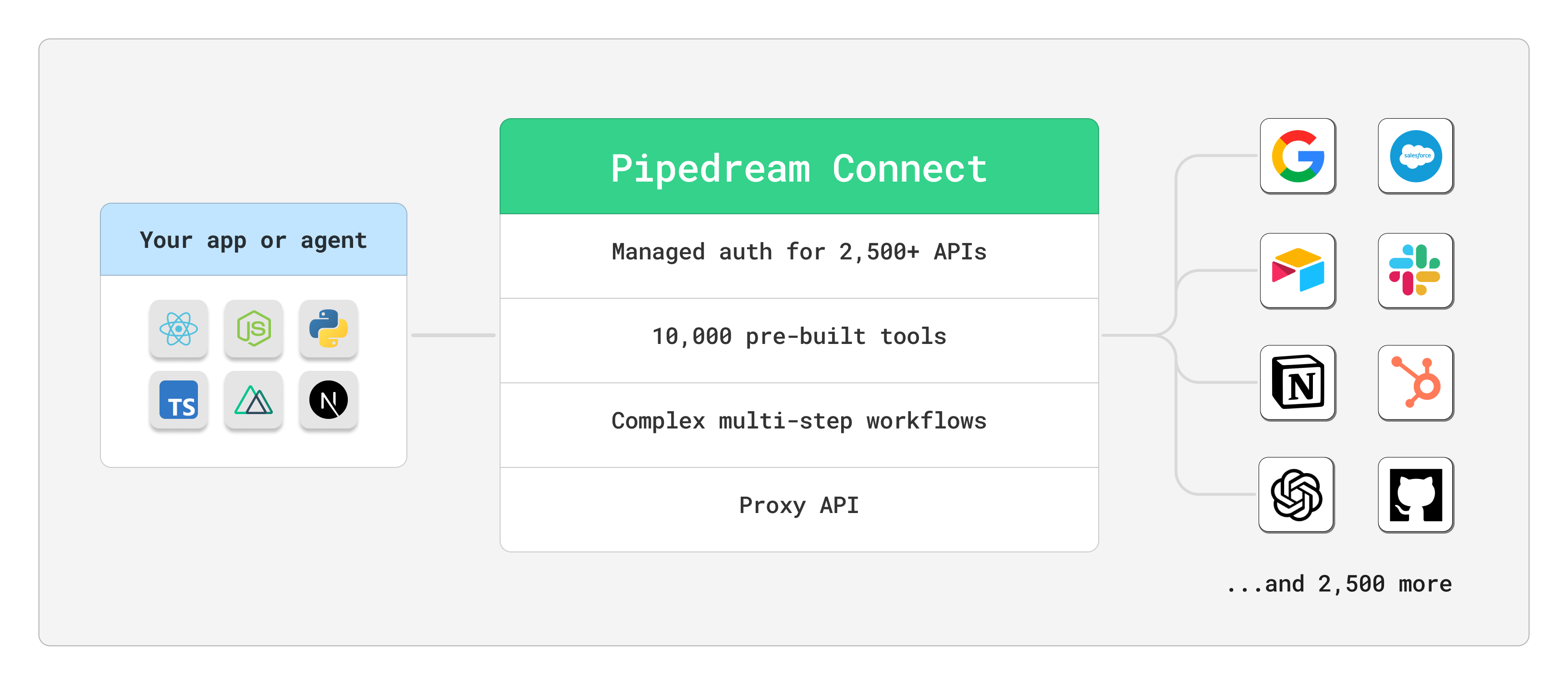
**Connect provides a developer toolkit that lets you add {PUBLIC_APPS}+ integrations to your app or AI agent.** You can build AI agents, chatbots, workflow builders, [and much more](/connect/use-cases/), all in a few minutes. You have full, code-level control over how these integrations work in your app. You handle your product, Pipedream simplifies the integration.
 ## Demos
Pipedream provides a few demos to help you explore and get started with Connect.
Explore the Connect SDK in our playground
See Pipedream MCP in action
Run these demo apps locally in the [Connect quickstart](/connect/quickstart/)
## Managed auth
* Handle authorization or accept API keys on behalf of your users, for any of Pipedream’s [{PUBLIC_APPS}+ APIs](https://pipedream.com/apps)
* Use the [Client SDK](https://github.com/PipedreamHQ/pipedream/tree/master/packages/sdk) or [Connect Link](/connect/managed-auth/quickstart/#or-use-connect-link) to accept auth in minutes
* Ship new integrations quickly with Pipedream’s approved OAuth clients, or use your own
## Make requests on behalf of your users
* Use [Pipedream’s MCP server](/connect/mcp/developers/) to provide your AI agent 10,000+ tools from {PUBLIC_APPS}+ APIs
* Add our [entire registry](https://github.com/PipedreamHQ/pipedream/tree/master/components) of [pre-built tools and triggers](/connect/components/) from {PUBLIC_APPS}+ APIs to your SaaS app or workflow builder
* Send custom API requests while still avoiding dealing with customer credentials with the [Connect proxy](/connect/api-proxy/)
* Develop and deploy complex multi-step [workflows](/connect/workflows/) in our best-in-class [visual builder](/workflows/building-workflows/)
## Use cases
Pipedream Connect lets you build any API integration into your product in minutes. Our customers build:
* **AI products**: Talk to any AI API or LLM, interacting with your users or running AI-driven asynchronous tasks
* **In-app messaging**: Send messages to Slack, Discord, Microsoft Teams, or any app directly from your product.
* **CRM syncs**: Sync data between your app and Salesforce, HubSpot, or any CRM
* **Spreadsheet integrations**: Sync data between your app and Google Sheets, Airtable, or any spreadsheet
[and much more](/connect/use-cases/).
## Getting started
Visit [the Connect quickstart](/connect/quickstart/) to build your first integration.
## Plans and pricing
**Connect is entirely free to get started and use in development mode**. Once you’re ready to ship to production, check out our [pricing page](https://pipedream.com/pricing?plan=Connect) for the latest info.
## Security
Pipedream takes the security of our products seriously. See [details on Connect security](/privacy-and-security/#pipedream-connect) and [our general security docs](/privacy-and-security/). Please send us any questions or [suspected vulnerabilities](/privacy-and-security/#reporting-a-vulnerability). You can also get a copy of our [SOC 2 Type 2 report](/privacy-and-security/#soc-2), [sign HIPAA BAAs](/privacy-and-security/#hipaa), and get information on other practices and controls.
### Storing user credentials, token refresh
All credentials and tokens are sent to Pipedream securely over HTTPS, and encrypted at rest. [See our security docs on credentials](/privacy-and-security/#third-party-oauth-grants-api-keys-and-environment-variables) for more information.
### How to secure your Connect apps
* **Secure all secrets** — Secure your Pipedream OAuth client credentials, and especially any user credentials. Never expose secrets in your client-side code. Make all requests to Pipedream’s API and third-party APIs from your server-side code.
* **Use HTTPS** — Always use HTTPS to secure your connections between your client and server. Requests to Pipedream’s API will be automatically redirected to HTTPS.
* **Use secure, session-based auth between your client and server** — authorize all requests from your client to your server using a secure, session-based auth mechanism. Use well-known identity providers with services like [Clerk](https://clerk.com/), [Firebase](https://firebase.google.com/), or [Auth0](https://auth0.com/) to securely generate and validate authentication tokens. The same follows for Pipedream workflows — if you trigger Pipedream workflows from your client or server, validate all requests in the workflow before executing workflow code.
* **Secure your workflows** — See our [standard security practices](/privacy-and-security/best-practices/) for recommendations on securing your Pipedream workflows.
## Glossary of terms
* **App**: GitHub, Notion, Slack, Google Sheets, and more. The app is the API you want your users to connect to in your product. See the [full list here](https://pipedream.com/apps).
* **Developer**: This is probably you, the Pipedream customer who’s developing an app and wants to use Connect to make API requests on behalf of your end users.
* **End User**: Your customer or user, whose data you want to access on their behalf. End users are identifed via the `external_user_id` param in the Connect SDK and API.
* **Connected Account**: The account your end user connects. [Read more about connected accounts](/apps/connected-accounts/).
* **OAuth Client**: This is admittedly a bit of an overloaded term and refers both to [custom OAuth clients](/connect/managed-auth/oauth-clients/) you create in Pipedream to use when your end users authorize access to their account, as well as [OAuth clients to authenticate to Pipedream’s API](/rest-api/auth/#oauth).
## Demos
Pipedream provides a few demos to help you explore and get started with Connect.
Explore the Connect SDK in our playground
See Pipedream MCP in action
Run these demo apps locally in the [Connect quickstart](/connect/quickstart/)
## Managed auth
* Handle authorization or accept API keys on behalf of your users, for any of Pipedream’s [{PUBLIC_APPS}+ APIs](https://pipedream.com/apps)
* Use the [Client SDK](https://github.com/PipedreamHQ/pipedream/tree/master/packages/sdk) or [Connect Link](/connect/managed-auth/quickstart/#or-use-connect-link) to accept auth in minutes
* Ship new integrations quickly with Pipedream’s approved OAuth clients, or use your own
## Make requests on behalf of your users
* Use [Pipedream’s MCP server](/connect/mcp/developers/) to provide your AI agent 10,000+ tools from {PUBLIC_APPS}+ APIs
* Add our [entire registry](https://github.com/PipedreamHQ/pipedream/tree/master/components) of [pre-built tools and triggers](/connect/components/) from {PUBLIC_APPS}+ APIs to your SaaS app or workflow builder
* Send custom API requests while still avoiding dealing with customer credentials with the [Connect proxy](/connect/api-proxy/)
* Develop and deploy complex multi-step [workflows](/connect/workflows/) in our best-in-class [visual builder](/workflows/building-workflows/)
## Use cases
Pipedream Connect lets you build any API integration into your product in minutes. Our customers build:
* **AI products**: Talk to any AI API or LLM, interacting with your users or running AI-driven asynchronous tasks
* **In-app messaging**: Send messages to Slack, Discord, Microsoft Teams, or any app directly from your product.
* **CRM syncs**: Sync data between your app and Salesforce, HubSpot, or any CRM
* **Spreadsheet integrations**: Sync data between your app and Google Sheets, Airtable, or any spreadsheet
[and much more](/connect/use-cases/).
## Getting started
Visit [the Connect quickstart](/connect/quickstart/) to build your first integration.
## Plans and pricing
**Connect is entirely free to get started and use in development mode**. Once you’re ready to ship to production, check out our [pricing page](https://pipedream.com/pricing?plan=Connect) for the latest info.
## Security
Pipedream takes the security of our products seriously. See [details on Connect security](/privacy-and-security/#pipedream-connect) and [our general security docs](/privacy-and-security/). Please send us any questions or [suspected vulnerabilities](/privacy-and-security/#reporting-a-vulnerability). You can also get a copy of our [SOC 2 Type 2 report](/privacy-and-security/#soc-2), [sign HIPAA BAAs](/privacy-and-security/#hipaa), and get information on other practices and controls.
### Storing user credentials, token refresh
All credentials and tokens are sent to Pipedream securely over HTTPS, and encrypted at rest. [See our security docs on credentials](/privacy-and-security/#third-party-oauth-grants-api-keys-and-environment-variables) for more information.
### How to secure your Connect apps
* **Secure all secrets** — Secure your Pipedream OAuth client credentials, and especially any user credentials. Never expose secrets in your client-side code. Make all requests to Pipedream’s API and third-party APIs from your server-side code.
* **Use HTTPS** — Always use HTTPS to secure your connections between your client and server. Requests to Pipedream’s API will be automatically redirected to HTTPS.
* **Use secure, session-based auth between your client and server** — authorize all requests from your client to your server using a secure, session-based auth mechanism. Use well-known identity providers with services like [Clerk](https://clerk.com/), [Firebase](https://firebase.google.com/), or [Auth0](https://auth0.com/) to securely generate and validate authentication tokens. The same follows for Pipedream workflows — if you trigger Pipedream workflows from your client or server, validate all requests in the workflow before executing workflow code.
* **Secure your workflows** — See our [standard security practices](/privacy-and-security/best-practices/) for recommendations on securing your Pipedream workflows.
## Glossary of terms
* **App**: GitHub, Notion, Slack, Google Sheets, and more. The app is the API you want your users to connect to in your product. See the [full list here](https://pipedream.com/apps).
* **Developer**: This is probably you, the Pipedream customer who’s developing an app and wants to use Connect to make API requests on behalf of your end users.
* **End User**: Your customer or user, whose data you want to access on their behalf. End users are identifed via the `external_user_id` param in the Connect SDK and API.
* **Connected Account**: The account your end user connects. [Read more about connected accounts](/apps/connected-accounts/).
* **OAuth Client**: This is admittedly a bit of an overloaded term and refers both to [custom OAuth clients](/connect/managed-auth/oauth-clients/) you create in Pipedream to use when your end users authorize access to their account, as well as [OAuth clients to authenticate to Pipedream’s API](/rest-api/auth/#oauth).