> ## Documentation Index
> Fetch the complete documentation index at: https://pipedream.com/docs/llms.txt
> Use this file to discover all available pages before exploring further.
# Component API Reference
export const PUBLIC_APPS = '3,000';
export const CONFIGURED_PROPS_SIZE_LIMIT = '64KB';
Our TypeScript component API is in **beta**. If you’re interested in developing TypeScript components and providing feedback, [see our TypeScript docs](/components/contributing/typescript/).
This document was created to help developers author and use [Pipedream components](/components/contributing/). Not only can you develop [sources](/components/contributing/sources-quickstart/) (workflow triggers) and [actions](/components/contributing/actions-quickstart/) using the component API, but you can also develop [Node.js steps](/workflows/building-workflows/code/nodejs/) right in your workflows - without leaving your browser! You can publish components to your account for private use, or [contribute them to the Pipedream registry](/components/contributing/) for anyone to run.
While sources and actions share the same core component API, they differ in both how they’re used and written, so certain parts of the component API apply only to one or the other. [This section of the docs](/components/contributing/api/#differences-between-sources-and-actions) explains the core differences. When this document uses the term “component”, the corresponding feature applies to both sources and actions. If a specific feature applies to only sources *or* actions, the correct term will be used.
If you have any questions about component development, please reach out [in our community](https://pipedream.com/community/c/dev/11).
## Overview
### What is a component?
Components are Node.js modules that run on Pipedream’s serverless infrastructure.
* Trigger Node.js code on HTTP requests, timers, cron schedules, or manually
* Emit data on each event to inspect it. Trigger Pipedream hosted workflows or access it outside of Pipedream via API
* Accept user input on deploy via [CLI](/cli/reference/#pd-deploy), [API](/rest-api/), or [UI](https://pipedream.com/sources)
* Connect to [{PUBLIC_APPS}+ apps](https://pipedream.com/apps) using Pipedream managed auth
* Use most npm packages with no `npm install` or `package.json` required
* Store and retrieve state using the [built-in key-value store](/components/contributing/api/#db)
### Quickstarts
To help you get started, we created a step-by-step walkthrough for developing both [sources](/components/contributing/sources-quickstart/) and [actions](/components/contributing/actions-quickstart/). We recommend starting with those docs and using the API reference below as you develop.
### Differences between sources and actions
Sources and actions share the same component API. However, certain features of the API only apply to one or the other:
* Actions are defined with `type: action` ([see the docs on the `type` property](/components/contributing/api/#component-structure)). Sources require no `type` property be set. Components without a `type` are considered sources.
* Sources emit events [using `this.$emit`](/components/contributing/api/#emit), which trigger linked workflows. Any features associated with emitting events (e.g., [dedupe strategies](/components/contributing/api/#dedupe-strategies)) can only be used with sources. Actions [return data using `return` or `$.export`](/components/contributing/api/#returning-data-from-steps), which is made available to future steps of the associated workflow.
* Sources have access to [lifecycle hooks](/components/contributing/api/#lifecycle-hooks), which are often required to configure the source to listen for new events. Actions do not have access to these lifecycle hooks.
* Actions have access to [a special `$` variable](/components/contributing/api/#actions), passed as a parameter to the `run` method. This variable exposes functions that allow you to send data to destinations, export data from the action, return HTTP responses, and more.
* Sources can be developed iteratively using `pd dev`. Actions currently cannot (please follow [this issue](https://github.com/PipedreamHQ/pipedream/issues/1437) to be notified of updates).
* You use `pd deploy` to deploy sources to your account. You use `pd publish` to publish actions, making them available for use in workflows.
* You can attach [interfaces](/components/contributing/api/#interface-props) (like HTTP endpoints, or timers) to sources. This defines how the source is invoked. Actions do not have interfaces, since they’re run step-by-step as a part of the associated workflow.
### Getting Started with the CLI
Several examples below use the Pipedream CLI. To install it, [follow the instructions for your OS / architecture](/cli/install/).
See the [CLI reference](/cli/reference/) for detailed usage and examples beyond those covered below.
### Example Components
You can find hundreds of example components in the `components/` directory of the [`PipedreamHQ/pipedream` repo](https://github.com/PipedreamHQ/pipedream).
## Component API
### Component Structure
Pipedream components export an object with the following properties:
```javascript theme={null}
export default {
name: "",
key: "",
type: "",
version: "",
description: "",
props: {},
methods: {},
hooks: {
async activate() {},
async deactivate() {},
async deploy() {},
},
dedupe: "",
async run(event) {
this.$emit(event);
},
};
```
| Property | Type | Required? | Description |
| ------------- | -------- | ----------------------- | ---------------------------------------------------------------------------------------------------------------------------------------------------------------------------------------------------------------------------------------------------------------------------------------------------------------------------------------------------------------------- |
| `name` | `string` | required | The name of the component, a string which identifies components deployed to users’ accounts. This name will show up in the Pipedream UI, in CLI output (for example, from `pd list` commands), etc. It will also be converted to a unique slug on deploy to reference a specific component instance (it will be auto-incremented if not unique within a user account). |
| `key` | `string` | recommended | The `key` uniquely identifies a component within a namespace. The default namespace for components is your account. When publishing components to the Pipedream registry, the `key` must be unique across registry components and should follow the pattern: `app_name_slug`-`slugified-component-name` |
| `type` | `string` | required | When publishing an action, `type: "action"` is required. When publishing a source, use `type: "source"`. |
| `version` | `string` | required | The component version. There are no constraints on the version, but [semantic versioning](https://semver.org/) is required for any components published to the [Pipedream registry](/components/contributing/guidelines/). |
| `description` | `string` | recommended | The description will appear in the Pipedream UI to aid in discovery and to contextualize instantiated components |
| `props` | `object` | optional | [Props](/components/contributing/api/#props) are custom attributes you can register on a component. When a value is passed to a prop attribute, it becomes a property on that component instance. You can reference these properties in component code using `this` (e.g., `this.propName`). |
| `methods` | `object` | optional | Define component methods for the component instance. They can be referenced via `this` (e.g., `this.methodName()`). |
| `hooks` | `object` | optional (sources only) | [Hooks](/components/contributing/api/#hooks) are functions that are executed when specific component lifecycle events occur. |
| `dedupe` | `string` | optional (sources only) | You may specify a [dedupe strategy](/components/contributing/api/#dedupe-strategies) to be applied to emitted events |
| `run` | `method` | required | Each time a component is invoked (for example, via HTTP request), [its `run` method](/components/contributing/api/#run) is called. The event that triggered the component is passed to `run`, so that you can access it within the method. Events are emitted using `this.$emit()`. |
### Props
Props are custom attributes you can register on a component. When a value is passed to a prop attribute, it becomes a property on that component instance. You can reference these properties in component code using `this` (e.g., `this.propName`).
| Prop Type | Description |
| ------------------------------------------------------------------------------------- | --------------------------------------------------------------------------------------------- |
| [User Input](/components/contributing/api/#user-input-props) | Enable components to accept input on deploy |
| [Interface](/components/contributing/api/#interface-props) | Attaches a Pipedream interface to your component (e.g., an HTTP interface or timer) |
| [Service](/components/contributing/api/#service-props) | Attaches a Pipedream service to your component (e.g., a key-value database to maintain state) |
| [App](/components/contributing/api/#app-props) | Enables managed auth for a component |
| [Data Store](/workflows/data-management/data-stores/#using-data-stores-in-code-steps) | Provides access to a Pipedream [data store](/workflows/data-management/data-stores/) |
| [HTTP Request](/components/contributing/api/#http-request-prop) | Enables components to execute HTTP requests based on user input |
| [Alert](/components/contributing/api/#alert-prop) | Renders an informational alert in the prop form to help users configure the source or action |
#### User Input Props
User input props allow components to accept input on deploy. When deploying a component, users will be prompted to enter values for these props, setting the behavior of the component accordingly.
##### General
**Definition**
```javascript theme={null}
props: {
myPropName: {
type: "",
label: "",
description: "",
options: [], // OR async options() {} to return dynamic options
optional: true || false,
propDefinition: [],
default: "",
secret: true || false,
format: "",
min: ,
max: ,
disabled: true || false,
hidden: true || false
},
},
```
| Property | Type | Required? | Description |
| ---------------- | ------------------------------------ | --------- | ------------------------------------------------------------------------------------------------------------------------------------------------------------------------------------------------------------------------------------------------------------------------------------------------------------------------------------------------------------------------------------------------------------------------------ |
| `type` | `string` | required | Value must be set to a valid `PropType` (see below). Suffix with `[]` (e.g. `string[]`) to denote array of that type (if supported). |
| `label` | `string` | optional | A friendly label to show to user for this prop. If a label is not provided, the `propName` is displayed to the user. |
| `description` | `string` | optional | Displayed near the prop input. Typically used to contextualize the prop or provide instructions to help users input the correct value. Markdown is supported. |
| `options` | `string[]` or `object[]` or `method` | optional | Provide an array to display options to a user in a drop down menu. **`[]` Basic usage** Array of strings. E.g., `['option 1', 'option 2']` **`object[]` Define Label and Value** `[{ label: 'Label 1', value: 'label1'}, { label: 'Label 2', value: 'label2'}]` **`method` Dynamic Options** You can generate options dynamically (e.g., based on real-time API requests with pagination). See configuration details below. |
| `useQuery` | `boolean` | optional | Use in conjunction with **Dynamic Options**. If set to `true`, the prop accepts a real-time query that can be used by the `options` method to obtain results according to that query. |
| `optional` | `boolean` | optional | Set to `true` to make this prop optional. Defaults to `false`. |
| `propDefinition` | `[]` | optional | Re-use a prop defined in an app file. When you include a prop definition, the prop will inherit values for all the properties listed here. However, you can override those values by redefining them for a given prop instance. See **propDefinitions** below for usage. |
| `default` | `string` | optional | Define a default value if the field is not completed. Can only be defined for optional fields (required fields require explicit user input). |
| `secret` | `boolean` | optional | If set to `true`, this field will hide your input in the browser like a password field, and its value will be encrypted in Pipedream’s database. The value will be decrypted when the component is run in [the execution environment](/privacy-and-security/#execution-environment). Defaults to `false`. Only allowed for `string` props. |
| `format` | `string` | optional | Specifies the format of a string prop’s value. Currently only supports `"file-ref"`, which indicates the prop accepts a URL of a file or a path to a file in `/tmp`. Only allowed for `string` props. |
| `min` | `integer` | optional | Minimum allowed integer value. Only allowed for `integer` props.. |
| `max` | `integer` | optional | Maximum allowed integer value . Only allowed for `integer` props. |
| `disabled` | `boolean` | optional | Set to `true` to disable usage of this prop. Defaults to `false`. |
| `hidden` | `boolean` | optional | Set to `true` to hide this field. Defaults to `false`. |
**Prop Types**
| Prop Type | Array Supported | Supported in Sources? | Supported in Actions? | Custom properties |
| ------------------- | --------------- | --------------------- | --------------------- | ----------------------------------------------------------------------------------------------------------------------------------------------------------------------- |
| `app` | | ✓ | ✓ | See [App Props](/components/contributing/api/#app-props) below |
| `boolean` | ✓ | ✓ | ✓ | |
| `integer` | ✓ | ✓ | ✓ | - `min` (`integer`): Minimum allowed integer value. - `max` (`integer`): Maximum allowed integer value. |
| `string` | ✓ | ✓ | ✓ | - `secret` (`boolean`): Whether to treat the value as a secret. - `format` (`string`): Set to `"file-ref"` to indicate the prop accepts a URL of a file or `/tmp` path. |
| `object` | | ✓ | ✓ | |
| `any` | | | ✓ | |
| `$.interface.http` | | ✓ | | |
| `$.interface.timer` | | ✓ | | |
| `$.service.db` | | ✓ | | |
| `data_store` | | | ✓ | |
| `http_request` | | | ✓ | |
| `alert` | | ✓ | ✓ | See [Alert Prop](/components/contributing/api/#alert-prop) below |
**Usage**
| Code | Description | Read Scope | Write Scope |
| ----------------- | ---------------------------------------- | ------------------------- | --------------------------------------------------------------------------------------- |
| `this.myPropName` | Returns the configured value of the prop | `run()` `hooks` `methods` | n/a (input props may only be modified on component deploy or update via UI, CLI or API) |
**Example**
Following is an example source that demonstrates how to capture user input via a prop and emit it on each event:
```javascript theme={null}
export default {
name: "User Input Prop Example",
version: "0.1",
props: {
msg: {
type: "string",
label: "Message",
description: "Enter a message to `console.log()`",
},
},
async run() {
this.$emit(this.msg);
},
};
```
To see more examples, explore the [curated components in Pipedream’s GitHub repo](/components/contributing/api/#example-components).
##### Advanced Configuration
##### Async Options (example)
Async options allow users to select prop values that can be programmatically-generated (e.g., based on a real-time API response).
```javascript theme={null}
async options({
page,
prevContext,
query,
}) {},
```
| Property | Type | Required? | Description |
| ------------- | --------- | --------- | -------------------------------------------------------------------------------------------------------------------------------------------------------------------------------------------------------------------------------------------------------------------------------------------------------------------------------------------------------------------------------------------------------------------------------------------------- |
| `options()` | `method` | optional | Typically returns an array of values matching the prop type (e.g., `string`) or an array of object that define the `label` and `value` for each option. The `page` and `prevContext` input parameter names are reserved for pagination (see below). When using `prevContext` for pagination, it must return an object with an `options` array and a `context` object with a `nextPageToken` key. E.g., `{ options, context: { nextPageToken }, }` |
| `page` | `integer` | optional | Returns a `0` indexed page number. Use with APIs that accept a numeric page number for pagination. |
| `prevContext` | `string` | optional | Returns a string representing the context for the previous `options` execution. Use with APIs that accept a token representing the last record for pagination. |
| `query` | `string` | optional | Returns a string with the user input if the prop has the `useQuery` property set to `true`. Use with APIs that return items based on a query or search parameter. |
Following is an example source demonstrating the usage of async options:
```javascript theme={null}
export default {
name: "Async Options Example",
version: "0.1",
props: {
msg: {
type: "string",
label: "Message",
description: "Select a message to `console.log()`",
async options() {
// write any node code that returns a string[] or object[] (with label/value keys)
return ["This is option 1", "This is option 2"];
},
},
},
async run() {
this.$emit(this.msg);
},
};
```
##### Prop Definitions (example)
Prop definitions enable you to reuse props that are defined in another object. A common use case is to enable re-use of props that are defined for a specific app.
```javascript theme={null}
props: {
myPropName: {
propDefinition: [
app,
"propDefinitionName",
inputValues
]
},
},
```
| Property | Type | Required? | Description |
| -------------------- | -------- | --------- | --------------------------------------------------------------------------------------------------------------------------------------------------------------------------------------------------------------------------------------------------------------------------- |
| `propDefinition` | `array` | optional | An array of options that define a reference to a `propDefinitions` within the `propDefinitions` for an `app` |
| `app` | `object` | required | An app object |
| `propDefinitionName` | `string` | required | The name of a specific `propDefinition` defined in the corresponding `app` object |
| `inputValues` | `object` | optional | Values to pass into the prop definition. To reference values from previous props, use an arrow function. E.g.,: `c => ({ variableName: c.previousPropName })` [See these docs](/components/contributing/api/#referencing-values-from-previous-props) for more information. |
Following is an example source that demonstrates how to use `propDefinitions`.
```javascript theme={null}
const rss = {
type: "app",
app: "rss",
propDefinitions: {
urlDef: {
type: "string",
label: "RSS URL",
description: "Enter a URL for an RSS feed.",
},
},
};
export default {
name: "Prop Definition Example",
description: `This component captures an RSS URL and logs it`,
version: "0.1",
props: {
rss,
url: { propDefinition: [rss, "urlDef"] },
},
async run() {
console.log(this.url);
},
};
```
##### Referencing values from previous props
When you define a prop in an app file, and that prop depends on the value of another prop, you’ll need to pass the value of the previous props in a special way. Let’s review an example from [Trello](https://trello.com), a task manager.
You create Trello *boards* for new projects. Boards contain *lists*. For example, this **Active** board contains two lists:
 In Pipedream, users can choose from lists on a specific board:
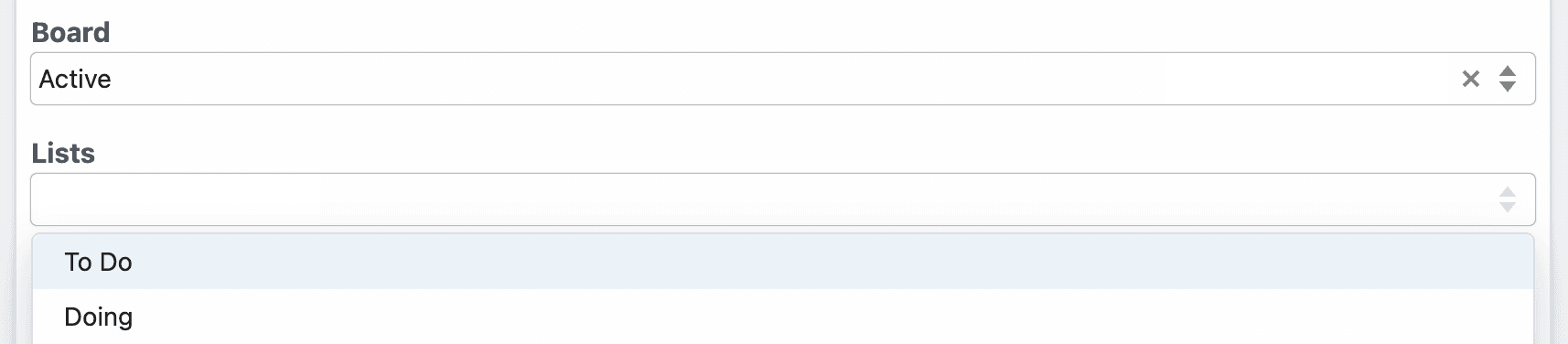 Both **Board** and **Lists** are defined in the Trello app file:
```javascript theme={null}
board: {
type: "string",
label: "Board",
async options(opts) {
const boards = await this.getBoards(this.$auth.oauth_uid);
const activeBoards = boards.filter((board) => board.closed === false);
return activeBoards.map((board) => {
return { label: board.name, value: board.id };
});
},
},
lists: {
type: "string[]",
label: "Lists",
optional: true,
async options(opts) {
const lists = await this.getLists(opts.board);
return lists.map((list) => {
return { label: list.name, value: list.id };
});
},
}
```
In the `lists` prop, notice how `opts.board` references the board. You can pass `opts` to the prop’s `options` method when you reference `propDefinitions` in specific components:
```javascript theme={null}
board: { propDefinition: [trello, "board"] },
lists: {
propDefinition: [
trello,
"lists",
(configuredProps) => ({ board: configuredProps.board }),
],
},
```
`configuredProps` contains the props the user previously configured (the board). This allows the `lists` prop to use it in the `options` method.
##### Dynamic props
Some prop definitions must be computed dynamically, after the user configures another prop. We call these **dynamic props**, since they are rendered on-the-fly. This technique is used in [the Google Sheets **Add Single Row** action](https://github.com/PipedreamHQ/pipedream/blob/master/components/google_sheets/actions/add-single-row/add-single-row.mjs), which we’ll use as an example below.
First, determine the prop whose selection should render dynamic props. In the Google Sheets example, we ask the user whether their sheet contains a header row. If it does, we display header fields as individual props:
Both **Board** and **Lists** are defined in the Trello app file:
```javascript theme={null}
board: {
type: "string",
label: "Board",
async options(opts) {
const boards = await this.getBoards(this.$auth.oauth_uid);
const activeBoards = boards.filter((board) => board.closed === false);
return activeBoards.map((board) => {
return { label: board.name, value: board.id };
});
},
},
lists: {
type: "string[]",
label: "Lists",
optional: true,
async options(opts) {
const lists = await this.getLists(opts.board);
return lists.map((list) => {
return { label: list.name, value: list.id };
});
},
}
```
In the `lists` prop, notice how `opts.board` references the board. You can pass `opts` to the prop’s `options` method when you reference `propDefinitions` in specific components:
```javascript theme={null}
board: { propDefinition: [trello, "board"] },
lists: {
propDefinition: [
trello,
"lists",
(configuredProps) => ({ board: configuredProps.board }),
],
},
```
`configuredProps` contains the props the user previously configured (the board). This allows the `lists` prop to use it in the `options` method.
##### Dynamic props
Some prop definitions must be computed dynamically, after the user configures another prop. We call these **dynamic props**, since they are rendered on-the-fly. This technique is used in [the Google Sheets **Add Single Row** action](https://github.com/PipedreamHQ/pipedream/blob/master/components/google_sheets/actions/add-single-row/add-single-row.mjs), which we’ll use as an example below.
First, determine the prop whose selection should render dynamic props. In the Google Sheets example, we ask the user whether their sheet contains a header row. If it does, we display header fields as individual props:
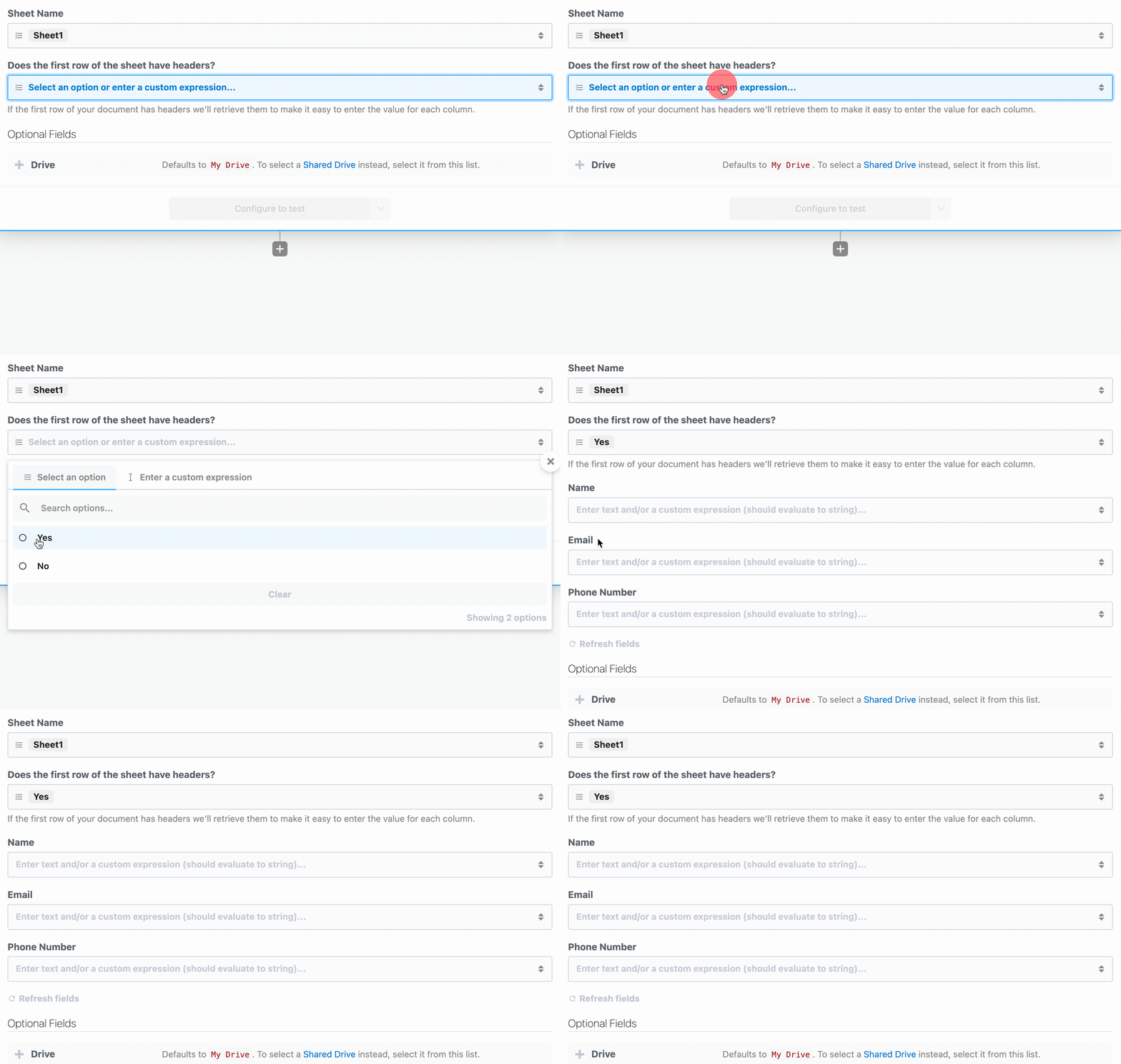 To load dynamic props, the header prop must have the `reloadProps` field set to `true`:
```javascript theme={null}
hasHeaders: {
type: "string",
label: "Does the first row of the sheet have headers?",
description: "If the first row of your document has headers we'll retrieve them to make it easy to enter the value for each column.",
options: [
"Yes",
"No",
],
reloadProps: true,
},
```
When a user chooses a value for this prop, Pipedream runs the `additionalProps` component method to render props:
```javascript theme={null}
async additionalProps() {
const sheetId = this.sheetId?.value || this.sheetId;
const props = {};
if (this.hasHeaders === "Yes") {
const { values } = await this.googleSheets.getSpreadsheetValues(sheetId, `${this.sheetName}!1:1`);
if (!values[0]?.length) {
throw new ConfigurationError("Cound not find a header row. Please either add headers and click \"Refresh fields\" or adjust the action configuration to continue.");
}
for (let i = 0; i < values[0]?.length; i++) {
props[`col_${i.toString().padStart(4, "0")}`] = {
type: "string",
label: values[0][i],
optional: true,
};
}
} else if (this.hasHeaders === "No") {
props.myColumnData = {
type: "string[]",
label: "Values",
description: "Provide a value for each cell of the row. Google Sheets accepts strings, numbers and boolean values for each cell. To set a cell to an empty value, pass an empty string.",
};
}
return props;
},
```
The signature of this function is:
```javascript theme={null}
async additionalProps(previousPropDefs)
```
where `previousPropDefs` are the full set of props (props merged with the previous `additionalProps`). When the function is executed, `this` is bound similar to when the `run` function is called, where you can access the values of the props as currently configured, and call any `methods`. The return value of `additionalProps` will replace any previous call, and that return value will be merged with props to define the final set of props.
Following is an example that demonstrates how to use `additionalProps` to dynamically change a prop’s `disabled` and `hidden` properties:
```javascript theme={null}
async additionalProps(previousPropDefs) {
if (this.myCondition === "Yes") {
previousPropDefs.myPropName.disabled = true;
previousPropDefs.myPropName.hidden = true;
} else {
previousPropDefs.myPropName.disabled = false;
previousPropDefs.myPropName.hidden = false;
}
return previousPropDefs;
},
```
Dynamic props can have any one of the following prop types:
* `app`
* `boolean`
* `integer`
* `string`
* `object`
* `any`
* `$.interface.http`
* `$.interface.timer`
* `data_store`
* `http_request`
#### Interface Props
Interface props are infrastructure abstractions provided by the Pipedream platform. They declare how a source is invoked — via HTTP request, run on a schedule, etc. — and therefore define the shape of the events it processes.
| Interface Type | Description |
| -------------------------------------------- | --------------------------------------------------------------- |
| [Timer](/components/contributing/api/#timer) | Invoke your source on an interval or based on a cron expression |
| [HTTP](/components/contributing/api/#http) | Invoke your source on HTTP requests |
#### Timer
To use the timer interface, declare a prop whose value is the string `$.interface.timer`:
**Definition**
```javascript theme={null}
props: {
myPropName: {
type: "$.interface.timer",
default: {},
},
}
```
| Property | Type | Required? | Description |
| --------- | -------- | --------- | ------------------------------------------------------------------------------------------------------------------------- |
| `type` | `string` | required | Must be set to `$.interface.timer` |
| `default` | `object` | optional | **Define a default interval** `{ intervalSeconds: 60, },` **Define a default cron expression** `{ cron: "0 0 * * *", },` |
**Usage**
| Code | Description | Read Scope | Write Scope |
| ----------------- | ------------------------------------------------------------------------------------------------------------------------------------------ | ------------------------- | ------------------------------------------------------------------------------------------- |
| `this.myPropName` | Returns the type of interface configured (e.g., `{ type: '$.interface.timer' }`) | `run()` `hooks` `methods` | n/a (interface props may only be modified on component deploy or update via UI, CLI or API) |
| `event` | Returns an object with the execution timestamp and interface configuration (e.g., `{ "timestamp": 1593937896, "interval_seconds": 3600 }`) | `run(event)` | n/a (interface props may only be modified on source deploy or update via UI, CLI or API) |
**Example**
Following is a basic example of a source that is triggered by a `$.interface.timer` and has default defined as a cron expression.
```javascript theme={null}
export default {
name: "Cron Example",
version: "0.1",
props: {
timer: {
type: "$.interface.timer",
default: {
cron: "0 0 * * *", // Run job once a day
},
},
},
async run() {
console.log("hello world!");
},
};
```
Following is an example source that’s triggered by a `$.interface.timer` and has a `default` interval defined.
```javascript theme={null}
export default {
name: "Interval Example",
version: "0.1",
props: {
timer: {
type: "$.interface.timer",
default: {
intervalSeconds: 60 * 60 * 24, // Run job once a day
},
},
},
async run() {
console.log("hello world!");
},
};
```
##### HTTP
To use the HTTP interface, declare a prop whose value is the string `$.interface.http`:
```javascript theme={null}
props: {
myPropName: {
type: "$.interface.http",
customResponse: true, // optional: defaults to false
},
}
```
**Definition**
| Property | Type | Required? | Description |
| --------- | -------- | --------- | ------------------------------------------------------------------------------------------------------------ |
| `type` | `string` | required | Must be set to `$.interface.http` |
| `respond` | `method` | required | The HTTP interface exposes a `respond()` method that lets your component issue HTTP responses to the client. |
**Usage**
| Code | Description | Read Scope | Write Scope |
| --------------------------- | --------------------------------------------------------------------------------------------------------------------------------------- | ------------------------- | ------------------------------------------------------------------------------------------------------------------------- |
| `this.myPropName` | Returns an object with the unique endpoint URL generated by Pipedream (e.g., `{ endpoint: 'https://abcde.m.pipedream.net' }`) | `run()` `hooks` `methods` | n/a (interface props may only be modified on source deploy or update via UI, CLI or API) |
| `event` | Returns an object representing the HTTP request (e.g., `{ method: 'POST', path: '/', query: {}, headers: {}, bodyRaw: '', body: {}, }`) | `run(event)` | The shape of `event` corresponds with the HTTP request you make to the endpoint generated by Pipedream for this interface |
| `this.myPropName.respond()` | Returns an HTTP response to the client (e.g., `this.http.respond({status: 200})`). | n/a | `run()` |
###### Responding to HTTP requests
The HTTP interface exposes a `respond()` method that lets your source issue HTTP responses. You may run `this.http.respond()` to respond to the client from the `run()` method of a source. In this case you should also pass the `customResponse: true` parameter to the prop.
| Property | Type | Required? | Description |
| --------- | -------------------------- | --------- | ------------------------------------------------------------------------------------------------------------------------------ |
| `status` | `integer` | required | An integer representing the HTTP status code. Return `200` to indicate success. Standard status codes range from `100` - `599` |
| `headers` | `object` | optional | Return custom key-value pairs in the HTTP response |
| `body` | `string` `object` `buffer` | optional | Return a custom body in the HTTP response. This can be any string, object, or Buffer. |
###### HTTP Event Shape
Following is the shape of the event passed to the `run()` method of your source:
```javascript theme={null}
{
method: 'POST',
path: '/',
query: {},
headers: {},
bodyRaw: '',
body:
}
```
**Example**
Following is an example source that’s triggered by `$.interface.http` and returns `{ 'msg': 'hello world!' }` in the HTTP response. On deploy, Pipedream will generate a unique URL for this source:
```javascript theme={null}
export default {
name: "HTTP Example",
version: "0.0.1",
props: {
http: {
type: "$.interface.http",
customResponse: true,
},
},
async run(event) {
this.http.respond({
status: 200,
body: {
msg: "hello world!",
},
headers: {
"content-type": "application/json",
},
});
console.log(event);
},
};
```
#### Service Props
| Service | Description |
| ------- | ---------------------------------------------------------------------------------------------------- |
| *DB* | Provides access to a simple, component-specific key-value store to maintain state across executions. |
##### DB
**Definition**
```javascript theme={null}
props: {
myPropName: "$.service.db",
}
```
**Usage**
| Code | Description | Read Scope | Write Scope |
| ----------------------------------- | -------------------------------------------------------------------------------------------- | ------------------------------------- | -------------------------------------- |
| `this.myPropName.get('key')` | Method to get a previously set value for a key. Returns `undefined` if a key does not exist. | `run()` `hooks` `methods` | Use the `set()` method to write values |
| `this.myPropName.set('key', value)` | Method to set a value for a key. Values must be JSON-serializable data. | Use the `get()` method to read values | `run()` `hooks` `methods` |
#### App Props
App props are normally defined in an [app file](/components/contributing/guidelines/#app-files), separate from individual components. See [the `components/` directory of the pipedream GitHub repo](https://github.com/PipedreamHQ/pipedream/tree/master/components) for example app files.
**Definition**
```javascript theme={null}
props: {
myPropName: {
type: "app",
app: "",
propDefinitions: {}
methods: {},
},
},
```
| Property | Type | Required? | Description |
| ----------------- | -------- | --------- | -------------------------------------------------------------------------------------------------------------------------------------------------------------------------------------------------------------------------------------------------------------------------------------------------------------------------------------------------------------------------------------------------------------------------------------------------------------------------------------------------------------------------------------------------------------------------------------------------------------------------------------------------------------------------------------------------- |
| `type` | `string` | required | Value must be `app` |
| `app` | `string` | required | Value must be set to the name slug for an app registered on Pipedream. [App files](/components/contributing/guidelines/#app-files) are programmatically generated for all integrated apps on Pipedream. To find your app’s slug, visit the `components` directory of [the Pipedream GitHub repo](https://github.com/PipedreamHQ/pipedream/tree/master/components), find the app file (the file that ends with `.app.mjs`), and find the `app` property at the root of that module. If you don’t see an app listed, please [open an issue here](https://github.com/PipedreamHQ/pipedream/issues/new?assignees=\&labels=app%2C+enhancement\&template=app---service-integration.md\&title=%5BAPP%5D). |
| `propDefinitions` | `object` | optional | An object that contains objects with predefined user input props. See the section on User Input Props above to learn about the shapes that can be defined and how to reference in components using the `propDefinition` property |
| `methods` | `object` | optional | Define app-specific methods. Methods can be referenced within the app object context via `this` (e.g., `this.methodName()`) and within a component via `this.myAppPropName` (e.g., `this.myAppPropName.methodName()`). |
**Usage**
| Code | Description | Read Scope | Write Scope |
| --------------------------------- | ------------------------------------------------------------------------------------------------ | ----------------------------------------------- | ----------- |
| `this.$auth` | Provides access to OAuth tokens and API keys for Pipedream managed auth | **App Object:** `methods` | n/a |
| `this.myAppPropName.$auth` | Provides access to OAuth tokens and API keys for Pipedream managed auth | **Parent Component:** `run()` `hooks` `methods` | n/a |
| `this.methodName()` | Execute a common method defined for an app within the app definition (e.g., from another method) | **App Object:** `methods` | n/a |
| `this.myAppPropName.methodName()` | Execute a common method defined for an app from a component that includes the app as a prop | **Parent Component:** `run()` `hooks` `methods` | n/a |
**Note:** The specific `$auth` keys supported for each app will be published in the near future.
#### HTTP Request Prop
**Usage**
| Code | Description | Read Scope | Write Scope |
| --------------------------- | ------------------------------------- | ---------- | ----------------- |
| `this.myPropName.execute()` | Execute an HTTP request as configured | n/a | `run()` `methods` |
**Example**
Following is an example action that demonstrates how to accept an HTTP request configuration as input and execute the request when the component is run:
```javascript theme={null}
export default {
name: "HTTP Request Example",
version: "0.0.1",
props: {
httpRequest: {
type: "http_request",
label: "API Request",
default: {
method: "GET",
url: "https://jsonplaceholder.typicode.com/posts",
}
},
},
async run() {
const { data } = await this.httpRequest.execute();
return data;
},
};
```
For more examples, see the [docs on making HTTP requests with Node.js](/workflows/building-workflows/code/nodejs/http-requests/#send-a-get-request-to-fetch-data).
#### Alert Prop
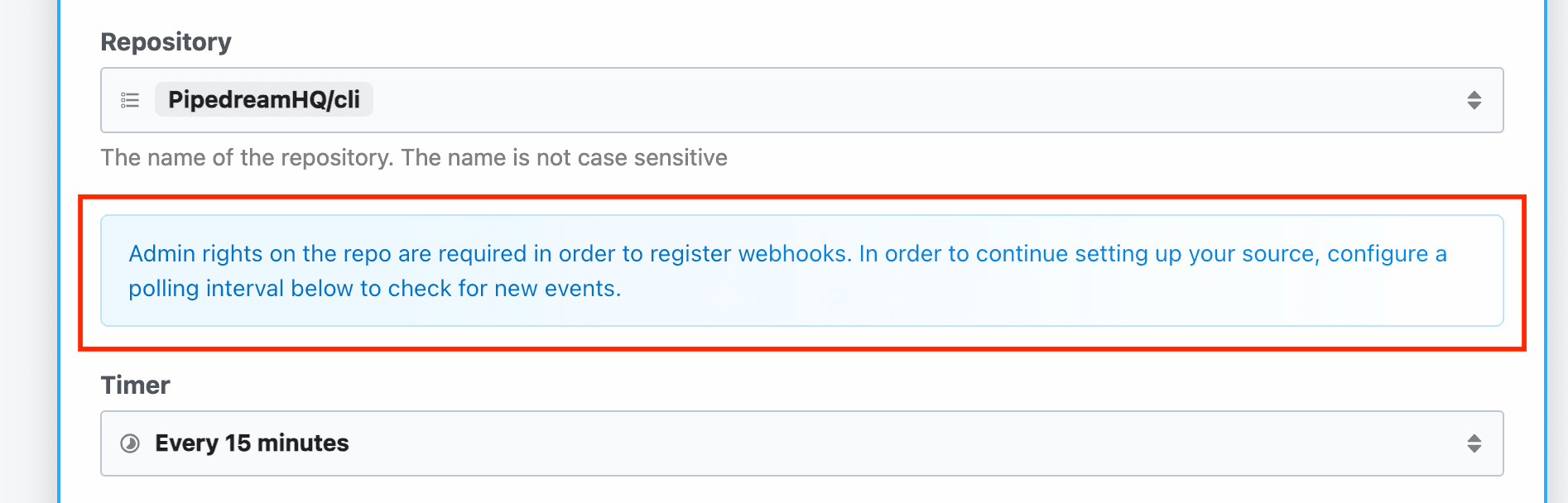
Sometimes you may need to surface contextual information to users within the prop form. This might be information that’s not directly related to a specific prop, so it doesn’t make sense to include in a prop description, but rather, it may be related to the overall configuration of the prop form.
**Usage**
| Property | Type | Required? | Description |
| ----------- | -------- | --------- | ---------------------------------------------------------------------------------------------------------------- |
| `type` | `string` | required | Set to `alert` |
| `alertType` | `string` | required | Determines the color and UI presentation of the alert prop. Can be one of `info`, `neutral`, `warning`, `error`. |
| `content` | `string` | required | Determines the text that is rendered in the alert. Both plain text and markdown are supported. |
```javascript theme={null}
export default defineComponent({
props: {
alert: {
type: "alert",
alertType: "info",
content: "Admin rights on the repo are required in order to register webhooks. In order to continue setting up your source, configure a polling interval below to check for new events.",
}
},
})
```
Refer to GitHub’s component sources in the `pipedream` repo for an [example implementation](https://github.com/PipedreamHQ/pipedream/blob/b447d71f658d10d6a7432e8f5153bbda56ba9810/components/github/sources/common/common-flex.mjs#L27).
To load dynamic props, the header prop must have the `reloadProps` field set to `true`:
```javascript theme={null}
hasHeaders: {
type: "string",
label: "Does the first row of the sheet have headers?",
description: "If the first row of your document has headers we'll retrieve them to make it easy to enter the value for each column.",
options: [
"Yes",
"No",
],
reloadProps: true,
},
```
When a user chooses a value for this prop, Pipedream runs the `additionalProps` component method to render props:
```javascript theme={null}
async additionalProps() {
const sheetId = this.sheetId?.value || this.sheetId;
const props = {};
if (this.hasHeaders === "Yes") {
const { values } = await this.googleSheets.getSpreadsheetValues(sheetId, `${this.sheetName}!1:1`);
if (!values[0]?.length) {
throw new ConfigurationError("Cound not find a header row. Please either add headers and click \"Refresh fields\" or adjust the action configuration to continue.");
}
for (let i = 0; i < values[0]?.length; i++) {
props[`col_${i.toString().padStart(4, "0")}`] = {
type: "string",
label: values[0][i],
optional: true,
};
}
} else if (this.hasHeaders === "No") {
props.myColumnData = {
type: "string[]",
label: "Values",
description: "Provide a value for each cell of the row. Google Sheets accepts strings, numbers and boolean values for each cell. To set a cell to an empty value, pass an empty string.",
};
}
return props;
},
```
The signature of this function is:
```javascript theme={null}
async additionalProps(previousPropDefs)
```
where `previousPropDefs` are the full set of props (props merged with the previous `additionalProps`). When the function is executed, `this` is bound similar to when the `run` function is called, where you can access the values of the props as currently configured, and call any `methods`. The return value of `additionalProps` will replace any previous call, and that return value will be merged with props to define the final set of props.
Following is an example that demonstrates how to use `additionalProps` to dynamically change a prop’s `disabled` and `hidden` properties:
```javascript theme={null}
async additionalProps(previousPropDefs) {
if (this.myCondition === "Yes") {
previousPropDefs.myPropName.disabled = true;
previousPropDefs.myPropName.hidden = true;
} else {
previousPropDefs.myPropName.disabled = false;
previousPropDefs.myPropName.hidden = false;
}
return previousPropDefs;
},
```
Dynamic props can have any one of the following prop types:
* `app`
* `boolean`
* `integer`
* `string`
* `object`
* `any`
* `$.interface.http`
* `$.interface.timer`
* `data_store`
* `http_request`
#### Interface Props
Interface props are infrastructure abstractions provided by the Pipedream platform. They declare how a source is invoked — via HTTP request, run on a schedule, etc. — and therefore define the shape of the events it processes.
| Interface Type | Description |
| -------------------------------------------- | --------------------------------------------------------------- |
| [Timer](/components/contributing/api/#timer) | Invoke your source on an interval or based on a cron expression |
| [HTTP](/components/contributing/api/#http) | Invoke your source on HTTP requests |
#### Timer
To use the timer interface, declare a prop whose value is the string `$.interface.timer`:
**Definition**
```javascript theme={null}
props: {
myPropName: {
type: "$.interface.timer",
default: {},
},
}
```
| Property | Type | Required? | Description |
| --------- | -------- | --------- | ------------------------------------------------------------------------------------------------------------------------- |
| `type` | `string` | required | Must be set to `$.interface.timer` |
| `default` | `object` | optional | **Define a default interval** `{ intervalSeconds: 60, },` **Define a default cron expression** `{ cron: "0 0 * * *", },` |
**Usage**
| Code | Description | Read Scope | Write Scope |
| ----------------- | ------------------------------------------------------------------------------------------------------------------------------------------ | ------------------------- | ------------------------------------------------------------------------------------------- |
| `this.myPropName` | Returns the type of interface configured (e.g., `{ type: '$.interface.timer' }`) | `run()` `hooks` `methods` | n/a (interface props may only be modified on component deploy or update via UI, CLI or API) |
| `event` | Returns an object with the execution timestamp and interface configuration (e.g., `{ "timestamp": 1593937896, "interval_seconds": 3600 }`) | `run(event)` | n/a (interface props may only be modified on source deploy or update via UI, CLI or API) |
**Example**
Following is a basic example of a source that is triggered by a `$.interface.timer` and has default defined as a cron expression.
```javascript theme={null}
export default {
name: "Cron Example",
version: "0.1",
props: {
timer: {
type: "$.interface.timer",
default: {
cron: "0 0 * * *", // Run job once a day
},
},
},
async run() {
console.log("hello world!");
},
};
```
Following is an example source that’s triggered by a `$.interface.timer` and has a `default` interval defined.
```javascript theme={null}
export default {
name: "Interval Example",
version: "0.1",
props: {
timer: {
type: "$.interface.timer",
default: {
intervalSeconds: 60 * 60 * 24, // Run job once a day
},
},
},
async run() {
console.log("hello world!");
},
};
```
##### HTTP
To use the HTTP interface, declare a prop whose value is the string `$.interface.http`:
```javascript theme={null}
props: {
myPropName: {
type: "$.interface.http",
customResponse: true, // optional: defaults to false
},
}
```
**Definition**
| Property | Type | Required? | Description |
| --------- | -------- | --------- | ------------------------------------------------------------------------------------------------------------ |
| `type` | `string` | required | Must be set to `$.interface.http` |
| `respond` | `method` | required | The HTTP interface exposes a `respond()` method that lets your component issue HTTP responses to the client. |
**Usage**
| Code | Description | Read Scope | Write Scope |
| --------------------------- | --------------------------------------------------------------------------------------------------------------------------------------- | ------------------------- | ------------------------------------------------------------------------------------------------------------------------- |
| `this.myPropName` | Returns an object with the unique endpoint URL generated by Pipedream (e.g., `{ endpoint: 'https://abcde.m.pipedream.net' }`) | `run()` `hooks` `methods` | n/a (interface props may only be modified on source deploy or update via UI, CLI or API) |
| `event` | Returns an object representing the HTTP request (e.g., `{ method: 'POST', path: '/', query: {}, headers: {}, bodyRaw: '', body: {}, }`) | `run(event)` | The shape of `event` corresponds with the HTTP request you make to the endpoint generated by Pipedream for this interface |
| `this.myPropName.respond()` | Returns an HTTP response to the client (e.g., `this.http.respond({status: 200})`). | n/a | `run()` |
###### Responding to HTTP requests
The HTTP interface exposes a `respond()` method that lets your source issue HTTP responses. You may run `this.http.respond()` to respond to the client from the `run()` method of a source. In this case you should also pass the `customResponse: true` parameter to the prop.
| Property | Type | Required? | Description |
| --------- | -------------------------- | --------- | ------------------------------------------------------------------------------------------------------------------------------ |
| `status` | `integer` | required | An integer representing the HTTP status code. Return `200` to indicate success. Standard status codes range from `100` - `599` |
| `headers` | `object` | optional | Return custom key-value pairs in the HTTP response |
| `body` | `string` `object` `buffer` | optional | Return a custom body in the HTTP response. This can be any string, object, or Buffer. |
###### HTTP Event Shape
Following is the shape of the event passed to the `run()` method of your source:
```javascript theme={null}
{
method: 'POST',
path: '/',
query: {},
headers: {},
bodyRaw: '',
body:
}
```
**Example**
Following is an example source that’s triggered by `$.interface.http` and returns `{ 'msg': 'hello world!' }` in the HTTP response. On deploy, Pipedream will generate a unique URL for this source:
```javascript theme={null}
export default {
name: "HTTP Example",
version: "0.0.1",
props: {
http: {
type: "$.interface.http",
customResponse: true,
},
},
async run(event) {
this.http.respond({
status: 200,
body: {
msg: "hello world!",
},
headers: {
"content-type": "application/json",
},
});
console.log(event);
},
};
```
#### Service Props
| Service | Description |
| ------- | ---------------------------------------------------------------------------------------------------- |
| *DB* | Provides access to a simple, component-specific key-value store to maintain state across executions. |
##### DB
**Definition**
```javascript theme={null}
props: {
myPropName: "$.service.db",
}
```
**Usage**
| Code | Description | Read Scope | Write Scope |
| ----------------------------------- | -------------------------------------------------------------------------------------------- | ------------------------------------- | -------------------------------------- |
| `this.myPropName.get('key')` | Method to get a previously set value for a key. Returns `undefined` if a key does not exist. | `run()` `hooks` `methods` | Use the `set()` method to write values |
| `this.myPropName.set('key', value)` | Method to set a value for a key. Values must be JSON-serializable data. | Use the `get()` method to read values | `run()` `hooks` `methods` |
#### App Props
App props are normally defined in an [app file](/components/contributing/guidelines/#app-files), separate from individual components. See [the `components/` directory of the pipedream GitHub repo](https://github.com/PipedreamHQ/pipedream/tree/master/components) for example app files.
**Definition**
```javascript theme={null}
props: {
myPropName: {
type: "app",
app: "",
propDefinitions: {}
methods: {},
},
},
```
| Property | Type | Required? | Description |
| ----------------- | -------- | --------- | -------------------------------------------------------------------------------------------------------------------------------------------------------------------------------------------------------------------------------------------------------------------------------------------------------------------------------------------------------------------------------------------------------------------------------------------------------------------------------------------------------------------------------------------------------------------------------------------------------------------------------------------------------------------------------------------------- |
| `type` | `string` | required | Value must be `app` |
| `app` | `string` | required | Value must be set to the name slug for an app registered on Pipedream. [App files](/components/contributing/guidelines/#app-files) are programmatically generated for all integrated apps on Pipedream. To find your app’s slug, visit the `components` directory of [the Pipedream GitHub repo](https://github.com/PipedreamHQ/pipedream/tree/master/components), find the app file (the file that ends with `.app.mjs`), and find the `app` property at the root of that module. If you don’t see an app listed, please [open an issue here](https://github.com/PipedreamHQ/pipedream/issues/new?assignees=\&labels=app%2C+enhancement\&template=app---service-integration.md\&title=%5BAPP%5D). |
| `propDefinitions` | `object` | optional | An object that contains objects with predefined user input props. See the section on User Input Props above to learn about the shapes that can be defined and how to reference in components using the `propDefinition` property |
| `methods` | `object` | optional | Define app-specific methods. Methods can be referenced within the app object context via `this` (e.g., `this.methodName()`) and within a component via `this.myAppPropName` (e.g., `this.myAppPropName.methodName()`). |
**Usage**
| Code | Description | Read Scope | Write Scope |
| --------------------------------- | ------------------------------------------------------------------------------------------------ | ----------------------------------------------- | ----------- |
| `this.$auth` | Provides access to OAuth tokens and API keys for Pipedream managed auth | **App Object:** `methods` | n/a |
| `this.myAppPropName.$auth` | Provides access to OAuth tokens and API keys for Pipedream managed auth | **Parent Component:** `run()` `hooks` `methods` | n/a |
| `this.methodName()` | Execute a common method defined for an app within the app definition (e.g., from another method) | **App Object:** `methods` | n/a |
| `this.myAppPropName.methodName()` | Execute a common method defined for an app from a component that includes the app as a prop | **Parent Component:** `run()` `hooks` `methods` | n/a |
**Note:** The specific `$auth` keys supported for each app will be published in the near future.
#### HTTP Request Prop
**Usage**
| Code | Description | Read Scope | Write Scope |
| --------------------------- | ------------------------------------- | ---------- | ----------------- |
| `this.myPropName.execute()` | Execute an HTTP request as configured | n/a | `run()` `methods` |
**Example**
Following is an example action that demonstrates how to accept an HTTP request configuration as input and execute the request when the component is run:
```javascript theme={null}
export default {
name: "HTTP Request Example",
version: "0.0.1",
props: {
httpRequest: {
type: "http_request",
label: "API Request",
default: {
method: "GET",
url: "https://jsonplaceholder.typicode.com/posts",
}
},
},
async run() {
const { data } = await this.httpRequest.execute();
return data;
},
};
```
For more examples, see the [docs on making HTTP requests with Node.js](/workflows/building-workflows/code/nodejs/http-requests/#send-a-get-request-to-fetch-data).
#### Alert Prop
Sometimes you may need to surface contextual information to users within the prop form. This might be information that’s not directly related to a specific prop, so it doesn’t make sense to include in a prop description, but rather, it may be related to the overall configuration of the prop form.
**Usage**
| Property | Type | Required? | Description |
| ----------- | -------- | --------- | ---------------------------------------------------------------------------------------------------------------- |
| `type` | `string` | required | Set to `alert` |
| `alertType` | `string` | required | Determines the color and UI presentation of the alert prop. Can be one of `info`, `neutral`, `warning`, `error`. |
| `content` | `string` | required | Determines the text that is rendered in the alert. Both plain text and markdown are supported. |
```javascript theme={null}
export default defineComponent({
props: {
alert: {
type: "alert",
alertType: "info",
content: "Admin rights on the repo are required in order to register webhooks. In order to continue setting up your source, configure a polling interval below to check for new events.",
}
},
})
```
Refer to GitHub’s component sources in the `pipedream` repo for an [example implementation](https://github.com/PipedreamHQ/pipedream/blob/b447d71f658d10d6a7432e8f5153bbda56ba9810/components/github/sources/common/common-flex.mjs#L27).
 #### Limits on props
When a user configures a prop with a value, it can hold at most {CONFIGURED_PROPS_SIZE_LIMIT} data. Consider this when accepting large input in these fields (such as a base64 string).
The {CONFIGURED_PROPS_SIZE_LIMIT} limit applies only to static values entered as raw text. In workflows, users can pass expressions (referencing data in a prior step). In that case the prop value is simply the text of the expression, for example `{{steps.nodejs.$return_value}}`, well below the limit. The value of these expressions is evaluated at runtime, and are subject to [different limits](/workflows/limits/).
### Methods
You can define helper functions within the `methods` property of your component. You have access to these functions within the [`run` method](/components/contributing/api/#run), or within other methods.
Methods can be accessed using `this.`. For example, a `random` method:
```javascript theme={null}
methods: {
random() {
return Math.random()
},
}
```
can be run like so:
```javascript theme={null}
const randomNum = this.random();
```
### Hooks
```javascript theme={null}
hooks: {
async deploy() {},
async activate() {},
async deactivate() {},
},
```
| Property | Type | Required? | Description |
| ------------ | -------- | --------- | ----------------------------------------------------- |
| `deploy` | `method` | optional | Executed each time a component is deployed |
| `activate` | `method` | optional | Executed each time a component is deployed or updated |
| `deactivate` | `method` | optional | Executed each time a component is deactivated |
### Dedupe Strategies
> **IMPORTANT:** To use a dedupe strategy, you must emit an `id` as part of the event metadata (dedupe strategies are applied to the submitted `id`)
| Strategy | Description |
| ---------- | ------------------------------------------------------------------------------------------------------------------------------------------------------------------------------------------------------------------------------------------------------------------------------------------------------------------------------------------------------------------------ |
| `unique` | Pipedream maintains a cache of 100 emitted `id` values. Events with `id` values that are not in the cache are emitted, and the `id` value is added to the cache. After 100 events, `id` values are purged from the cache based on the order received (first in, first out). A common use case for this strategy is an RSS feed which typically does not exceed 100 items |
| `greatest` | Pipedream caches the largest `id` value (must be numeric). Only events with larger `id` values are emitted, and the cache is updated to match the new, largest value.. |
| `last` | Pipedream caches the ID associated with the last emitted event. When new events are emitted, only events after the matching `id` value will be emitted as events. If no `id` values match, then all events will be emitted. |
### Run
Each time a component is invoked, its `run` method is called. Sources are invoked by their [interface](/components/contributing/api/#interface-props) (for example, via HTTP request). Actions are run when their parent workflow is triggered.
You can reference `this` within the `run` method. `this` refers to the component, and provides access to [props](/components/contributing/api/#props), [methods](/components/contributing/api/#methods), and more.
#### Sources
When a source is invoked, the event that triggered the source is passed to `run`, so that you can access it within the method:
```javascript theme={null}
async run(event) {
console.log(event)
}
```
##### \$emit
`this.$emit()` is a method in scope for the `run` method of a source
```javascript theme={null}
this.$emit(event, {
id,
name,
summary,
ts,
});
```
| Property | Type | Required? | Description |
| --------- | ---------------------- | ---------------------------------------- | ------------------------------------------------------------------------------------------------------------------------------------------------------------------------------------------------------------------------------------------------------------------------------------------------------- |
| `event` | JSON serializable data | optional | The data to emit as the event |
| `id` | `string` or `number` | Required if a dedupe strategy is applied | A value to uniquely identify this event. Common `id` values may be a 3rd party ID, a timestamp, or a data hash |
| `name` | `string` | optional | The name of the “channel” you’d like to emit the event to. By default, events are emitted to the `default` channel. If you set a different channel here, listening sources or workflows can subscribe to events on this channel, running the source or workflow only on events emitted to that channel. |
| `summary` | `string` | optional | Define a summary to customize the data displayed in the events list to help differentiate events at a glance |
| `ts` | `integer` | optional | Accepts an epoch timestamp in **milliseconds**. If you submit a timestamp, events will automatically be ordered and emitted from oldest to newest. If using the `last` dedupe strategy, the value cached as the `last` event for an execution will correspond to the event with the newest timestamp. |
Following is a basic example that emits an event on each component execution.
```javascript theme={null}
export default {
name: "this.$emit() example",
description: "Deploy and run this component manually via the Pipedream UI",
async run() {
this.$emit({ message: "hello world!" });
},
};
```
##### Logs
You can view logs produced by a source’s `run` method in the **Logs** section of the [Pipedream source UI](https://pipedream.com/sources), or using the `pd logs` CLI command:
```
pd logs
```
##### Events
If the `run` method emits events using `this.$emit`, you can access the events in the **EVENTS** section of the Pipedream UI for the component, or using the `pd events` CLI command:
```
pd events
```
#### Actions
When an action is run in a workflow, Pipedream passes an object with a `$` variable that gives you access to special functions, outlined below:
```javascript theme={null}
async run({ $ }) {
// You have access to $ within your action
}
```
##### Returning data from steps
By default, variables declared within an action are scoped to that action. To return data from a step, you have two options: 1) use the `return` keyword, or 2) use `$.export` to return a named export from a step.
**`return`**
Use `return` to return data from an action:
```javascript theme={null}
async run({ $ }) {
return "data"
}
```
When you use return, the exported data will appear at `steps.[STEP NAME].$return_value`. For example, if you ran the code above in a step named `nodejs`, you’d reference the returned data using `steps.nodejs.$return_value`.
**`$.export`**
You can also use `$.export` to return named exports from an action. `$.export` takes the name of the export as the first argument, and the value to export as the second argument:
```javascript theme={null}
async run({ $ }) {
$.export("name", "value")
}
```
When your workflow runs, you’ll see the named exports appear below your step, with the data you exported. You can reference these exports in other steps using `steps.[STEP NAME].[EXPORT NAME]`.
##### Returning HTTP responses with `$.respond`
`$.respond` lets you issue HTTP responses from your workflow. [See the full `$.respond` docs for more information](/workflows/building-workflows/triggers/#customizing-the-http-response).
```javascript theme={null}
async run({ $ }) {
$.respond({
status: 200,
body: "hello, world"
})
}
```
##### Ending steps early with `return $.flow.exit`
`return $.flow.exit` terminates the entire workflow. It accepts a single argument: a string that tells the workflow why the workflow terminated, which is displayed in the Pipedream UI.
```javascript theme={null}
async run({ $ }) {
return $.flow.exit("reason")
}
```
##### `$.summary`
`$.summary` is used to surface brief, user-friendly summaries about what happened when an action step succeeds. For example, when [adding items to a Spotify playlist](https://github.com/PipedreamHQ/pipedream/blob/master/components/spotify/actions/add-items-to-playlist/add-items-to-playlist.mjs#L51):
#### Limits on props
When a user configures a prop with a value, it can hold at most {CONFIGURED_PROPS_SIZE_LIMIT} data. Consider this when accepting large input in these fields (such as a base64 string).
The {CONFIGURED_PROPS_SIZE_LIMIT} limit applies only to static values entered as raw text. In workflows, users can pass expressions (referencing data in a prior step). In that case the prop value is simply the text of the expression, for example `{{steps.nodejs.$return_value}}`, well below the limit. The value of these expressions is evaluated at runtime, and are subject to [different limits](/workflows/limits/).
### Methods
You can define helper functions within the `methods` property of your component. You have access to these functions within the [`run` method](/components/contributing/api/#run), or within other methods.
Methods can be accessed using `this.`. For example, a `random` method:
```javascript theme={null}
methods: {
random() {
return Math.random()
},
}
```
can be run like so:
```javascript theme={null}
const randomNum = this.random();
```
### Hooks
```javascript theme={null}
hooks: {
async deploy() {},
async activate() {},
async deactivate() {},
},
```
| Property | Type | Required? | Description |
| ------------ | -------- | --------- | ----------------------------------------------------- |
| `deploy` | `method` | optional | Executed each time a component is deployed |
| `activate` | `method` | optional | Executed each time a component is deployed or updated |
| `deactivate` | `method` | optional | Executed each time a component is deactivated |
### Dedupe Strategies
> **IMPORTANT:** To use a dedupe strategy, you must emit an `id` as part of the event metadata (dedupe strategies are applied to the submitted `id`)
| Strategy | Description |
| ---------- | ------------------------------------------------------------------------------------------------------------------------------------------------------------------------------------------------------------------------------------------------------------------------------------------------------------------------------------------------------------------------ |
| `unique` | Pipedream maintains a cache of 100 emitted `id` values. Events with `id` values that are not in the cache are emitted, and the `id` value is added to the cache. After 100 events, `id` values are purged from the cache based on the order received (first in, first out). A common use case for this strategy is an RSS feed which typically does not exceed 100 items |
| `greatest` | Pipedream caches the largest `id` value (must be numeric). Only events with larger `id` values are emitted, and the cache is updated to match the new, largest value.. |
| `last` | Pipedream caches the ID associated with the last emitted event. When new events are emitted, only events after the matching `id` value will be emitted as events. If no `id` values match, then all events will be emitted. |
### Run
Each time a component is invoked, its `run` method is called. Sources are invoked by their [interface](/components/contributing/api/#interface-props) (for example, via HTTP request). Actions are run when their parent workflow is triggered.
You can reference `this` within the `run` method. `this` refers to the component, and provides access to [props](/components/contributing/api/#props), [methods](/components/contributing/api/#methods), and more.
#### Sources
When a source is invoked, the event that triggered the source is passed to `run`, so that you can access it within the method:
```javascript theme={null}
async run(event) {
console.log(event)
}
```
##### \$emit
`this.$emit()` is a method in scope for the `run` method of a source
```javascript theme={null}
this.$emit(event, {
id,
name,
summary,
ts,
});
```
| Property | Type | Required? | Description |
| --------- | ---------------------- | ---------------------------------------- | ------------------------------------------------------------------------------------------------------------------------------------------------------------------------------------------------------------------------------------------------------------------------------------------------------- |
| `event` | JSON serializable data | optional | The data to emit as the event |
| `id` | `string` or `number` | Required if a dedupe strategy is applied | A value to uniquely identify this event. Common `id` values may be a 3rd party ID, a timestamp, or a data hash |
| `name` | `string` | optional | The name of the “channel” you’d like to emit the event to. By default, events are emitted to the `default` channel. If you set a different channel here, listening sources or workflows can subscribe to events on this channel, running the source or workflow only on events emitted to that channel. |
| `summary` | `string` | optional | Define a summary to customize the data displayed in the events list to help differentiate events at a glance |
| `ts` | `integer` | optional | Accepts an epoch timestamp in **milliseconds**. If you submit a timestamp, events will automatically be ordered and emitted from oldest to newest. If using the `last` dedupe strategy, the value cached as the `last` event for an execution will correspond to the event with the newest timestamp. |
Following is a basic example that emits an event on each component execution.
```javascript theme={null}
export default {
name: "this.$emit() example",
description: "Deploy and run this component manually via the Pipedream UI",
async run() {
this.$emit({ message: "hello world!" });
},
};
```
##### Logs
You can view logs produced by a source’s `run` method in the **Logs** section of the [Pipedream source UI](https://pipedream.com/sources), or using the `pd logs` CLI command:
```
pd logs
```
##### Events
If the `run` method emits events using `this.$emit`, you can access the events in the **EVENTS** section of the Pipedream UI for the component, or using the `pd events` CLI command:
```
pd events
```
#### Actions
When an action is run in a workflow, Pipedream passes an object with a `$` variable that gives you access to special functions, outlined below:
```javascript theme={null}
async run({ $ }) {
// You have access to $ within your action
}
```
##### Returning data from steps
By default, variables declared within an action are scoped to that action. To return data from a step, you have two options: 1) use the `return` keyword, or 2) use `$.export` to return a named export from a step.
**`return`**
Use `return` to return data from an action:
```javascript theme={null}
async run({ $ }) {
return "data"
}
```
When you use return, the exported data will appear at `steps.[STEP NAME].$return_value`. For example, if you ran the code above in a step named `nodejs`, you’d reference the returned data using `steps.nodejs.$return_value`.
**`$.export`**
You can also use `$.export` to return named exports from an action. `$.export` takes the name of the export as the first argument, and the value to export as the second argument:
```javascript theme={null}
async run({ $ }) {
$.export("name", "value")
}
```
When your workflow runs, you’ll see the named exports appear below your step, with the data you exported. You can reference these exports in other steps using `steps.[STEP NAME].[EXPORT NAME]`.
##### Returning HTTP responses with `$.respond`
`$.respond` lets you issue HTTP responses from your workflow. [See the full `$.respond` docs for more information](/workflows/building-workflows/triggers/#customizing-the-http-response).
```javascript theme={null}
async run({ $ }) {
$.respond({
status: 200,
body: "hello, world"
})
}
```
##### Ending steps early with `return $.flow.exit`
`return $.flow.exit` terminates the entire workflow. It accepts a single argument: a string that tells the workflow why the workflow terminated, which is displayed in the Pipedream UI.
```javascript theme={null}
async run({ $ }) {
return $.flow.exit("reason")
}
```
##### `$.summary`
`$.summary` is used to surface brief, user-friendly summaries about what happened when an action step succeeds. For example, when [adding items to a Spotify playlist](https://github.com/PipedreamHQ/pipedream/blob/master/components/spotify/actions/add-items-to-playlist/add-items-to-playlist.mjs#L51):
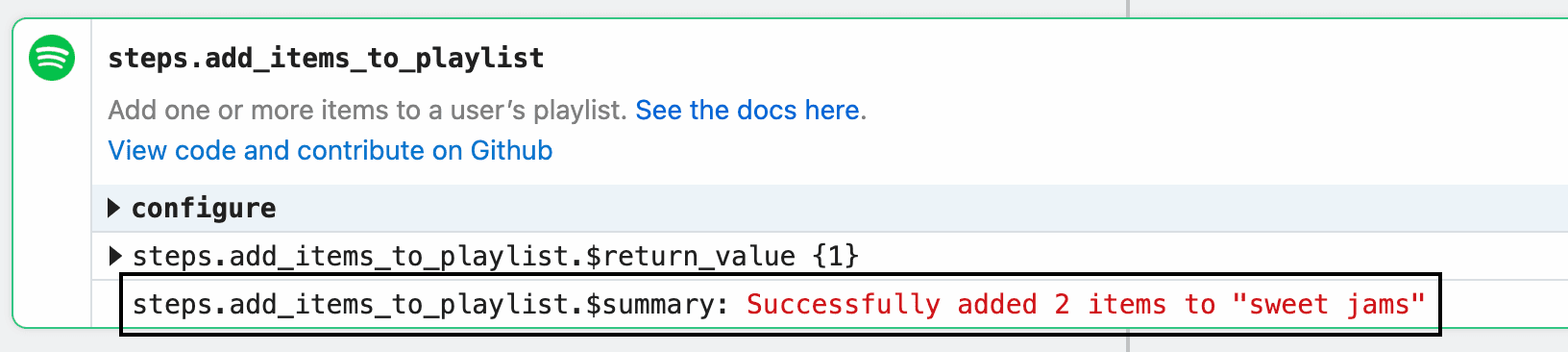 Example implementation:
```javascript theme={null}
const data = [1, 2];
const playlistName = "Cool jams";
$.export(
"$summary",
`Successfully added ${data.length} ${
data.length == 1 ? "item" : "items"
} to "${playlistName}"`
);
```
##### `$.send`
`$.send` allows you to send data to [Pipedream destinations](/workflows/data-management/destinations/).
**`$.send.http`**
[See the HTTP destination docs](/workflows/data-management/destinations/http/#using-sendhttp-in-component-actions).
**`$.send.email`**
[See the Email destination docs](/workflows/data-management/destinations/email/#using-sendemail-in-component-actions).
**`$.send.s3`**
[See the S3 destination docs](/workflows/data-management/destinations/s3/#using-sends3-in-component-actions).
**`$.send.emit`**
[See the Emit destination docs](/workflows/data-management/destinations/emit/#using-sendemit-in-component-actions).
**`$.send.sse`**
[See the SSE destination docs](/workflows/data-management/destinations/sse/#using-sendsse-in-component-actions).
##### `$.context`
`$.context` exposes [the same properties as `steps.trigger.context`](/workflows/building-workflows/triggers/#stepstriggercontext), and more. Action authors can use it to get context about the calling workflow and the execution.
All properties from [`steps.trigger.context`](/workflows/building-workflows/triggers/#stepstriggercontext) are exposed, as well as:
| Property | Description |
| ---------- | -------------------------------------------------------------------------------------------------------------------------------------------------------------------------- |
| `deadline` | An epoch millisecond timestamp marking the point when the workflow is configured to [timeout](/workflows/limits/#time-per-execution). |
| `JIT` | Stands for “just in time” (environment). `true` if the user is testing the step, `false` if the step is running in production. |
| `run` | An object containing metadata about the current run number. See [the docs on `$.flow.rerun`](/workflows/building-workflows/triggers/#stepstriggercontext) for more detail. |
### Environment variables
[Environment variables](/workflows/environment-variables/) are not accessible within sources or actions directly. Since components can be used by anyone, you cannot guarantee that a user will have a specific variable set in their environment.
In sources, you can use [`secret` props](/components/contributing/api/#props) to reference sensitive data.
In actions, you’ll see a list of your environment variables in the object explorer when selecting a variable to pass to a step:
### Using npm packages
To use an npm package in a component, just require it. There is no `package.json` or `npm install` required.
```javascript theme={null}
import axios from "axios";
```
When you deploy a component, Pipedream downloads the latest versions of these packages and bundles them with your deployment.
Some packages that rely on large dependencies or on unbundled binaries — may not work on Pipedream. Please [reach out](https://pipedream.com/support) if you encounter a specific issue.
#### Referencing a specific version of a package
*This currently applies only to sources*.
If you’d like to use a *specific* version of a package in a source, you can add that version in the `require` string, for example: `require("axios@0.19.2")`. Moreover, you can pass the same version specifiers that npm and other tools allow to specify allowed [semantic version](https://semver.org/) upgrades. For example:
* To allow for future patch version upgrades, use `require("axios@~0.20.0")`
* To allow for patch and minor version upgrades, use `require("axios@^0.20.0")`
## Managing Components
Sources and actions are developed and deployed in different ways, given the different functions they serve in the product.
* [Managing Sources](/components/contributing/api/#managing-sources)
* [Managing Actions](/components/contributing/api/#managing-actions)
### Managing Sources
#### CLI - Development Mode
***
The easiest way to develop and test sources is with the `pd dev` command. `pd dev` deploys a local file, attaches it to a component, and automatically updates the component on each local save. To deploy a new component with `pd dev`, run:
```
pd dev
```
To attach to an existing deployed component, run:
```
pd dev --dc
```
#### CLI - Deploy
##### From Local Code
To deploy a source via CLI, use the `pd deploy` command.
```
pd deploy
```
E.g.,
```
pd deploy my-source.js
```
##### From Pipedream GitHub Repo
You can explore the components available to deploy in [Pipedream’s GitHub repo](https://github.com/PipedreamHQ/pipedream/tree/master/components).
```
pd deploy
```
E.g.,
```javascript theme={null}
pd deploy http-new-requests
```
##### From Any URL
```
pd deploy
```
E.g.,
```bash theme={null}
pd deploy https://raw.githubusercontent.com/PipedreamHQ/pipedream/master/components/http/sources/new-requests/new-requests.js
```
#### CLI - Update
View the [CLI command reference](/cli/reference/#command-reference).
#### CLI - Delete
View the [CLI command reference](/cli/reference/#command-reference).
#### UI - Deploy
You can find and deploy curated components at [https://pipedream.com/sources/new](https://pipedream.com/sources/new), or you can deploy code via the UI using following URL patterns.
##### From Pipedream GitHub Repo
```javascript theme={null}
https://pipedream.com/sources?action=create&key=
```
E.g.,
```javascript theme={null}
https://pipedream.com/sources?action=create&key=http-new-requests
```
##### From Any URL
```javascript theme={null}
https://pipedream.com/sources?action=create&url=
```
E.g.,
```javascript theme={null}
https://pipedream.com/sources?action=create&url=https%3A%2F%2Fraw.githubusercontent.com%2FPipedreamHQ%2Fpipedream%2Fmaster%2Fcomponents%2Fhttp%2Fhttp.js
```
#### UI - Update
You can update the code and props for a component from the **Configuration** tab for a source in the Pipedream UI.
#### UI - Delete
You can delete a component via the UI at [https://pipedream.com/sources](https://pipedream.com/sources).
#### API
See the [REST API docs](/rest-api/).
### Managing Actions
#### CLI - Publish
To publish an action, use the `pd publish` command.
```
pd publish FILENAME
```
E.g.,
```
pd publish my-action.js
```
## Source Lifecycle
### Lifecycle hooks
Pipedream sources support the following hooks. The code for these hooks are defined within the component. Learn more about the [component structure](/components/contributing/api/#component-structure) and [hook usage](/components/contributing/api/#hooks).
#### `deploy`
The `deploy()` hook is automatically invoked by Pipedream when a source is deployed. A common use case for the deploy hook is to create webhook subscriptions when the source is deployed, but you can run any Node.js code within the `deploy` hook. To learn more about the `deploy()` hook, refer to the [API documentation](/components/contributing/api/#hooks).
#### `activate`
The `activate()` hook is automatically invoked by Pipedream when a source is deployed or updated. For example, this hook will be run when users update component props, so you can run code here that handles those changes. To learn more about defining a custom `activate()` hook, refer to the [API documentation](/components/contributing/api/#hooks).
#### `deactivate`
The `deactivate()` hook is automatically invoked by Pipedream when a source is updated or deleted. A common use case for the deactivate hook is to automatically delete a webhook subscription when a component is deleted, but you can run any Node.js code within the `deactivate` hook. To learn more about the `deactivate()` hook, refer to the [API documentation](/components/contributing/api/#hooks).
### States
#### Saved Component
A saved component is non-instantiated component code that has previously been deployed to Pipedream. Each saved component has a unique saved component ID. Saved components cannot be invoked directly —they must first be deployed.
#### Deployed Component
A deployed component is an instance of a saved component that can be invoked. Deployed components can be active or inactive. On deploy, Pipedream instantiates a saved component and invokes the `activate()` hook.
#### Deleted Component
On delete, Pipedream invokes the `deactivate()` hook and then deletes the deployed component instance.
### Operations
#### Deploy
On deploy, Pipedream creates an instance of a saved component and invokes the optional `deploy()` and `activate()` hooks. A unique deployed component ID is generated for the component.
You can deploy a component via the CLI, UI or API.
#### Update
On update, Pipedream, invokes the optional `deactivate()` hook, updates the code and props for a deployed component, and then invokes the optional `activate()` hook. The deployed component ID is not changed by an update operation.
#### Delete
On delete, Pipedream invokes the optional `deactivate()` hook and deletes the component instance.
## Source Event Lifecycle
The event lifecycle applies to deployed sources. Learn about the [source lifecycle](/components/contributing/api/#source-lifecycle).
### Diagram
Example implementation:
```javascript theme={null}
const data = [1, 2];
const playlistName = "Cool jams";
$.export(
"$summary",
`Successfully added ${data.length} ${
data.length == 1 ? "item" : "items"
} to "${playlistName}"`
);
```
##### `$.send`
`$.send` allows you to send data to [Pipedream destinations](/workflows/data-management/destinations/).
**`$.send.http`**
[See the HTTP destination docs](/workflows/data-management/destinations/http/#using-sendhttp-in-component-actions).
**`$.send.email`**
[See the Email destination docs](/workflows/data-management/destinations/email/#using-sendemail-in-component-actions).
**`$.send.s3`**
[See the S3 destination docs](/workflows/data-management/destinations/s3/#using-sends3-in-component-actions).
**`$.send.emit`**
[See the Emit destination docs](/workflows/data-management/destinations/emit/#using-sendemit-in-component-actions).
**`$.send.sse`**
[See the SSE destination docs](/workflows/data-management/destinations/sse/#using-sendsse-in-component-actions).
##### `$.context`
`$.context` exposes [the same properties as `steps.trigger.context`](/workflows/building-workflows/triggers/#stepstriggercontext), and more. Action authors can use it to get context about the calling workflow and the execution.
All properties from [`steps.trigger.context`](/workflows/building-workflows/triggers/#stepstriggercontext) are exposed, as well as:
| Property | Description |
| ---------- | -------------------------------------------------------------------------------------------------------------------------------------------------------------------------- |
| `deadline` | An epoch millisecond timestamp marking the point when the workflow is configured to [timeout](/workflows/limits/#time-per-execution). |
| `JIT` | Stands for “just in time” (environment). `true` if the user is testing the step, `false` if the step is running in production. |
| `run` | An object containing metadata about the current run number. See [the docs on `$.flow.rerun`](/workflows/building-workflows/triggers/#stepstriggercontext) for more detail. |
### Environment variables
[Environment variables](/workflows/environment-variables/) are not accessible within sources or actions directly. Since components can be used by anyone, you cannot guarantee that a user will have a specific variable set in their environment.
In sources, you can use [`secret` props](/components/contributing/api/#props) to reference sensitive data.
In actions, you’ll see a list of your environment variables in the object explorer when selecting a variable to pass to a step:
### Using npm packages
To use an npm package in a component, just require it. There is no `package.json` or `npm install` required.
```javascript theme={null}
import axios from "axios";
```
When you deploy a component, Pipedream downloads the latest versions of these packages and bundles them with your deployment.
Some packages that rely on large dependencies or on unbundled binaries — may not work on Pipedream. Please [reach out](https://pipedream.com/support) if you encounter a specific issue.
#### Referencing a specific version of a package
*This currently applies only to sources*.
If you’d like to use a *specific* version of a package in a source, you can add that version in the `require` string, for example: `require("axios@0.19.2")`. Moreover, you can pass the same version specifiers that npm and other tools allow to specify allowed [semantic version](https://semver.org/) upgrades. For example:
* To allow for future patch version upgrades, use `require("axios@~0.20.0")`
* To allow for patch and minor version upgrades, use `require("axios@^0.20.0")`
## Managing Components
Sources and actions are developed and deployed in different ways, given the different functions they serve in the product.
* [Managing Sources](/components/contributing/api/#managing-sources)
* [Managing Actions](/components/contributing/api/#managing-actions)
### Managing Sources
#### CLI - Development Mode
***
The easiest way to develop and test sources is with the `pd dev` command. `pd dev` deploys a local file, attaches it to a component, and automatically updates the component on each local save. To deploy a new component with `pd dev`, run:
```
pd dev
```
To attach to an existing deployed component, run:
```
pd dev --dc
```
#### CLI - Deploy
##### From Local Code
To deploy a source via CLI, use the `pd deploy` command.
```
pd deploy
```
E.g.,
```
pd deploy my-source.js
```
##### From Pipedream GitHub Repo
You can explore the components available to deploy in [Pipedream’s GitHub repo](https://github.com/PipedreamHQ/pipedream/tree/master/components).
```
pd deploy
```
E.g.,
```javascript theme={null}
pd deploy http-new-requests
```
##### From Any URL
```
pd deploy
```
E.g.,
```bash theme={null}
pd deploy https://raw.githubusercontent.com/PipedreamHQ/pipedream/master/components/http/sources/new-requests/new-requests.js
```
#### CLI - Update
View the [CLI command reference](/cli/reference/#command-reference).
#### CLI - Delete
View the [CLI command reference](/cli/reference/#command-reference).
#### UI - Deploy
You can find and deploy curated components at [https://pipedream.com/sources/new](https://pipedream.com/sources/new), or you can deploy code via the UI using following URL patterns.
##### From Pipedream GitHub Repo
```javascript theme={null}
https://pipedream.com/sources?action=create&key=
```
E.g.,
```javascript theme={null}
https://pipedream.com/sources?action=create&key=http-new-requests
```
##### From Any URL
```javascript theme={null}
https://pipedream.com/sources?action=create&url=
```
E.g.,
```javascript theme={null}
https://pipedream.com/sources?action=create&url=https%3A%2F%2Fraw.githubusercontent.com%2FPipedreamHQ%2Fpipedream%2Fmaster%2Fcomponents%2Fhttp%2Fhttp.js
```
#### UI - Update
You can update the code and props for a component from the **Configuration** tab for a source in the Pipedream UI.
#### UI - Delete
You can delete a component via the UI at [https://pipedream.com/sources](https://pipedream.com/sources).
#### API
See the [REST API docs](/rest-api/).
### Managing Actions
#### CLI - Publish
To publish an action, use the `pd publish` command.
```
pd publish FILENAME
```
E.g.,
```
pd publish my-action.js
```
## Source Lifecycle
### Lifecycle hooks
Pipedream sources support the following hooks. The code for these hooks are defined within the component. Learn more about the [component structure](/components/contributing/api/#component-structure) and [hook usage](/components/contributing/api/#hooks).
#### `deploy`
The `deploy()` hook is automatically invoked by Pipedream when a source is deployed. A common use case for the deploy hook is to create webhook subscriptions when the source is deployed, but you can run any Node.js code within the `deploy` hook. To learn more about the `deploy()` hook, refer to the [API documentation](/components/contributing/api/#hooks).
#### `activate`
The `activate()` hook is automatically invoked by Pipedream when a source is deployed or updated. For example, this hook will be run when users update component props, so you can run code here that handles those changes. To learn more about defining a custom `activate()` hook, refer to the [API documentation](/components/contributing/api/#hooks).
#### `deactivate`
The `deactivate()` hook is automatically invoked by Pipedream when a source is updated or deleted. A common use case for the deactivate hook is to automatically delete a webhook subscription when a component is deleted, but you can run any Node.js code within the `deactivate` hook. To learn more about the `deactivate()` hook, refer to the [API documentation](/components/contributing/api/#hooks).
### States
#### Saved Component
A saved component is non-instantiated component code that has previously been deployed to Pipedream. Each saved component has a unique saved component ID. Saved components cannot be invoked directly —they must first be deployed.
#### Deployed Component
A deployed component is an instance of a saved component that can be invoked. Deployed components can be active or inactive. On deploy, Pipedream instantiates a saved component and invokes the `activate()` hook.
#### Deleted Component
On delete, Pipedream invokes the `deactivate()` hook and then deletes the deployed component instance.
### Operations
#### Deploy
On deploy, Pipedream creates an instance of a saved component and invokes the optional `deploy()` and `activate()` hooks. A unique deployed component ID is generated for the component.
You can deploy a component via the CLI, UI or API.
#### Update
On update, Pipedream, invokes the optional `deactivate()` hook, updates the code and props for a deployed component, and then invokes the optional `activate()` hook. The deployed component ID is not changed by an update operation.
#### Delete
On delete, Pipedream invokes the optional `deactivate()` hook and deletes the component instance.
## Source Event Lifecycle
The event lifecycle applies to deployed sources. Learn about the [source lifecycle](/components/contributing/api/#source-lifecycle).
### Diagram
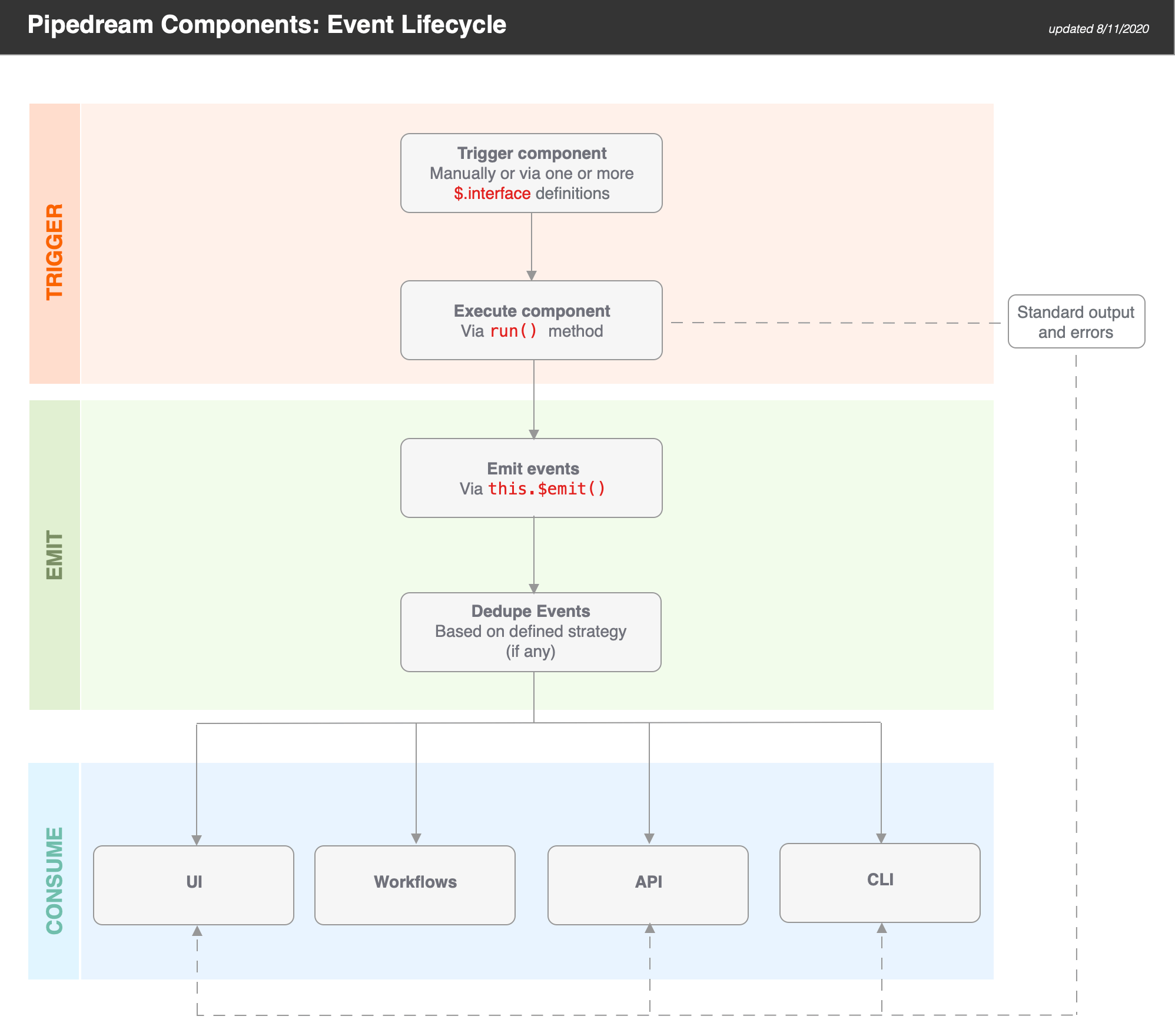 ### Triggering Sources
Sources are triggered when you manually run them (e.g., via the **RUN NOW** button in the UI) or when one of their [interfaces](/components/contributing/api/#interface-props) is triggered. Pipedream sources currently support **HTTP** and **Timer** interfaces.
When a source is triggered, the `run()` method of the component is executed. Standard output and errors are surfaced in the **Logs** tab.
### Emitting Events from Sources
Sources can emit events via `this.$emit()`. If you define a [dedupe strategy](/components/contributing/api/#dedupe-strategies) for a source, Pipedream automatically dedupes the events you emit.
> **TIP:** if you want to use a dedupe strategy, be sure to pass an `id` for each event. Pipedream uses this value for deduping purposes.
### Consuming Events from Sources
Pipedream makes it easy to consume events via:
* The UI
* Workflows
* APIs
* CLI
#### UI
When you navigate to your source [in the UI](https://pipedream.com/sources), you’ll be able to select and inspect the most recent 100 events (i.e., an event bin). For example, if you send requests to a simple HTTP source, you will be able to inspect the events (i.e., a request bin).
#### Workflows
[Trigger hosted Node.js workflows](/workflows/building-workflows/) on each event. Integrate with {PUBLIC_APPS}+ apps including Google Sheets, Discord, Slack, AWS, and more!
#### API
Events can be retrieved using the [REST API](/rest-api/) or [SSE stream tied to your component](/workflows/data-management/destinations/sse/). This makes it easy to retrieve data processed by your component from another app. Typically, you’ll want to use the [REST API](/rest-api/) to retrieve events in batch, and connect to the [SSE stream](/workflows/data-management/destinations/sse/) to process them in real time.
#### CLI
Use the `pd events` command to retrieve the last 10 events via the CLI:
```
pd events -n 10
```
### Triggering Sources
Sources are triggered when you manually run them (e.g., via the **RUN NOW** button in the UI) or when one of their [interfaces](/components/contributing/api/#interface-props) is triggered. Pipedream sources currently support **HTTP** and **Timer** interfaces.
When a source is triggered, the `run()` method of the component is executed. Standard output and errors are surfaced in the **Logs** tab.
### Emitting Events from Sources
Sources can emit events via `this.$emit()`. If you define a [dedupe strategy](/components/contributing/api/#dedupe-strategies) for a source, Pipedream automatically dedupes the events you emit.
> **TIP:** if you want to use a dedupe strategy, be sure to pass an `id` for each event. Pipedream uses this value for deduping purposes.
### Consuming Events from Sources
Pipedream makes it easy to consume events via:
* The UI
* Workflows
* APIs
* CLI
#### UI
When you navigate to your source [in the UI](https://pipedream.com/sources), you’ll be able to select and inspect the most recent 100 events (i.e., an event bin). For example, if you send requests to a simple HTTP source, you will be able to inspect the events (i.e., a request bin).
#### Workflows
[Trigger hosted Node.js workflows](/workflows/building-workflows/) on each event. Integrate with {PUBLIC_APPS}+ apps including Google Sheets, Discord, Slack, AWS, and more!
#### API
Events can be retrieved using the [REST API](/rest-api/) or [SSE stream tied to your component](/workflows/data-management/destinations/sse/). This makes it easy to retrieve data processed by your component from another app. Typically, you’ll want to use the [REST API](/rest-api/) to retrieve events in batch, and connect to the [SSE stream](/workflows/data-management/destinations/sse/) to process them in real time.
#### CLI
Use the `pd events` command to retrieve the last 10 events via the CLI:
```
pd events -n 10
```