> ## Documentation Index
> Fetch the complete documentation index at: https://pipedream.com/docs/llms.txt
> Use this file to discover all available pages before exploring further.
# Overview
export const PUBLIC_APPS = '3,000';
## What are Components?
Components are [Node.js modules](/components/contributing/api/#component-structure) that run on Pipedream's serverless infrastructure. They can use Pipedream managed auth for [{PUBLIC_APPS}+ apps](https://pipedream.com/explore) (for both OAuth and key-based APIs) and [use most npm packages](/components/contributing/api/#using-npm-packages) with no `npm install` or `package.json` required.
Components are most commonly used as the building blocks of Pipedream workflows, but they can also be used like typical serverless functions. You can explore curated components for popular apps in Pipedream's [Marketplace](https://pipedream.com/explore) and [GitHub repo](https://github.com/PipedreamHQ/pipedream/tree/master/components) or you can author and share your own.
Our TypeScript component API is in **beta**. If you're interested in developing TypeScript components and providing feedback, [see our TypeScript docs](/components/contributing/typescript/).
## Component Types
Pipedream supports two types of components — [sources](#sources) and [actions](#actions).
### Sources
[Sources](/workflows/building-workflows/triggers/) must be instantiated and they run as independent resources on Pipedream. They are commonly used as workflow triggers (but can also be used as standalone serverless functions).
**Capabilities**
* Accept user input on deploy via `props`
* [Trigger](/components/contributing/api/#interface-props) on HTTP requests, timers, cron schedules, or manually
* Emit events that can be inspected, trigger Pipedream [workflows](/workflows/building-workflows/) and that can be consumed in your own app via [API](/rest-api/)
* Store and retrieve state using the [built-in key-value store](/components/contributing/api/#db)
* Use any of Pipedream's built-in [deduping strategies](/components/contributing/api/#dedupe-strategies)
* Deploy via Pipedream's UI, CLI or API
**Example**
The [New Files (Instant)](https://github.com/PipedreamHQ/pipedream/blob/master/components/google_drive/sources/new-files-instant/new-files-instant.mjs) source for Google Drive is a prebuilt component in Pipedream's registry that can be deployed in seconds and emits an event every time a new file is added to the user's Google Drive, and can also be configured to watch for changes to a specific folder within that drive. Each new event that is emitted can be used to trigger a workflow.
### Actions
Actions are components that may be used as steps in a workflow. Unlike sources, actions cannot run independently (outside of a workflow).
**Capabilities**
* Accept user input via `props`
* May `return` JSON serializable data
**Example**
The Add Single Row action for Google Sheets is a prebuilt component in Pipedream's registry that can be added to a workflow and configured in seconds. Users can configure it in seconds and send workflow data to Google Sheets without having to learn the Google Sheets API.
## Using Components
Components may be instantiated or added to workflows via Pipedream's UI.
* Sources may be instantiated and consumed via [UI](https://pipedream.com/sources/new), [CLI](/cli/reference/#pd-deploy) or API
* Actions may be added to [workflows](https://pipedream.com/new)
### Using Private Actions
Private action components published from the [CLI](/cli/reference/#pd-publish) or from a [Node.js Code Step](/workflows/building-workflows/code/nodejs/sharing-code/) are available for use across your workflows.
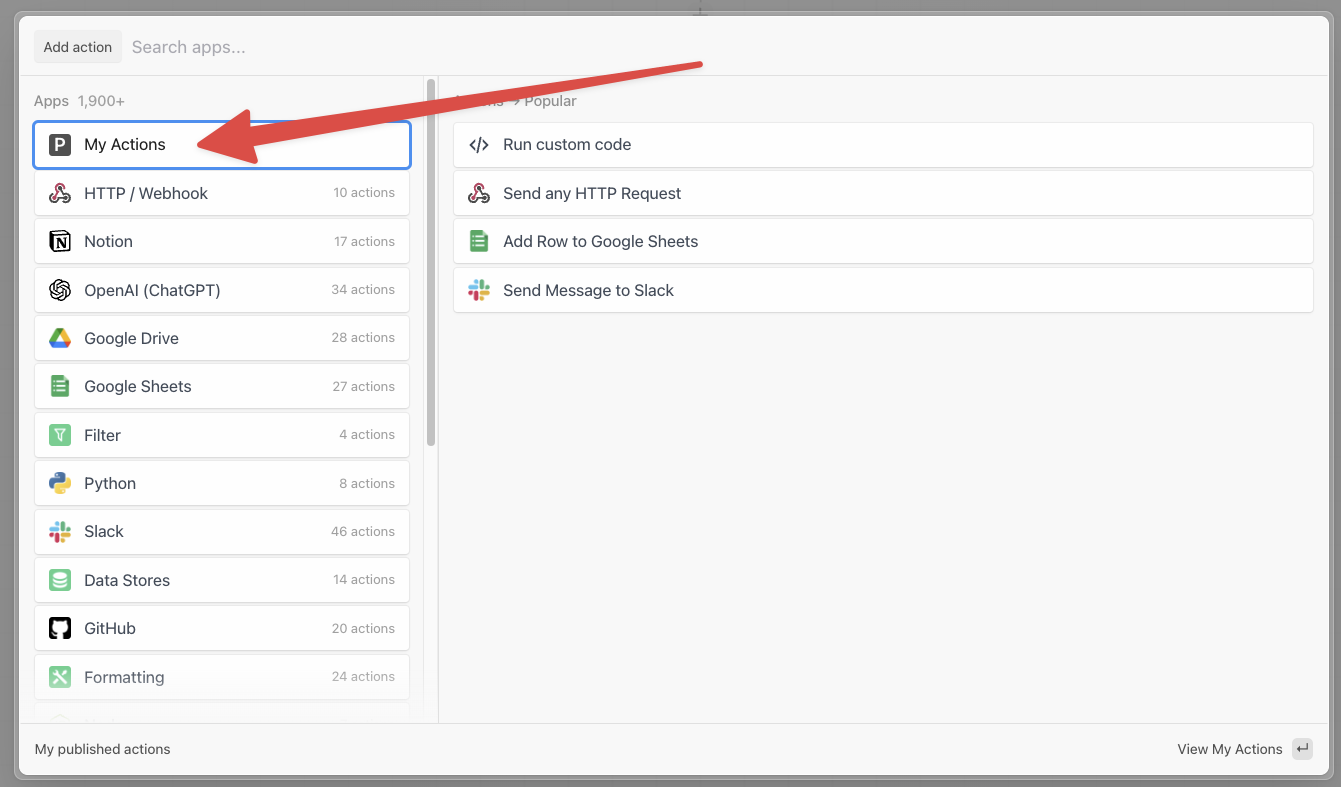
To use a published action, add a new step to your workflow and click **My Actions**. Your privately published action components will appear in this list.
### Using Private Sources
Private source components deployed from your account via the [CLI](/cli/reference/#pd-deploy) will automatically create a new Source in your account with the prop configuration you specified.
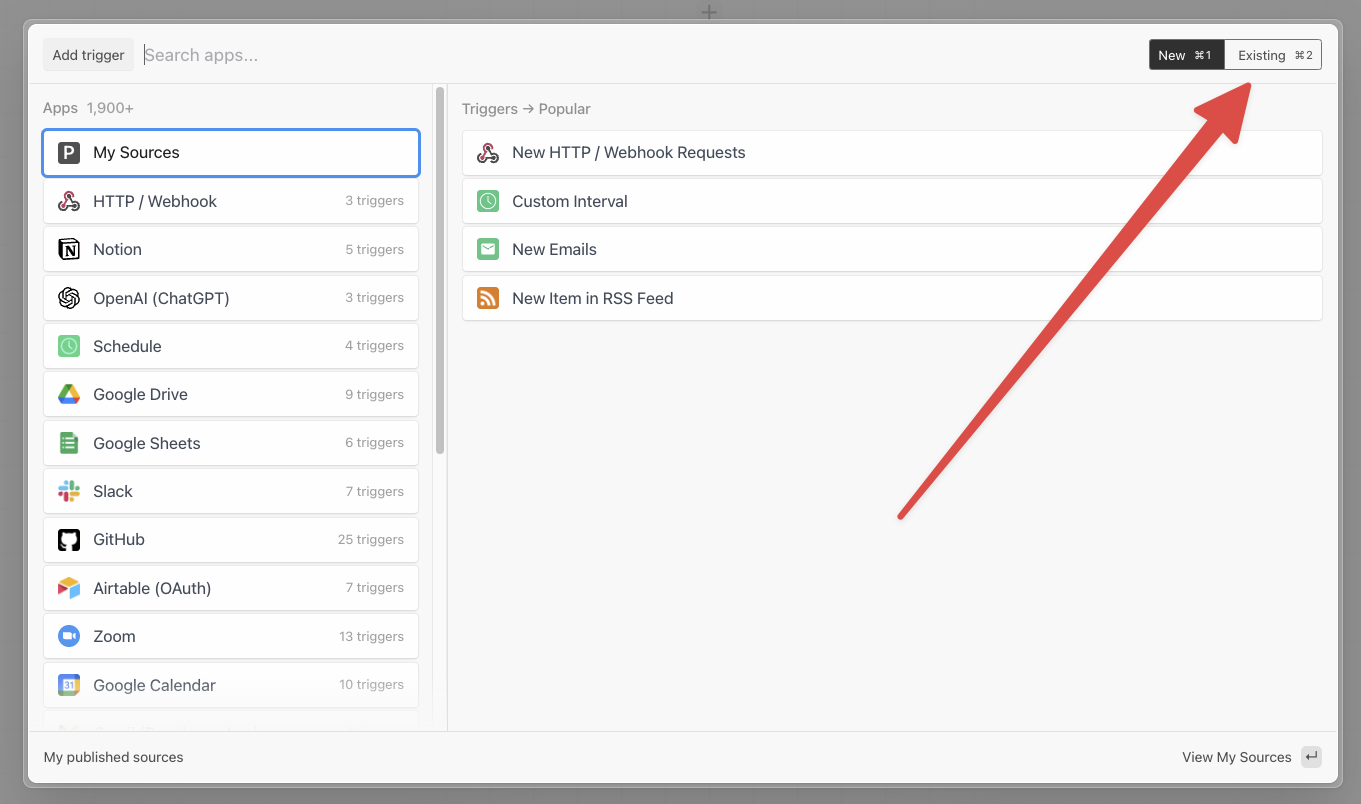
Then in the workflow builder, when creating the trigger, select the *Existing* sources tab in the upper right corner to select your deployed source:
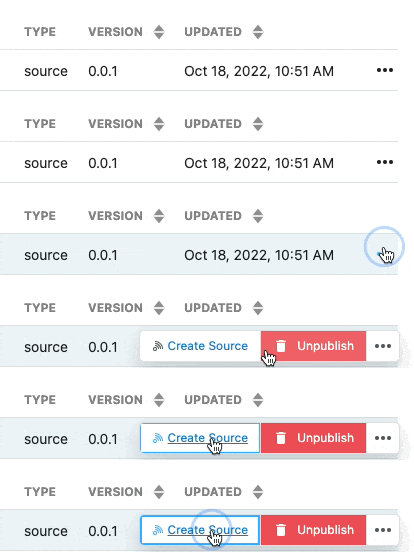
You can also deploy new instances of a source from the [Components dashboard](/images/image-20210411165325045_ia5sd5.png). To deploy a new instance of a source, click the menu on the right hand side and select **Create source**.
## Developing Components
Develop components locally using your preferred code editor (and maintain your code in your own GitHub repo) and deploy or publish using Pipedream's [CLI](/cli/reference/#pd-deploy).
* Sources may be deployed directly from local code or published to your account and instantiated via Pipedream's UI
* Actions may only be published — published actions may be added to workflows via Pipedream's UI
Published components are only available to your own account by default. If published to a team account, the component (source or action) may be discovered and selected by any member of the team.
### Prerequisites
* A free [Pipedream](https://pipedream.com) account
* A free [GitHub](https://github.com) account
* Basic proficiency with Node.js or JavaScript
* Pipedream [CLI](/cli/reference/)
Finally, the target app must be integrated with Pipedream. You can explore all apps supported by Pipedream in the [marketplace](https://pipedream.com/explore). If your app is not listed, please [create a GitHub issue](https://github.com/PipedreamHQ/pipedream/issues/new?assignees=\&labels=app%2C+enhancement\&template=app---service-integration.md\&title=%5BAPP%5D) to request it and [reach out](https://pipedream.com/community/c/dev/11) to our team to let us know that you're blocked on source or action development.
### Quickstart Guides
* [Sources](/components/contributing/sources-quickstart/)
* [Actions](/components/contributing/actions-quickstart/)
### Component API Reference
After getting familiar with source/action development using the quickstart guides, check out [the Component API Reference](/components/contributing/api/) and [examples on GitHub](https://github.com/PipedreamHQ/pipedream/tree/master/components) to learn more.
## Managing Privately Published Components
Components published to your workspace are available in the [Components](https://pipedream.com/components) section of the dashboard.
Your private components published from the CLI or from Node.js code steps are listed here.
### Unpublishing Privately Published Components
To unpublish components belonging to your workspace, open the menu on the right hand side of the component details and select **Unpublish Component**.
A prompt will open to confirm the action, click **Confirm** to unpublish your action.

Unpublishing a component is a permanent action, please be careful to ensure you still have access to the source code.
## Sharing Components
Contribute to the Pipedream community by publishing and sharing new components, and contributing to the maintenance of existing components.
### Verified Components
Pipedream maintains a source-available registry of components (sources and actions) that have been curated for the community. Registered components are verified by Pipedream through the [GitHub PR process](/components/contributing/#contribution-process) and:
* Can be trusted by end users
* Follow consistent patterns for usability
* Are supported by Pipedream if issues arise
Registered components also appear in the Pipedream marketplace and are listed in Pipedream's UI when building workflows.
### Community Components
Developers may create, deploy and share components that do not conform to these guidelines, but they will not be eligible to be listed in the curated registry (e.g., they may be hosted in a GitHub repo). If you develop a component that does not adhere to these guidelines, but you believe there is value to the broader community, please [reach out in our community forum](https://pipedream.com/community/c/dev/11).
 ### Using Private Sources
Private source components deployed from your account via the [CLI](/cli/reference/#pd-deploy) will automatically create a new Source in your account with the prop configuration you specified.
Then in the workflow builder, when creating the trigger, select the *Existing* sources tab in the upper right corner to select your deployed source:
### Using Private Sources
Private source components deployed from your account via the [CLI](/cli/reference/#pd-deploy) will automatically create a new Source in your account with the prop configuration you specified.
Then in the workflow builder, when creating the trigger, select the *Existing* sources tab in the upper right corner to select your deployed source:
 You can also deploy new instances of a source from the [Components dashboard](/images/image-20210411165325045_ia5sd5.png). To deploy a new instance of a source, click the menu on the right hand side and select **Create source**.
 ## Developing Components
Develop components locally using your preferred code editor (and maintain your code in your own GitHub repo) and deploy or publish using Pipedream's [CLI](/cli/reference/#pd-deploy).
* Sources may be deployed directly from local code or published to your account and instantiated via Pipedream's UI
* Actions may only be published — published actions may be added to workflows via Pipedream's UI
Published components are only available to your own account by default. If published to a team account, the component (source or action) may be discovered and selected by any member of the team.
### Prerequisites
* A free [Pipedream](https://pipedream.com) account
* A free [GitHub](https://github.com) account
* Basic proficiency with Node.js or JavaScript
* Pipedream [CLI](/cli/reference/)
Finally, the target app must be integrated with Pipedream. You can explore all apps supported by Pipedream in the [marketplace](https://pipedream.com/explore). If your app is not listed, please [create a GitHub issue](https://github.com/PipedreamHQ/pipedream/issues/new?assignees=\&labels=app%2C+enhancement\&template=app---service-integration.md\&title=%5BAPP%5D) to request it and [reach out](https://pipedream.com/community/c/dev/11) to our team to let us know that you're blocked on source or action development.
### Quickstart Guides
* [Sources](/components/contributing/sources-quickstart/)
* [Actions](/components/contributing/actions-quickstart/)
### Component API Reference
After getting familiar with source/action development using the quickstart guides, check out [the Component API Reference](/components/contributing/api/) and [examples on GitHub](https://github.com/PipedreamHQ/pipedream/tree/master/components) to learn more.
## Managing Privately Published Components
Components published to your workspace are available in the [Components](https://pipedream.com/components) section of the dashboard.
Your private components published from the CLI or from Node.js code steps are listed here.
### Unpublishing Privately Published Components
To unpublish components belonging to your workspace, open the menu on the right hand side of the component details and select **Unpublish Component**.
A prompt will open to confirm the action, click **Confirm** to unpublish your action.

## Developing Components
Develop components locally using your preferred code editor (and maintain your code in your own GitHub repo) and deploy or publish using Pipedream's [CLI](/cli/reference/#pd-deploy).
* Sources may be deployed directly from local code or published to your account and instantiated via Pipedream's UI
* Actions may only be published — published actions may be added to workflows via Pipedream's UI
Published components are only available to your own account by default. If published to a team account, the component (source or action) may be discovered and selected by any member of the team.
### Prerequisites
* A free [Pipedream](https://pipedream.com) account
* A free [GitHub](https://github.com) account
* Basic proficiency with Node.js or JavaScript
* Pipedream [CLI](/cli/reference/)
Finally, the target app must be integrated with Pipedream. You can explore all apps supported by Pipedream in the [marketplace](https://pipedream.com/explore). If your app is not listed, please [create a GitHub issue](https://github.com/PipedreamHQ/pipedream/issues/new?assignees=\&labels=app%2C+enhancement\&template=app---service-integration.md\&title=%5BAPP%5D) to request it and [reach out](https://pipedream.com/community/c/dev/11) to our team to let us know that you're blocked on source or action development.
### Quickstart Guides
* [Sources](/components/contributing/sources-quickstart/)
* [Actions](/components/contributing/actions-quickstart/)
### Component API Reference
After getting familiar with source/action development using the quickstart guides, check out [the Component API Reference](/components/contributing/api/) and [examples on GitHub](https://github.com/PipedreamHQ/pipedream/tree/master/components) to learn more.
## Managing Privately Published Components
Components published to your workspace are available in the [Components](https://pipedream.com/components) section of the dashboard.
Your private components published from the CLI or from Node.js code steps are listed here.
### Unpublishing Privately Published Components
To unpublish components belonging to your workspace, open the menu on the right hand side of the component details and select **Unpublish Component**.
A prompt will open to confirm the action, click **Confirm** to unpublish your action.
