> ## Documentation Index
> Fetch the complete documentation index at: https://pipedream.com/docs/llms.txt
> Use this file to discover all available pages before exploring further.
# Product Changelog
> New updates and improvements
## OAuth for Pipedream MCP + ChatGPT Support
**We've shipped major upgrades to Pipedream's MCP server, and you can now [use Pipedream MCP in ChatGPT](/connect/mcp/users#chatgpt).**
**What's new:**
* **Better security**: OAuth authentication with a static URL: `https://mcp.pipedream.net/v2`
* **Richer metadata**: All 10,000+ tools now include `toolAnnotations` to help MCP clients understand which tools are read vs write, destructive, etc.
* **Easier UX**: No pre-setup required - just enter the MCP server URL in your chat client and Pipedream will automatically prompt you to connect your accounts
* **Developer-first**: Powered by Connect, developers building apps or agents can [use Pipedream MCP](/connect/mcp/developers) to connect their agent to 10,000+ tools from 3,000+ APIs - **framework and LLM provider agnostic**
**Get started:**
* **ChatGPT**: [Watch demo video](https://www.loom.com/share/5226939080f1472ea2b14a41e77898fa) | [Read the docs](https://pipedream.com/docs/connect/mcp/users#chatgpt)
* **Claude**: [Watch demo video](https://www.loom.com/share/371678cefb3f4ac0a87c6b1753ac1e26) | [Read the docs](https://pipedream.com/docs/connect/mcp/users#claude)
Pipedream MCP makes it easier and more secure to bring all your work tools into your AI conversations.
## Python, TypeScript, and Java SDKs + Interactive AI-Friendly Docs
We're excited to ship two major upgrades that make it easier for developers to integrate Pipedream Connect: **multi-language SDKs** and **completely redesigned, interactive, AI-friendly documentation**.
**Python, TypeScript, and Java SDKs for Connect**
For the first time, we now offer SDKs for [Python](https://github.com/PipedreamHQ/pipedream-sdk-python) and [Java](http://github.com/PipedreamHQ/pipedream-sdk-java), and we've completely rewritten our [TypeScript SDK](https://github.com/PipedreamHQ/pipedream-sdk-typescript) with better type definitions, namespaced methods, and overall improved DX.
* Read more about installing and using the SDKs [in our docs](https://pipedream.com/docs/connect/api-reference/sdks)
* Refer to the full [Connect API reference](https://pipedream.com/docs/connect/api-reference/introduction) for code snippets for REST, TypeScript, Python, Java, and Go
* ⚠️ **Note**: there are no plans to deprecate the `1.x` TypeScript SDK, so if you've already implemented that version, make sure to read through [the migration guide](https://pipedream.com/docs/connect/api-reference/sdk-migration) before upgrading to version `2.x`
**All new documentation: pipedream.com/docs**
As part of shipping new SDKs for Connect, we also published new documentation to produce a first-class, interactive, and AI-native docs experience:
* We now have a **first-class and fully interactive [API reference for Connect](https://pipedream.com/docs/connect/api-reference/introduction)**, along with code snippets for using the REST API or any of our SDKs
* We published a [dedicated page](https://pipedream.com/docs/ai-tooling) that highlights how you can more effectively **use AI tooling when building on top of Connect**: provide Pipedream docs as context for your LLM, access our docs as [plain text](https://pipedream.com/docs/llms-full.txt) or [markdown](https://pipedream.com/docs/connect.md), or even add our docs [MCP server](https://pipedream.com/docs/mcp) to easily search across all of our docs from your IDE or coding agent
We're continuing to improve the DX and capabilities of Pipedream Connect, and we'd love your feedback — please let us know what's working well and what you'd like to see!
## Edit Existing Workflows with AI
You can now edit your existing workflows using AI directly from the workflow builder. Click the **Edit with AI** button in any workflow header or code step to make changes with natural language instructions.
Key features:
* **Workflow-level editing**: Modify entire workflows with AI assistance
* **Code step editing**: Update individual code steps using natural language
* **Debug with AI**: Get AI-powered help when encountering errors in workflow execution
* **Seamless integration**: Edit directly in [String.com](https://string.com/) and deploy back to Pipedream
This works for most workflows, though some limitations apply for workflows with control flow, GitHub sync, Python steps, or Pipedream Connect features.
**[Learn more about building with AI](/workflows/building-workflows/build-with-ai)**
## MCP Chat - Talk directly with all your tools
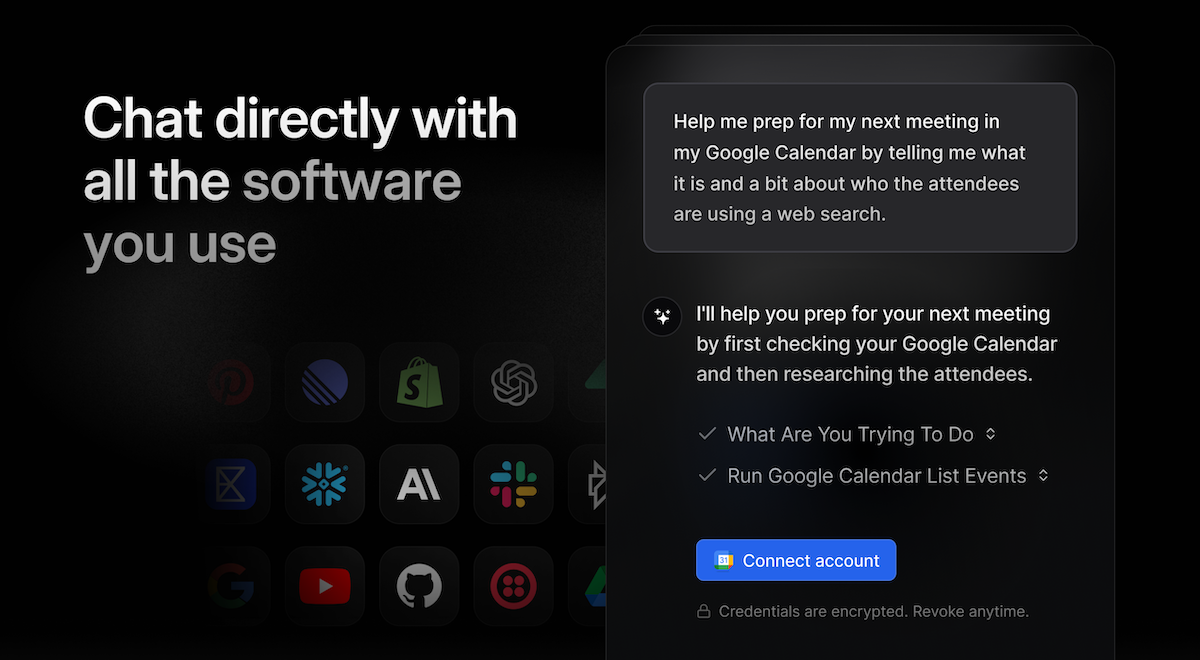 [MCP Chat](https://chat.pipedream.com) lets you talk directly with all of the tools that you use.
* It's powered by Pipedream Connect and Vercel's AI SDK and works with a wide variety of LLMs
* Direct access to >10k tools from >2800 APIs (with auth built-in of course)
* We've open sourced MCP Chat (MIT license), so you can [fork it or use it as a reference implementation](https://github.com/PipedreamHQ/mcp-chat) for your own AI app
In case you haven't tried it yet, you can send prompts like:
> Summarize my recent emails
> Draft a product release announcement based on my team's recent Linear tickets
> Find the latest screenshot in my Google Drive and send it to my team on Slack
> Help me prep for my next meeting — who am I meeting with and what are we discussing?
All the integrations are developed by our team and battle-tested, with secure user auth built-in. **Try it now at [chat.pipedream.com](https://chat.pipedream.com)**
## New Developer Playground for Pipedream Connect
We released a new developer playground for Pipedream Connect that lets you explore the SDK and check out how implementation works using either the server API / SDK with your own front, or using Pipedream's connect-react package. As part of this update, we shipped a lot improvements:
* **We added a Debug tab** so you can inspect all of the calls happening in realtime (with payloads and responses)
* **Fixed bugs and expanded connect-react capabilities** (added support for `sql` and `object` prop types and improved the UX for `string[]` inputs)
* **We gave it a big overall facelift** with a fresh new design throughout the playground
* **The code is public** — check out the code for the playground and run it locally [here](https://github.com/PipedreamHQ/pipedream-connect-examples)
**Check it out → [pipedream.com/connect/demo](https://pipedream.com/connect/demo)**
## Remote MCP Server and OpenAI Support
We're excited to share a couple big updates to our MCP product for developers — if you're working on exposing tools to your AI app or agent via MCP, it just got a lot easier to do this with Pipedream:
**Remote MCP server for developers**
* You no longer need to host and deploy Pipedream's MCP server in order to add it to your app (you still can if you prefer though)
* You can now make authenticated requests to `https://remote.mcp.pipedream.net`
* [Check out our docs for more info](https://pipedream.com/connect/mcp)
**MCP support in OpenAI's Responses API**
* OpenAI just released native support for using MCP servers in their Responses API
* We're excited to have partnered with them to make sure Pipedream has a drop-in solution to use our MCP server with their SDK
* [Check out the docs to get started](https://pipedream.com/connect/mcp/openai)
**Code examples**
First, initialize the Pipedream SDK and handle developer auth:
```javascript theme={null}
// Import the Pipedream SDK
import { createBackendClient } from "@pipedream/sdk/server";
// Initialize the Pipedream SDK client
const pd = createBackendClient({
environment: PIPEDREAM_ENVIRONMENT,
credentials: {
clientId: PIPEDREAM_CLIENT_ID,
clientSecret: PIPEDREAM_CLIENT_SECRET,
},
projectId: PIPEDREAM_PROJECT_ID
});
// Get access token for MCP server auth
const accessToken = await pd.rawAccessToken();
```
Then use either the official MCP SDK:
```javascript theme={null}
import { StreamableHTTPClientTransport } from "@modelcontextprotocol/sdk/client/streamableHttp.js";
const serverUrl = MCP_SERVER_URL || `https://remote.mcp.pipedream.net/${externalUserId}/notion`;
const transport = new StreamableHTTPClientTransport(new URL(serverUrl), {
requestInit: {
headers: {
"Authorization": `Bearer ${accessToken}`,
"x-pd-project-id": PIPEDREAM_PROJECT_ID, // proj_xxxxxxx
"x-pd-environment": PIPEDREAM_ENVIRONMENT // development | production
}
}
});
```
Or use OpenAI's SDK:
```javascript theme={null}
import OpenAI from 'openai';
// Initialize OpenAI client
const client = new OpenAI();
// Make the OpenAI request with the MCP server
const response = await client.responses.create({
model: 'gpt-4.1',
tools: [
{
type: 'mcp',
server_label: 'Notion',
server_url: `https://remote.mcp.pipedream.net/${externalUserId}/notion`,
headers: {
Authorization: `Bearer ${accessToken}`,
"x-pd-project-id": PIPEDREAM_PROJECT_ID,
"x-pd-environment": PIPEDREAM_ENVIRONMENT
},
require_approval: 'never'
}
],
input: 'Summarize my most recently created Notion doc for me and help draft an email to our customers'
});
console.log(response);
```
## Pipedream Connect Updates
We've shipped *a lot* of improvements to [Pipedream Connect](https://pipedream.com/connect/docs) and wanted to share the latest with you all:
**MCP**
* ICYMI, [we published all 2600+ integrated apps as MCP servers](https://mcp.pipedream.com/) for individuals to use **for free** and for developers to deploy to their AI apps and agents
* We published an update to the [MCP server reference in the public repo](https://github.com/PipedreamHQ/pipedream/tree/master/modelcontextprotocol)
* We released support for the new streamable HTTP transport type (in addition to SSE and stdio)
* We added a debug flag to make it easier for devs to see what API calls are happening from tool calls (`pd_sdk_debug=true`)
* We added support for configuring dynamic props
* **[Check out the code](https://github.com/PipedreamHQ/pipedream/tree/master/modelcontextprotocol)**
**Pre-built tools**
* `query` is [now a supported option](https://github.com/PipedreamHQ/pipedream/blob/master/packages/sdk/src/shared/index.ts#L410-L414) in `configureComponent`, so your end users can easily search across remote options for Google Spreadsheets, Notion docs, and more
* Email, HTTP, and Schedule triggers are now supported in Connect ([docs](https://pipedream.com/connect/components/#native-triggers))
* Basic source logs are now available for deployed triggers that are owned by external users ([docs](https://pipedream.com/connect/components/#checking-source-logs-for-deployed-triggers))
* We published an API for updating deployed triggers ([docs](https://pipedream.com/connect/api/#update-deployed-trigger))
* **[Check out the docs](https://pipedream.com/connect/components)**
**Connect Proxy**
* The Connect proxy now supports nearly 100% of all integrated apps and we *significantly* improved the developer interface to remove a lot of the complexity: as a dev, you don't need to reference auth at all — the proxy will automatically inject the necessary headers or params where they need to go, based on the upstream API's requirements
* We increased the timeout window from 2 to 30 seconds
* **[Check out the docs](https://pipedream.com/connect/api-proxy/)**
**Overall Connect API, SDK, and Docs**
* Added an [interactive managed auth quickstart](https://pipedream.com/connect/managed-auth/quickstart/) to help you get started more easily
* Improved type definitions
* Added `featured_weight` to the `/apps` API ([docs](https://pipedream.com/rest-api/#list-apps))
* Shipped various bug fixes
* **And we released a [much lower priced plan](https://pipedream.com/pricing?plan=Connect) to use Connect in production**
Let us know what you think!
## Connect your AI assistant to any API
**We're very excited to ship [2500+ Pipedream MCP servers with 10k+ tools](https://mcp.pipedream.com/).** These servers all include built-in authentication and over 10k pre-built actions as distinct tools that you can use with any LLM or agent that supports MCP. You can use Cursor, Windsurf, Claude desktop, or any other MCP client.
**Get started at [mcp.pipedream.com](https://mcp.pipedream.com/)**
**LLMs + MCP == cheat mode**
* Claude, Cursor, Windsurf, and many AI SDKs all have built-in support for MCP servers in their desktop apps, and OpenAI just announced they're rolling out support as well
* Chatting with an LLM no longer has to be siloed from the rest of your work — add MCP servers for [Slack](https://mcp.pipedream.com/app/slack), [GitHub](https://mcp.pipedream.com/app/github), [Linear](https://mcp.pipedream.com/app/linear), [Gmail](https://mcp.pipedream.com/app/gmail), etc, and go wild!
* Enable your AI assistant to [access your Notion workspace](https://mcp.pipedream.com/app/notion) so it can get up to speed on your internal processes and knowledge base, then use it to actually draft *and reply* to customer requests via [Front](https://mcp.pipedream.com/app/front) or [Intercom](https://mcp.pipedream.com/app/intercom)
**Wait what's MCP?**
* [MCP](https://modelcontextprotocol.io/) is a new standard that [Anthropic co-authored](https://www.anthropic.com/news/model-context-protocol) and is promoting within the AI industry, which provides a common interface for LLMs to communicate with APIs and other resources
* The MCP spec is nascent but quickly evolving, and [there's a lot of excitement](https://huggingface.co/blog/Kseniase/mcp) from many developers within the AI community
* Generally, the idea is that it makes it easier to provide LLMs and AI agents with specific tools to accomplish tasks
We're really excited about what MCP enables for both end users and AI developers, and this is just the start of what we're rolling out — our app-based MCP servers are free to use, and it's all made possible thanks to [Pipedream Connect](https://pipedream.com/connect/)!
## Send custom API requests for your users
We're excited to announce another way to help you ship integrations more quickly with Pipedream Connect: the **[Connect API Proxy](https://pipedream.com/connect/api-proxy)**.
We recently announced that you can easily [add 10k+ actions and triggers to your app or agent](https://pipedream.com/connect/components), yet even with that many prebuilt tools, there are still instances where developers need full code level control to send custom requests to 3rd party APIs on behalf of your end users. The Connect proxy makes this easy with a few key features:
1. Avoid dealing with authorization grants or token storage and refresh with managed auth to let your customers connect to >2500 APIs
2. Get started more quickly by accessing hundreds of approved Pipedream OAuth clients in production
3. Send custom requests to any integrated API and Pipedream automatically inserts the required auth header or token for your end user
**[Check out the docs to get started](https://pipedream.com/connect/api-proxy)**
## Add 10k tools to your AI agent with Connect
**Connect provides a developer toolkit that lets you easily add 2,500+ integrations to your app or AI agent.**
Building integrations that can access all of your customer's apps is a core challenge for every company developing AI products.
Today we're announcing our [Connect SDK and API](https://pipedream.com/connect/):
* **Connect to every app:** Get immediate access to 10,000+ tools across 2,500+ apps so you can run any action and deploy any trigger directly from your AI agent.
* **No more auth headaches:** Pipedream manages OAuth token storage and refresh so you don't have to worry about managing user credentials -- you can even use our pre-approved OAuth clients to avoid lengthy approval processes.
* **Full UI Control:** Choose between our pre-built UI components (via the connect-react package) or build your own using our server-side SDK.
Review the [SDK docs](https://pipedream.com/connect/api) and check out the [demo app](https://pdrm.co/connect) to see how it works.
——
**What's possible with the Connect SDK and API?**
Early customers are unlocking powerful use cases including:
* **AI agents:** Seamlessly power your agent with the tools they need to get their tasks done. With over 2,500+ apps supported, we have you covered.
* **Embedded workflow builders:** Creating an AI agent solution built around a workflow experience? Use the Connect SDK to power your integrated tools. You control the UI, we handle the integrations.
* **Product integrations:** Not focused on AI agents but still looking to rapidly expand integration coverage for your SaaS app? The Connect SDK and API enables new integrations to be added in a few hours instead of days/weeks.
——
**What's coming next**
We're continuing to release major new features and improvements over the coming weeks, keep an eye out for our upcoming Connect API proxy, which gives you code-level control to send custom API requests on behalf of your users, while still avoiding dealing with auth management.
## Run workflows for your end users
With [Pipedream Connect](https://pipedream.com/connect), you can ship product integrations remarkably fast—saving time and reducing complexity compared to developing integrations in house.
Today we're announcing that you can also **configure workflows in Pipedream to run on behalf of your end users.**
**Getting started**
1. Use the Connect [frontend SDK](https://pipedream.com/connect/quickstart#use-the-pipedream-sdk-in-your-frontend) or [Connect Link](https://pipedream.com/connect/quickstart#use-connect-link) to let your users connect their account
2. Within any workflow, toggle **Use end user's auth via Connect** on any step to use your end user's auth instead of your own
3. [Invoke your workflow](https://pipedream.com/connect/workflows#invoke-the-workflow) via HTTP trigger or use Pipedream's SDK
4. [Learn more in our quickstart](https://pipedream.com/connect/workflows#how-to-run-workflows-for-your-end-users)
Early customers have been building **AI agents** on top of Connect to execute actions on behalf of their end users, enabling **notifications** with various messaging platforms directly from their app, and generally [expanding the scope of what their customers can do](https://pipedream.com/connect/use-cases) in their application!
**What's next**
We're continuing to ship major new features and improvements over the coming weeks, including an API and SDK to embed any action or trigger directly in your application.
[Let us know](https://pipedream.com/join-slack) what you think and if you have any questions!
## Introducing Pipedream Connect
[Connect](https://pipedream.com/connect) is a new product that enables app developers to embed the core functionality of Pipedream directly in your app or AI agent. Pipedream Connect provides managed authentication, approved client IDs, durable components, and infrastructure for running serverless functions. Build in-app messaging, CRM syncs, AI agents, and more in minutes.
**One SDK, thousands of API integrations!**
**Managed authentication**
**Today, managed authentication is publicly available.** Developers have full, code-level control over how these integrations work in your application or AI agent. Pipedream simplifies the authentication process and enables you to:
* Connect to all 2,400+ supported APIs, directly from your application
* Retrieve end user credentials via API
* Free on all plans up to 1,000 connected accounts
* [Check out the docs](https://pipedream.com/connect/quickstart)
Core functionality:
* Use the [Pipedream SDK](https://github.com/PipedreamHQ/pipedream-sdk-typescript) or [Connect Link](https://pipedream.com/connect/connect-link) to handle authorization or accept API keys for any of Pipedream's [2,400+ supported APIs](https://pipedream.com/apps).
* Securely retrieve OAuth access tokens, API keys, and other credentials for your end users with Pipedream's [REST API](https://pipedream.com/connect/api).
**Test out the connection flow directly in the Pipedream UI:**
1. [Open an existing project or create a new one](https://pipedream.com/@/projects)
2. Click on the **Connect** tab on the left
3. Click on the **Users** tab at the top
4. Click **Connect account**
**Coming next**
We planning to release major features over the coming weeks, including the ability to,
* Run Pipedream workflows on behalf of your end users
* Embed any action or trigger directly in your application
* [Join us on Slack](https://pipedream.com/join-slack) to learn more and request early access
## Parallel branching now available in beta!
We're excited to announce that Parallel branching is now available in beta! To get started, check out the [docs](https://pipedream.com/workflows/control-flow/parallel) and [build a workflow](https://pipedream.com/new)!
By default, workflow steps are executed serially and in sequence — only one step can run at a time. **Parallel execution unlocks the ability to run steps concurrently.**
For example, if you need to make multiple LLM queries that are not dependent on one another you can now make them in parallel and then reference the responses in the parent flow. You may also optionally apply filtering rules to control when each branch executes.
If you need a single path branching operator check out the [If/Else](https://pipedream.com/workflows/control-flow/ifelse) and [Switch](https://pipedream.com/workflows/control-flow/switch) operators.
Check out [the docs](https://pipedream.com/workflows/control-flow/parallel) to learn more and let us know if you have any feedback in the **#product-feedback** channel of our [Slack community](https://pipedream.com/join-slack).
## More intuitive and powerful filtering
**We deployed an updated Filter operator that uses the new rule builder.** It's easier than ever to configure basic filtering rules to continue or end a workflow. In addition, you can now define advanced rules using boolean operators, groups and nesting. To get started, simply add a Filter step to your workflow. Let us know if you have any feedback in the **#product-feedback** channel of our [Slack community](https://pipedream.com/join-slack).
## New and improved test options
**We added new options to test workflow segments and control flow blocks**. The full set of test scopes are now:
* Test individual steps
* Test entire workflow, segment or block
* Test from the start of the workflow or segment
* Test to the end of the workflow or segment
**The steps that are in scope for a test are also now highlighted on the canvas** (so you know which steps will run before you click **Test**).
Check out a [demo](https://www.youtube.com/watch?v=YHn4f3XLv2M) below!
## Switch operator for conditional branching now in beta!
We're excited to announce that the **Switch** control flow operator is now available in beta!
Switch is a single-path branching operator (similar to [If/Else](https://pipedream.com/workflows/control-flow/ifelse)). It's useful when you need to branch based on the value of a **single variable** (e.g., based on the path of an inbound request). If you need to branch based on the values of **multiple variables** use the **If/Else** operator.
Switch and If/Else are just the first of many powerful control flow operators we're adding to the product to enable advanced workflow orchestration. Stay tuned for updates on more capabilities in the coming weeks including parallel, wait for callback, looping and more!
Check out [the docs](https://pipedream.com/workflows/control-flow/switch) to learn more and let us know if you have any feedback in the **#product-feedback** channel of our [Slack community](https://pipedream.com/join-slack).
[MCP Chat](https://chat.pipedream.com) lets you talk directly with all of the tools that you use.
* It's powered by Pipedream Connect and Vercel's AI SDK and works with a wide variety of LLMs
* Direct access to >10k tools from >2800 APIs (with auth built-in of course)
* We've open sourced MCP Chat (MIT license), so you can [fork it or use it as a reference implementation](https://github.com/PipedreamHQ/mcp-chat) for your own AI app
In case you haven't tried it yet, you can send prompts like:
> Summarize my recent emails
> Draft a product release announcement based on my team's recent Linear tickets
> Find the latest screenshot in my Google Drive and send it to my team on Slack
> Help me prep for my next meeting — who am I meeting with and what are we discussing?
All the integrations are developed by our team and battle-tested, with secure user auth built-in. **Try it now at [chat.pipedream.com](https://chat.pipedream.com)**
## New Developer Playground for Pipedream Connect
We released a new developer playground for Pipedream Connect that lets you explore the SDK and check out how implementation works using either the server API / SDK with your own front, or using Pipedream's connect-react package. As part of this update, we shipped a lot improvements:
* **We added a Debug tab** so you can inspect all of the calls happening in realtime (with payloads and responses)
* **Fixed bugs and expanded connect-react capabilities** (added support for `sql` and `object` prop types and improved the UX for `string[]` inputs)
* **We gave it a big overall facelift** with a fresh new design throughout the playground
* **The code is public** — check out the code for the playground and run it locally [here](https://github.com/PipedreamHQ/pipedream-connect-examples)
**Check it out → [pipedream.com/connect/demo](https://pipedream.com/connect/demo)**
## Remote MCP Server and OpenAI Support
We're excited to share a couple big updates to our MCP product for developers — if you're working on exposing tools to your AI app or agent via MCP, it just got a lot easier to do this with Pipedream:
**Remote MCP server for developers**
* You no longer need to host and deploy Pipedream's MCP server in order to add it to your app (you still can if you prefer though)
* You can now make authenticated requests to `https://remote.mcp.pipedream.net`
* [Check out our docs for more info](https://pipedream.com/connect/mcp)
**MCP support in OpenAI's Responses API**
* OpenAI just released native support for using MCP servers in their Responses API
* We're excited to have partnered with them to make sure Pipedream has a drop-in solution to use our MCP server with their SDK
* [Check out the docs to get started](https://pipedream.com/connect/mcp/openai)
**Code examples**
First, initialize the Pipedream SDK and handle developer auth:
```javascript theme={null}
// Import the Pipedream SDK
import { createBackendClient } from "@pipedream/sdk/server";
// Initialize the Pipedream SDK client
const pd = createBackendClient({
environment: PIPEDREAM_ENVIRONMENT,
credentials: {
clientId: PIPEDREAM_CLIENT_ID,
clientSecret: PIPEDREAM_CLIENT_SECRET,
},
projectId: PIPEDREAM_PROJECT_ID
});
// Get access token for MCP server auth
const accessToken = await pd.rawAccessToken();
```
Then use either the official MCP SDK:
```javascript theme={null}
import { StreamableHTTPClientTransport } from "@modelcontextprotocol/sdk/client/streamableHttp.js";
const serverUrl = MCP_SERVER_URL || `https://remote.mcp.pipedream.net/${externalUserId}/notion`;
const transport = new StreamableHTTPClientTransport(new URL(serverUrl), {
requestInit: {
headers: {
"Authorization": `Bearer ${accessToken}`,
"x-pd-project-id": PIPEDREAM_PROJECT_ID, // proj_xxxxxxx
"x-pd-environment": PIPEDREAM_ENVIRONMENT // development | production
}
}
});
```
Or use OpenAI's SDK:
```javascript theme={null}
import OpenAI from 'openai';
// Initialize OpenAI client
const client = new OpenAI();
// Make the OpenAI request with the MCP server
const response = await client.responses.create({
model: 'gpt-4.1',
tools: [
{
type: 'mcp',
server_label: 'Notion',
server_url: `https://remote.mcp.pipedream.net/${externalUserId}/notion`,
headers: {
Authorization: `Bearer ${accessToken}`,
"x-pd-project-id": PIPEDREAM_PROJECT_ID,
"x-pd-environment": PIPEDREAM_ENVIRONMENT
},
require_approval: 'never'
}
],
input: 'Summarize my most recently created Notion doc for me and help draft an email to our customers'
});
console.log(response);
```
## Pipedream Connect Updates
We've shipped *a lot* of improvements to [Pipedream Connect](https://pipedream.com/connect/docs) and wanted to share the latest with you all:
**MCP**
* ICYMI, [we published all 2600+ integrated apps as MCP servers](https://mcp.pipedream.com/) for individuals to use **for free** and for developers to deploy to their AI apps and agents
* We published an update to the [MCP server reference in the public repo](https://github.com/PipedreamHQ/pipedream/tree/master/modelcontextprotocol)
* We released support for the new streamable HTTP transport type (in addition to SSE and stdio)
* We added a debug flag to make it easier for devs to see what API calls are happening from tool calls (`pd_sdk_debug=true`)
* We added support for configuring dynamic props
* **[Check out the code](https://github.com/PipedreamHQ/pipedream/tree/master/modelcontextprotocol)**
**Pre-built tools**
* `query` is [now a supported option](https://github.com/PipedreamHQ/pipedream/blob/master/packages/sdk/src/shared/index.ts#L410-L414) in `configureComponent`, so your end users can easily search across remote options for Google Spreadsheets, Notion docs, and more
* Email, HTTP, and Schedule triggers are now supported in Connect ([docs](https://pipedream.com/connect/components/#native-triggers))
* Basic source logs are now available for deployed triggers that are owned by external users ([docs](https://pipedream.com/connect/components/#checking-source-logs-for-deployed-triggers))
* We published an API for updating deployed triggers ([docs](https://pipedream.com/connect/api/#update-deployed-trigger))
* **[Check out the docs](https://pipedream.com/connect/components)**
**Connect Proxy**
* The Connect proxy now supports nearly 100% of all integrated apps and we *significantly* improved the developer interface to remove a lot of the complexity: as a dev, you don't need to reference auth at all — the proxy will automatically inject the necessary headers or params where they need to go, based on the upstream API's requirements
* We increased the timeout window from 2 to 30 seconds
* **[Check out the docs](https://pipedream.com/connect/api-proxy/)**
**Overall Connect API, SDK, and Docs**
* Added an [interactive managed auth quickstart](https://pipedream.com/connect/managed-auth/quickstart/) to help you get started more easily
* Improved type definitions
* Added `featured_weight` to the `/apps` API ([docs](https://pipedream.com/rest-api/#list-apps))
* Shipped various bug fixes
* **And we released a [much lower priced plan](https://pipedream.com/pricing?plan=Connect) to use Connect in production**
Let us know what you think!
## Connect your AI assistant to any API
**We're very excited to ship [2500+ Pipedream MCP servers with 10k+ tools](https://mcp.pipedream.com/).** These servers all include built-in authentication and over 10k pre-built actions as distinct tools that you can use with any LLM or agent that supports MCP. You can use Cursor, Windsurf, Claude desktop, or any other MCP client.
**Get started at [mcp.pipedream.com](https://mcp.pipedream.com/)**
**LLMs + MCP == cheat mode**
* Claude, Cursor, Windsurf, and many AI SDKs all have built-in support for MCP servers in their desktop apps, and OpenAI just announced they're rolling out support as well
* Chatting with an LLM no longer has to be siloed from the rest of your work — add MCP servers for [Slack](https://mcp.pipedream.com/app/slack), [GitHub](https://mcp.pipedream.com/app/github), [Linear](https://mcp.pipedream.com/app/linear), [Gmail](https://mcp.pipedream.com/app/gmail), etc, and go wild!
* Enable your AI assistant to [access your Notion workspace](https://mcp.pipedream.com/app/notion) so it can get up to speed on your internal processes and knowledge base, then use it to actually draft *and reply* to customer requests via [Front](https://mcp.pipedream.com/app/front) or [Intercom](https://mcp.pipedream.com/app/intercom)
**Wait what's MCP?**
* [MCP](https://modelcontextprotocol.io/) is a new standard that [Anthropic co-authored](https://www.anthropic.com/news/model-context-protocol) and is promoting within the AI industry, which provides a common interface for LLMs to communicate with APIs and other resources
* The MCP spec is nascent but quickly evolving, and [there's a lot of excitement](https://huggingface.co/blog/Kseniase/mcp) from many developers within the AI community
* Generally, the idea is that it makes it easier to provide LLMs and AI agents with specific tools to accomplish tasks
We're really excited about what MCP enables for both end users and AI developers, and this is just the start of what we're rolling out — our app-based MCP servers are free to use, and it's all made possible thanks to [Pipedream Connect](https://pipedream.com/connect/)!
## Send custom API requests for your users
We're excited to announce another way to help you ship integrations more quickly with Pipedream Connect: the **[Connect API Proxy](https://pipedream.com/connect/api-proxy)**.
We recently announced that you can easily [add 10k+ actions and triggers to your app or agent](https://pipedream.com/connect/components), yet even with that many prebuilt tools, there are still instances where developers need full code level control to send custom requests to 3rd party APIs on behalf of your end users. The Connect proxy makes this easy with a few key features:
1. Avoid dealing with authorization grants or token storage and refresh with managed auth to let your customers connect to >2500 APIs
2. Get started more quickly by accessing hundreds of approved Pipedream OAuth clients in production
3. Send custom requests to any integrated API and Pipedream automatically inserts the required auth header or token for your end user
**[Check out the docs to get started](https://pipedream.com/connect/api-proxy)**
## Add 10k tools to your AI agent with Connect
**Connect provides a developer toolkit that lets you easily add 2,500+ integrations to your app or AI agent.**
Building integrations that can access all of your customer's apps is a core challenge for every company developing AI products.
Today we're announcing our [Connect SDK and API](https://pipedream.com/connect/):
* **Connect to every app:** Get immediate access to 10,000+ tools across 2,500+ apps so you can run any action and deploy any trigger directly from your AI agent.
* **No more auth headaches:** Pipedream manages OAuth token storage and refresh so you don't have to worry about managing user credentials -- you can even use our pre-approved OAuth clients to avoid lengthy approval processes.
* **Full UI Control:** Choose between our pre-built UI components (via the connect-react package) or build your own using our server-side SDK.
Review the [SDK docs](https://pipedream.com/connect/api) and check out the [demo app](https://pdrm.co/connect) to see how it works.
——
**What's possible with the Connect SDK and API?**
Early customers are unlocking powerful use cases including:
* **AI agents:** Seamlessly power your agent with the tools they need to get their tasks done. With over 2,500+ apps supported, we have you covered.
* **Embedded workflow builders:** Creating an AI agent solution built around a workflow experience? Use the Connect SDK to power your integrated tools. You control the UI, we handle the integrations.
* **Product integrations:** Not focused on AI agents but still looking to rapidly expand integration coverage for your SaaS app? The Connect SDK and API enables new integrations to be added in a few hours instead of days/weeks.
——
**What's coming next**
We're continuing to release major new features and improvements over the coming weeks, keep an eye out for our upcoming Connect API proxy, which gives you code-level control to send custom API requests on behalf of your users, while still avoiding dealing with auth management.
## Run workflows for your end users
With [Pipedream Connect](https://pipedream.com/connect), you can ship product integrations remarkably fast—saving time and reducing complexity compared to developing integrations in house.
Today we're announcing that you can also **configure workflows in Pipedream to run on behalf of your end users.**
**Getting started**
1. Use the Connect [frontend SDK](https://pipedream.com/connect/quickstart#use-the-pipedream-sdk-in-your-frontend) or [Connect Link](https://pipedream.com/connect/quickstart#use-connect-link) to let your users connect their account
2. Within any workflow, toggle **Use end user's auth via Connect** on any step to use your end user's auth instead of your own
3. [Invoke your workflow](https://pipedream.com/connect/workflows#invoke-the-workflow) via HTTP trigger or use Pipedream's SDK
4. [Learn more in our quickstart](https://pipedream.com/connect/workflows#how-to-run-workflows-for-your-end-users)
Early customers have been building **AI agents** on top of Connect to execute actions on behalf of their end users, enabling **notifications** with various messaging platforms directly from their app, and generally [expanding the scope of what their customers can do](https://pipedream.com/connect/use-cases) in their application!
**What's next**
We're continuing to ship major new features and improvements over the coming weeks, including an API and SDK to embed any action or trigger directly in your application.
[Let us know](https://pipedream.com/join-slack) what you think and if you have any questions!
## Introducing Pipedream Connect
[Connect](https://pipedream.com/connect) is a new product that enables app developers to embed the core functionality of Pipedream directly in your app or AI agent. Pipedream Connect provides managed authentication, approved client IDs, durable components, and infrastructure for running serverless functions. Build in-app messaging, CRM syncs, AI agents, and more in minutes.
**One SDK, thousands of API integrations!**
**Managed authentication**
**Today, managed authentication is publicly available.** Developers have full, code-level control over how these integrations work in your application or AI agent. Pipedream simplifies the authentication process and enables you to:
* Connect to all 2,400+ supported APIs, directly from your application
* Retrieve end user credentials via API
* Free on all plans up to 1,000 connected accounts
* [Check out the docs](https://pipedream.com/connect/quickstart)
Core functionality:
* Use the [Pipedream SDK](https://github.com/PipedreamHQ/pipedream-sdk-typescript) or [Connect Link](https://pipedream.com/connect/connect-link) to handle authorization or accept API keys for any of Pipedream's [2,400+ supported APIs](https://pipedream.com/apps).
* Securely retrieve OAuth access tokens, API keys, and other credentials for your end users with Pipedream's [REST API](https://pipedream.com/connect/api).
**Test out the connection flow directly in the Pipedream UI:**
1. [Open an existing project or create a new one](https://pipedream.com/@/projects)
2. Click on the **Connect** tab on the left
3. Click on the **Users** tab at the top
4. Click **Connect account**
**Coming next**
We planning to release major features over the coming weeks, including the ability to,
* Run Pipedream workflows on behalf of your end users
* Embed any action or trigger directly in your application
* [Join us on Slack](https://pipedream.com/join-slack) to learn more and request early access
## Parallel branching now available in beta!
We're excited to announce that Parallel branching is now available in beta! To get started, check out the [docs](https://pipedream.com/workflows/control-flow/parallel) and [build a workflow](https://pipedream.com/new)!
By default, workflow steps are executed serially and in sequence — only one step can run at a time. **Parallel execution unlocks the ability to run steps concurrently.**
For example, if you need to make multiple LLM queries that are not dependent on one another you can now make them in parallel and then reference the responses in the parent flow. You may also optionally apply filtering rules to control when each branch executes.
If you need a single path branching operator check out the [If/Else](https://pipedream.com/workflows/control-flow/ifelse) and [Switch](https://pipedream.com/workflows/control-flow/switch) operators.
Check out [the docs](https://pipedream.com/workflows/control-flow/parallel) to learn more and let us know if you have any feedback in the **#product-feedback** channel of our [Slack community](https://pipedream.com/join-slack).
## More intuitive and powerful filtering
**We deployed an updated Filter operator that uses the new rule builder.** It's easier than ever to configure basic filtering rules to continue or end a workflow. In addition, you can now define advanced rules using boolean operators, groups and nesting. To get started, simply add a Filter step to your workflow. Let us know if you have any feedback in the **#product-feedback** channel of our [Slack community](https://pipedream.com/join-slack).
## New and improved test options
**We added new options to test workflow segments and control flow blocks**. The full set of test scopes are now:
* Test individual steps
* Test entire workflow, segment or block
* Test from the start of the workflow or segment
* Test to the end of the workflow or segment
**The steps that are in scope for a test are also now highlighted on the canvas** (so you know which steps will run before you click **Test**).
Check out a [demo](https://www.youtube.com/watch?v=YHn4f3XLv2M) below!
## Switch operator for conditional branching now in beta!
We're excited to announce that the **Switch** control flow operator is now available in beta!
Switch is a single-path branching operator (similar to [If/Else](https://pipedream.com/workflows/control-flow/ifelse)). It's useful when you need to branch based on the value of a **single variable** (e.g., based on the path of an inbound request). If you need to branch based on the values of **multiple variables** use the **If/Else** operator.
Switch and If/Else are just the first of many powerful control flow operators we're adding to the product to enable advanced workflow orchestration. Stay tuned for updates on more capabilities in the coming weeks including parallel, wait for callback, looping and more!
Check out [the docs](https://pipedream.com/workflows/control-flow/switch) to learn more and let us know if you have any feedback in the **#product-feedback** channel of our [Slack community](https://pipedream.com/join-slack).